
Quick Summary
| Key Insight | What You Need to Know |
|---|---|
| Active Engagement | This isn't just waiting for comments to roll in. It's about proactively starting conversations, asking questions, and making your followers feel like they're part of something. |
| Customer Support | When a customer asks a question on your post, you answer it right there. It’s fast, public, and shows everyone you care about getting things right. |
| Content Moderation | Keeping your comment section a positive and safe space is non-negotiable. This means clearing out spam, hiding offensive remarks, and making sure the vibe stays constructive. |
| First Response Time (FRT) | How fast are you getting back to people? A speedy response time doesn't just make for a happy customer; it shows your team is on the ball and efficient. |
| Sentiment Score | Are people talking about you in a good, bad, or neutral way? Tools can track this for you, giving you a real-time pulse check on how your brand is perceived out in the wild. |
| Engagement Rate | The old classic (likes, comments, shares) still matters. It’s a straightforward way to see if your audience is actually listening and interacting, or just scrolling by. |
Social media community management is all about building and nurturing an online home for your brand on platforms like Instagram or Facebook. It's so much more than just scheduling posts. It’s about cultivating two-way conversations, building real relationships, and creating a space where your customers genuinely feel heard and valued.
What Is Social Media Community Management Anyway?
Let's think of your social media page like a bustling neighborhood cafe. The social media manager is the one who designs the menu, decorates the space, and plans the weekly events. They're focused on the big-picture campaigns.
But the community manager? They're the friendly host at the door. They greet everyone by name, remember their favorite coffee order, and get great conversations started. They make sure everyone feels welcome and wants to come back. That's the real magic—turning a simple brand page from a megaphone into a vibrant, interactive hub.
This difference is everything for an e-commerce brand. Instead of just shouting about your latest sale, community management is about building the trust and loyalty that keeps people coming back long-term.
At its core, it breaks down into a few key jobs that directly grow your business:
- Active Engagement: This isn't just waiting for comments to roll in. It's about proactively starting conversations, asking questions, and making your followers feel like they're part of something.
- Customer Support: When a customer asks a question on your post, you answer it right there. It’s fast, public, and shows everyone you care about getting things right.
- Content Moderation: Keeping your comment section a positive and safe space is non-negotiable. This means clearing out spam, hiding offensive remarks, and making sure the vibe stays constructive.
- Feedback Collection: Your customers are telling you what they want every single day. Community management means listening closely to gather those golden nuggets of feedback that can shape your next product or marketing campaign. For a deeper dive, check out our guide on https://feedguardians.com/blog/what-is-social-listening.
To give you a clearer picture, here's a quick breakdown of the main pillars that hold up a strong community management strategy.
The Four Pillars of Effective Community Management
| Pillar | Core Function | Business Impact |
|---|---|---|
| Engagement | Sparking and participating in conversations. | Builds brand loyalty and increases organic reach. |
| Support | Answering questions and solving problems publicly. | Boosts customer satisfaction and builds trust. |
| Moderation | Keeping the community safe from spam and abuse. | Protects brand reputation and user experience. |
| Listening | Gathering feedback and monitoring sentiment. | Provides priceless insights for product and marketing. |
When these four pillars work together, you create a powerful engine for customer retention and advocacy.
The Business Value of Building a Community
All this effort in building relationships pays off—big time. Brands that cultivate active online communities see a massive 53% higher customer retention rate compared to brands that don't. That connection between engagement and loyalty is a huge win for any e-commerce brand trying to boost lifetime value and lower the cost of finding new customers.
At the end of the day, great community management turns passive followers into your most passionate brand advocates. To really get a handle on the practice, it’s worth exploring an in-depth look at what is community management and how it fuels sustainable growth.
What a Community Manager Actually Does All Day
So, what does a community manager really do? It’s a role that goes way beyond just scheduling posts and calling it a day. Think of them as the human heart of your brand online—part diplomat, part detective, and a full-time advocate for your customers. Their job is a constant balancing act between reaching out to start conversations and jumping in to solve problems as they pop up.
A typical day isn’t about passively waiting for notifications to roll in. It starts with a morning sweep across all your social media channels, actively looking for opportunities to connect. This means finding relevant discussions to join, celebrating a customer’s great experience, or asking thoughtful questions. The goal is to turn your brand’s page from a megaphone into a conversation.
Proactive Engagement and Frontline Support
One of the most important parts of the job is providing customer support right there in your social feeds. When someone asks about shipping times or how a product works, a fast, helpful public response doesn't just help that one person—it shows everyone else watching how much you care.
Your community manager is your frontline. They’re the first person many customers will interact with, so they embody your brand's commitment to service. This also makes them perfectly positioned to gather feedback. They are your eyes and ears, spotting recurring complaints, tracking product ideas, and noticing when the mood of your audience starts to shift.
This kind of real-time insight is gold. It’s raw, unfiltered customer feedback that can shape everything from your next marketing campaign to your future product roadmap. It creates a direct line between what your customers want and what your business does.
Keeping the Community Healthy and Safe
Another huge responsibility is protecting the community itself. This means ongoing content moderation: filtering out spam, hiding nasty comments, and making sure conversations stick to your brand’s guidelines. Good moderation protects your reputation and keeps your social spaces from turning into a toxic mess. To really get a handle on this, it's worth understanding the role of a social media content moderator in detail.
It's not all about deleting the bad stuff, though. A great community manager is also a content curator, always hunting for amazing user-generated content (UGC). When they spot a brilliant customer photo, get permission, and share it, they’ve just found authentic marketing material and made a customer feel like a rockstar. That’s how you build real loyalty.
A Quick Look at a Typical Day
A community manager's day is a cycle of engaging, listening, and analyzing. Here’s a rough idea of how their time might break down:
- Morning (9 AM - 12 PM): The first order of business is checking all overnight activity. This means tackling urgent customer questions and doing the first big sweep of comment moderation for the day.
- Afternoon (12 PM - 4 PM): Time to be proactive. This is when they’ll search for conversations to join, look for great UGC to feature, monitor brand mentions across the web, and pass any tricky issues on to the right departments.
- End of Day (4 PM - 5 PM): Before logging off, they’ll review the day’s engagement metrics, look for any interesting trends, and often pull together a quick summary of community feedback for the rest of the team.
How to Build Your Community Management Playbook
To really nail social media community management, you need more than just a quick wit. You need a plan. Think of a community management playbook as your brand's official rulebook for engaging with people online. It ensures every team member speaks with a consistent voice and acts with a clear purpose, turning what could be reactive chaos into a structured, scalable system.
This playbook isn’t about scripting every possible conversation down to the last word. Instead, it’s a set of guardrails. It gives your team the confidence to act decisively, whether they’re celebrating a glowing review or carefully handling a sensitive complaint. The goal is simple: protect your brand while making sure your customers feel heard and valued.
Define Your Brand Voice and Tone
Before you even think about writing response templates, you have to lock in your brand’s personality. Are you witty and playful? Or are you more professional and authoritative? A clearly defined brand voice ensures that whether it’s Jane from marketing or Tom from support doing the replying, the customer always feels like they’re talking to the same brand.
Your playbook should spell this out with concrete examples.
- Personality Adjectives: List 3-5 words that capture your brand's vibe (e.g., "Friendly, Helpful, Energetic").
- Words to Use: Create a go-to list of on-brand words and phrases.
- Words to Avoid: Jot down any industry jargon or specific phrases that just don't fit your voice.
- Emoji Use: Make a call on emojis. Which ones are okay? How often should they be used?
Establish Clear Moderation Guidelines
Not every comment needs a detailed, drawn-out response, but every single one needs a clear plan of action. Your playbook absolutely must detail how to categorize and handle different types of interactions. This is what keeps your community safe, constructive, and on-topic.
This flowchart maps out a simple decision-making process for handling incoming comments, from flagging spam to escalating a more sensitive issue.
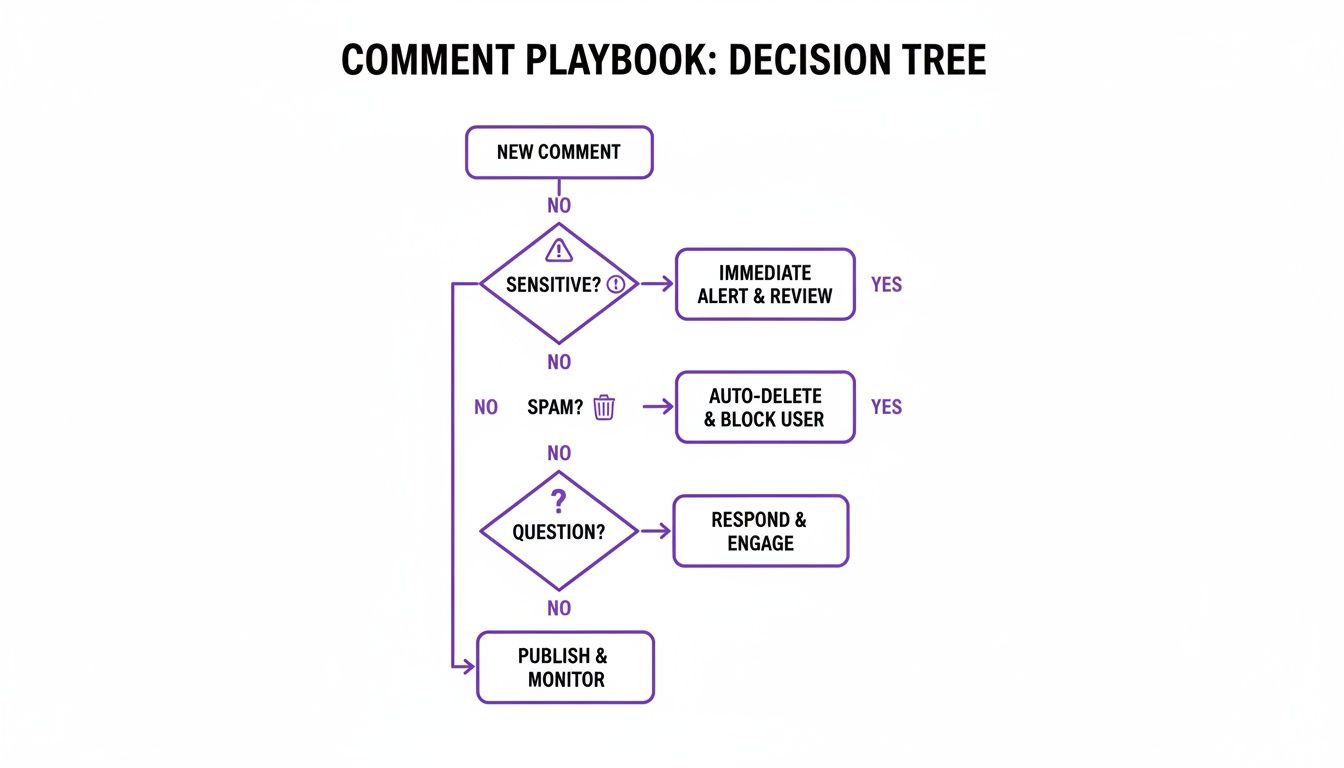
A visual guide like this helps your team figure out the right move almost instantly, which is key for staying consistent and fast. To get even more granular with your responses, it's worth exploring the best practices for social media engagement to really refine your approach.
Create an Escalation Matrix
Let's be real: some situations need backup. An escalation matrix is a simple but critical chart that tells your community manager exactly who to loop in when a problem is above their pay grade. It completely removes the guesswork during those high-stress moments.
A well-defined escalation plan is your brand’s safety net. It ensures that critical issues—like legal threats, PR crises, or serious product flaws—are routed to the right experts immediately, preventing a minor issue from becoming a major catastrophe.
Your matrix should clearly map out different scenarios and point to the right person or department.
| Issue Type | Severity | First Point of Contact | Time to Escalate |
|---|---|---|---|
| Product Defect Complaint | Medium | Customer Support Lead | Within 1 Hour |
| Legal Threat | High | Legal Department | Immediately |
| Negative Influencer Mention | High | Marketing/PR Manager | Immediately |
| Spam/Bot Comments | Low | Community Manager (Handle) | N/A |
By building this playbook, you’re not just writing a document; you're creating a solid foundation for consistent, effective, and safe community management that can scale right alongside your brand.
Proven Strategies for Comment Moderation and Response
Think of every comment on your social media posts as a tiny conversation waiting to happen. It's your chance to turn a simple interaction into something meaningful, showing everyone watching that you're a brand that listens. A solid plan for moderating and responding is what separates a thriving community from a chaotic one.
Let’s face it, people spend a huge chunk of their day on social media. Your comment section is prime real estate for building real connections, and that's where community-led growth really starts. You can see just how massive the audience is by checking out the latest usage stats on SproutSocial.com.

This means you need a game plan for everything—from the five-star reviews to the not-so-flattering feedback.
Handling Different Comment Types
Not all comments are created equal, so your responses shouldn't be either. The key is to have a tiered approach that lets you react with the right mix of speed, empathy, and personality. It makes your followers feel like they're talking to a real person, not a bot.
Positive Comments and Praise: It’s tempting to just hit "like" and move on, but don't! Take a moment to write a personalized reply. Thanking the user by their name makes a huge difference and encourages others to chime in with their own positive thoughts.
Questions and Inquiries: Jump on these fast. Answering a question publicly doesn't just help one person; it helps everyone else who had the same thought but was too shy to ask. It’s like a mini-FAQ in your comment thread, positioning you as a helpful expert.
Negative Feedback and Complaints: Okay, deep breath. These are actually opportunities in disguise. The first rule is to always reply publicly. Acknowledge their frustration with empathy and offer to make things right. Then, ask them to send a DM so you can sort out the specifics privately. This shows you're accountable without airing all the dirty laundry.
Spam and Trolls: These require a zero-tolerance policy. Hide or delete them on sight. Don't engage, don't argue—it only feeds the fire and clutters your feed for genuine fans. Protecting your community from this stuff is a huge part of your job. For a deeper dive, our complete guide to Facebook comment moderation has some great tactics.
Deciding Between Public Replies and Private DMs
Knowing when to keep a conversation in the public eye versus taking it private is a real skill. The right move can defuse a tense situation or even turn a customer complaint into a powerful testimonial.
A public reply to a complaint shows your entire audience you’re accountable. A private message resolves the specific issue with the care and privacy it deserves. Get good at both, and you'll build unbreakable trust.
Here's a simple way to think about it:
| Situation | Best Approach | Why It Works |
|---|---|---|
| General Praise | Public Reply | Spreads positivity and encourages more of it. |
| Product Questions | Public Reply | Educates your whole audience and shows you're responsive. |
| Customer Complaint | Public Reply, then DM | Shows transparency first, then protects customer privacy. |
| Sensitive Information | Private DM | Secures personal data and builds one-on-one trust. |
By sorting comments into these buckets and having a clear strategy, you give your team the confidence to handle anything that comes their way. This kind of structured approach ensures every single interaction strengthens your brand and turns passive followers into your biggest fans.
How AI Is Changing the Game in Community Management
Let's be honest, managing a busy online community can feel like trying to drink from a firehose. The endless stream of comments, DMs, questions, and spam across all your channels is a massive undertaking. Staying on top of it all is a huge challenge.
This is where Artificial Intelligence comes in. And no, I'm not talking about robots taking over. Think of AI as the ultimate sidekick for your community team.
AI tools are built to tackle the repetitive, high-volume stuff that bogs managers down. It’s like having a tireless assistant working around the clock. It can instantly hide spammy links, filter out nasty or toxic comments, and even fire off quick, automated answers to common questions about your shipping policy or return process.
When AI handles the grunt work, your human managers are freed up to do what they do best: build real relationships. Instead of spending their days deleting bot comments, they can focus on strategic planning, having meaningful conversations, and showing genuine empathy to your customers.
Supercharging Your Team's Efforts
The shift toward AI isn't just a trend; it's a fundamental change in how we work. A staggering 89% of social media teams have already woven AI into their daily workflows. It’s clear that AI is becoming essential for everything from brainstorming content to managing a crisis. It helps teams deliver the kind of near-instant responses that customers now expect.
AI doesn't get rid of the human touch—it makes more room for it. By filtering out all the noise, AI lets your community managers focus on creating the authentic connections that build loyalty and protect your brand, 24/7.
Here’s a look at how an AI tool can automatically sort and deal with different kinds of comments.
You can see how the system neatly separates junk from genuine customer questions, helping your team focus on the conversations that actually matter.
What AI Integration Actually Does for You
Bringing AI into your community management workflow isn't just about efficiency; it delivers real business results. You get faster response times, cleaner and more positive comment sections on your ads, and constant brand protection that a human-only team could never pull off. These tools also help managers get a better pulse on conversations, including learning how to monitor ChatGPT brand mentions and other hot topics.
For e-commerce brands, this is a total game-changer. By handling the basics perfectly, AI ensures no customer feels ignored and no toxic comment slips through to tarnish your brand's reputation.
If you're curious about the specific tools out there, check out our guide to the top AI comment moderation tools for 2025 to see what this tech can do for you.
Measuring the ROI of Your Community Efforts
So, how do you prove that all this community management work is actually worth it? It's a question every community manager gets, and the answer is crucial. You have to connect your daily chats, comments, and DMs to real business results. This isn't about vanity metrics like how many followers you have; it's about showing how your efforts directly fatten the bottom line.
Think of it this way: your community is an investment. And like any good investment, you need to show a return. To do that, you need to track specific Key Performance Indicators (KPIs) that your boss or client actually cares about. These metrics turn all that good-vibe relationship-building into cold, hard numbers that prove growth, savings, and brand power.
Key Metrics to Track for E-commerce
To really show the full impact of your community, you need to look at metrics across three main business areas. This helps you demonstrate that community management isn't just a "nice-to-have"—it's a core driver of the entire business.
Customer Service Efficiency: This is all about proving how your work saves the company money and time.
- First Response Time (FRT): How fast are you getting back to people? A speedy response time doesn't just make for a happy customer; it shows your team is on the ball and efficient.
- Resolution Rate: What percentage of customer problems do you solve right there on social media, without needing to escalate them to a support ticket? A high rate here means your community is a highly effective—and cost-effective—support channel.
Brand Health and Loyalty: These metrics measure the fuzzier, but critically important, stuff: how people feel about your brand.
- Sentiment Score: Are people talking about you in a good, bad, or neutral way? Tools can track this for you, giving you a real-time pulse check on how your brand is perceived out in the wild.
- Engagement Rate: The old classic (likes, comments, shares) still matters. It’s a straightforward way to see if your audience is actually listening and interacting, or just scrolling by.
When you track these KPIs together, you can tell a powerful story. You can confidently walk into a meeting and say, "Our faster response time on social media has boosted positive sentiment by 15%, and we've seen a 5% lift in repeat purchases from engaged community members."
- Sales and Conversions: This is where the rubber meets the road—tying community activity directly to revenue.
- Conversion Rate from Social: It's time to get friendly with UTM parameters. Track how many people click a link in your post and go on to buy something. This is the clearest line you can draw from a post to a sale.
- Community-Generated Leads: Are sales inquiries popping up in the comments or DMs? Track them! Every lead that starts with a conversation in your community is a win you can claim.
By keeping a close eye on these areas, you’re not just managing a community; you’re building a powerful business case for its value, backed by undeniable data.
Got Questions? We've Got Answers
Still have a few questions floating around? You're definitely not the only one. Let's tackle some of the most common things people ask about social media community management.
Social Media Manager vs. Community Manager
Think of it like a party. The social media manager is the event planner—they pick the theme, send out the invitations, and decide what music to play. They're focused on broadcasting the message.
The community manager is the host mingling with the guests. They're on the floor, sparking conversations, making sure everyone feels welcome, and handling any issues that pop up. They build the relationships.
How Fast Should We Respond to Comments?
The short answer? As fast as you possibly can. For most comments, aiming for a response within a few hours is a great goal.
But when it comes to customer service issues, the clock is ticking even faster. People expect immediate help. A quick reply isn't just good service; it's a sign that you're paying attention and you care.
Speed is a sign of respect. When you respond quickly, you're telling your community, "We see you, we hear you, and you matter to us." This builds immense trust over time.
What's the Right Way to Handle Negative Comments?
The instinct might be to delete them and pretend they never happened, but that almost always backfires. Your best bet is to respond to genuine criticism publicly. It shows you aren't hiding and you're committed to making things right.
Acknowledge their problem, offer a solution, and then suggest moving the conversation to a private message or email to handle personal details.
So, when should you hit the delete button? Only for comments that clearly cross the line and violate your community guidelines, like:
- Spam and shady promotional links
- Hate speech, personal attacks, or bigotry
- Direct threats or harassment
How Can a Small Business Handle Community Management?
If you're a small team (or a team of one), the idea of 24/7 monitoring can feel overwhelming. Don't panic. You can absolutely do this.
Start small. Create a simple document with a handful of pre-written replies for your most common questions. Then, just block out 15-20 minutes a couple of times a day to check your notifications and engage with your audience.
This is also where automation can be a lifesaver. AI-powered tools can handle the low-hanging fruit for you—hiding spam, filtering out toxic comments, and even answering basic questions. This keeps your page clean and professional, freeing you up to focus on the conversations that truly matter.
Ready to protect your brand and delight your customers around the clock? FeedGuardians uses AI to automatically manage your comment sections, hiding spam and replying to customers in real-time. See how it works at feedguardians.com.
Tired of manually moderating comments?
FeedGuardians automates spam filtering, responds to customers, and protects your brand — setup in 3 minutes.