
Quick Summary
| Key Insight | What You Need to Know |
|---|---|
| Instantly reply publicly | "We do! Check your DMs for a direct link." |
| Simultaneously send a DM | "Here's the link to the blue version you asked about! Let us know if you have any other questions." |
| Alert your team | Flag the conversation as a hot lead. |
When you hear auto comment on Instagram, don't think spam. Think smart, strategic conversation management that grows your brand and protects it at the same time. This isn't about blasting out generic replies; it's about using official APIs to hide harmful comments, spot sales opportunities, and offer instant, helpful responses that the Instagram algorithm absolutely loves.
Why Smart Comment Automation Is A Game-Changer
Let's clear the air. The old-school idea of Instagram automation—spammy, repetitive, and obviously fake—is over. Today's intelligent automation is a completely different beast. It’s not about flooding every post with "Nice pic!" anymore. It’s about creating a responsive, clean, and conversion-ready space for your audience to engage with you.
The brands winning on Instagram are using API-approved platforms like FeedGuardians to turn their chaotic comment sections into valuable assets. This isn't just a time-saver. It's a fundamental upgrade to your brand's presence on a platform where speed and relevance are everything.
The Real Cost of a Messy Comment Section
In the cutthroat world of Instagram marketing, an unmanaged comment section is a silent growth killer. Spam, toxic remarks, and ignored questions paint a negative picture that can scare potential customers away before you even have a chance to make your pitch.
The scale of the problem is bigger than most people realize. A whopping 30% of comments on Meta platforms are spam or toxic enough that they should be hidden. Think about that: for every ten comments your ad gets, three are actively damaging your brand's reputation.
We’ve seen firsthand that brands using smart comment moderation see a significant lift in their return on ad spend (ROAS)—often 20-50% higher. Why? Because clean, positive comment threads build trust and encourage real interaction.
Manual vs Automated Comment Management: A Quick Comparison
Deciding between handling comments by hand versus using an automated system can feel daunting. This table breaks down what you can realistically expect from each approach, showing how intelligent automation can directly impact your results.
| Aspect | Manual Management | Intelligent Automation (e.g., FeedGuardians) |
|---|---|---|
| Response Time | Slow, often delayed by hours or days | Instant, 24/7 replies |
| Spam & Toxicity Control | Reactive and time-consuming | Proactive; automatically hides harmful comments |
| Lead Identification | Inconsistent, relies on manual spotting | Automatically flags comments with purchase intent |
| Scalability | Poor; impossible to manage during high volume | Excellent; handles thousands of comments effortlessly |
| ROAS Impact | Neutral to negative (if unmanaged) | Positive; can increase ROAS by 20-50% |
| Team Burnout | High; tedious and repetitive work | Low; frees up team for high-value tasks |
As you can see, while manual management might feel more personal, it simply can't keep up with the speed and scale required to succeed on Instagram today. Intelligent automation provides the consistency and efficiency needed to turn your comment section into a growth engine.
From Putting Out Fires To Driving Growth
Smart automation moves you from a reactive stance to a proactive one. Instead of just playing whack-a-mole with spam, you can set up rules that hide it on sight while simultaneously pinpointing comments from people ready to buy.
Picture this: a user comments, "Do you have this in blue?" An intelligent system can do three things at once:
- Instantly reply publicly: "We do! Check your DMs for a direct link."
- Simultaneously send a DM: "Here's the link to the blue version you asked about! Let us know if you have any other questions."
- Alert your team: Flag the conversation as a hot lead.
This level of responsiveness does more than just answer a question. It shortens the sales cycle and signals to the Instagram algorithm that your content is valuable and engaging, which can lead to better reach.
This is what separates a basic bot from a true moderation and engagement platform. Understanding this is key to boosting your Instagram engagement rates. It's all about creating a smooth user experience that builds trust and encourages action. This also ties directly into a broader strategy of monitoring brand mentions and customer feelings, a topic we cover in our guide on what is social listening.
Choosing Your Tools: Official APIs vs. Risky Apps
When you’re ready to auto comment on Instagram, you'll hit a critical fork in the road. One path leads to safe, sustainable growth. The other? It’s a fast track to getting your account suspended and damaging your brand’s reputation.
The entire decision boils down to one make-or-break factor: does the tool use the official Instagram Graph API? This isn’t just some minor technical detail; it's the single most important choice you'll make.
Tools that are official Meta Business Partners or use the API are playing by Instagram's rules. They have an approved, secure pipeline to the platform, which means everything they do is compliant and above board.
Then there are the non-API tools that operate in the shadows. They often ask you to hand over your password—a massive red flag—and use sketchy methods like scraping to get the job done. This puts your entire account on the line.
The Dangers of Non-API Automation Apps
Using an unsanctioned tool is like giving a total stranger the keys to your business. You're just hoping they won't wreck the place, but you have zero real control. These apps are a direct threat to everything you've built.
The risks aren't just theoretical; they are severe and immediate:
- Account Suspension or Deletion: Instagram is constantly on the hunt for unauthorized activity. Use a non-API tool, and you risk getting flagged, shadowbanned, or even permanently disabled without any warning.
- Data and Security Breaches: Handing over your login credentials is a huge security hole. Your account data, and even your followers' private information, could easily be compromised.
- Reputational Damage: Let's be honest, these tools are often clumsy. They can spew spammy, irrelevant comments that alienate your audience and make your brand look cheap and desperate.
Choosing an unauthorized tool is a shortcut that almost always leads to a dead end. The temporary convenience is never worth the permanent risk to your account and brand reputation.
The Clear Advantages of Official API Tools
Opting for an API-approved platform like FeedGuardians is the only smart way to automate. These tools are built for the long haul, offering reliability and features that the risky apps simply can't touch. Think of the API connection as a secure, stable bridge to Instagram's ecosystem.
This "official" approach unlocks a world of intelligent automation. Because these tools are fully compliant, they can offer sophisticated features without ever putting you at risk of breaking the rules. That means you can focus on your strategy, not on whether you’ll wake up to a disabled account.
With an official API tool, you get a whole suite of powerful features designed to protect your brand while helping it grow.
Here’s what you get with API-approved tools:
- Guaranteed Compliance: You get total peace of mind knowing your automation is 100% aligned with Instagram's terms of service. No guesswork involved.
- Advanced Capabilities: You can access powerful features like AI-powered intent analysis, sophisticated spam filtering, and seamless handoffs to your support team in DMs—things non-API tools can't do reliably.
- Enhanced Security: Your login info is never shared. API tools use secure authentication methods, protecting your account from being hijacked.
- Long-Term Reliability: As Instagram evolves, official API-based tools are updated right alongside it. Your workflows keep running smoothly, no matter what changes the platform makes.
Making the right choice here is everything. For a deeper look at what separates the great platforms from the risky ones, our guide on comparing social media automation tools breaks it all down.
Ultimately, sticking with official partners ensures your efforts to auto comment on Instagram build your brand up instead of tearing it down.
Building Your First Auto-Comment Campaign
Alright, let's get our hands dirty. Going from theory to a live, working campaign is where the real fun begins, and it’s less intimidating than it sounds. Using a compliant tool like FeedGuardians, you can set up a system to auto-comment on Instagram that's both smart and safe. The goal is to turn your chaotic comment section into a well-oiled, responsive machine.
First things first, you'll need to securely connect your Instagram Business account. This is a straightforward authorization process—it works through the official API, so you’ll never be asked for your password. This is a critical security step. Once that's done, we can start building the brains of the operation: the automation rules.
Defining Your Core Triggers
The whole system hinges on getting your triggers right. These are the specific keywords, phrases, and even emojis that tell your automation what to do. Think of them as tripwires that your audience sets off, activating the perfect response.
Start by jotting down the most common comments you see. For an e-commerce brand, they usually fall into a few buckets:
- Buying Signals: Anything with "price," "how much," "where to buy," "link," or "is this available?"
- Customer Questions: Comments about "shipping," "delivery," "returns," or product details like "sizing."
- Partnership Inquiries: You'll often see "collab," "partner," "ambassador," or "check your DMs."
- Contest Entries: Specific hashtags or phrases you've asked for, like
#MyBrandGiveawayor "I want to win!"
By mapping these out, you’re creating a foundation for an automation that actually understands what people want. This is what separates a helpful, relevant reply from a generic, spammy one.
Crafting Human-Sounding Reply Templates
Now that you have your triggers, it’s time to write the replies. The absolute golden rule here is to avoid sounding like a robot. Nobody likes a canned response. A single, static reply gets old fast and can make your brand feel cheap. The secret is to build in variety.
For every trigger you identified, write five to seven unique response variations. It sounds like a lot, but this one step makes your automation feel incredibly dynamic and human. For example, if someone asks about the "price," your replies could cycle through these:
- "Great question! We've just sent you a DM with all the details. ✨"
- "Happy to help! All the pricing info is heading to your inbox right now."
- "You've got great taste! Check your DMs for a direct link to this item."
See how they all say the same thing but in a slightly different way? That variation is everything. It keeps your interactions fresh and helps you stay on the right side of Instagram's spam detection.
Pro Tip: Your brand's personality should shine through in every template. If you're a playful brand, load up on emojis. If you're more formal, keep the language clean and professional. When the tone is consistent, the automation just feels like another member of your team.
Setting Up Smart Spam and Negativity Filters
A huge part of comment management is just filtering out the junk. A good automation tool doesn't just reply—it also acts as a bouncer for your community. This is where you set up rules to automatically hide spam, troll comments, and negativity.
Create a "hide" rule with a list of common spam words ("promo," "follow me," and other garbage) and let the system instantly hide any comment containing them. No more manual cleanup. You can do the same thing for offensive language or common trolling phrases to keep the vibes positive for your actual followers.
The speed here is more important than you might think. Instagram's algorithm loves rapid engagement. In fact, posts that get comments within the first hour are 74% more likely to get a major reach boost. We've seen that using keyword-triggered auto-replies can lift comment volume by over 23%. Some media buyers have even reported that accounts using a mix of AI replies and smart engagement rules grow up to 40% faster without getting flagged. You can dive deeper into how these data signals are shaping Instagram growth in 2025 on Business Insider Africa.
Creating Escalation Paths for Your Human Team
Finally, remember that automation is here to help your team, not replace it. The most effective campaigns always have a plan for when things get tricky. This means creating escalation workflows that flag complex or sensitive comments and send them straight to a human for review.
For instance, a comment like, "My order arrived broken!" shouldn't get an automated public reply. That's a disaster waiting to happen. Instead, that comment should trigger an internal notification for your customer service team. The system can tag it for follow-up, and a real person can step in to provide the empathy needed to fix the problem.
By combining sharp triggers, varied replies, protective filters, and smart hand-offs to your team, you can confidently launch your first campaign to auto-comment on Instagram. This is how you build a system that captures leads, supports customers, and protects your brand around the clock.
Advanced Strategies to Turn Comments into Sales
Once you’ve got your basic automation handling the frontline comments, it’s time to switch from defense to offense. This is the real game-changer—moving beyond just managing engagement to actively turning it into a direct revenue stream.
The secret lies in building smart funnels that guide someone from a casual public comment to a private, sales-focused conversation in their DMs.
The Power of the Comment-to-DM Funnel
The most effective strategy I've seen in this space is the comment-to-DM funnel. It’s simple in concept but incredibly powerful in practice. When someone leaves a comment with a keyword showing they’re interested in buying, the system doesn’t just reply publicly. It instantly slides into their DMs, pulling them into a private space where you can actually make the sale.
This isn’t just a nice idea; it's a proven tactic that's changing the e-commerce game on Instagram. Think about it: auto-DMs triggered from comments are seeing 90% open rates and 50-60% reply rates. That’s not a typo. It blows traditional email marketing out of the water.
Brands using tools like FeedGuardians can automatically detect purchase-related questions—like "Is size M available?"—and fire off a DM with a direct product link and even a discount code. This creates a frictionless path from interest to checkout. We’ve seen this work wonders in live sales events, where every commenter gets a personalized nudge, pushing conversion rates as high as 12%.
At its core, the process is straightforward.
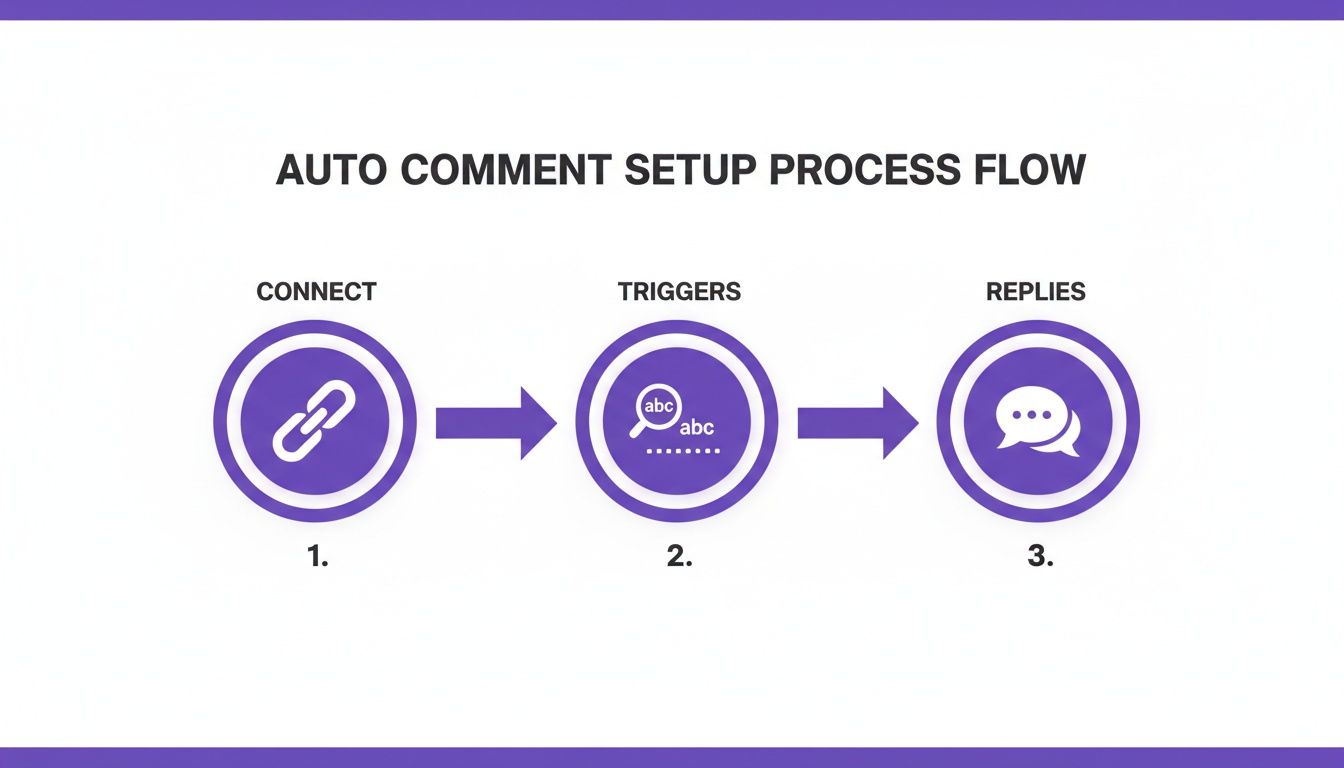
This flow—connecting your account, setting triggers, and crafting replies—is the foundation for the more advanced sales funnels we're about to build.
Building Your First Sales Funnel: A Practical Example
Let’s walk through a real-world scenario. Imagine you run an e-commerce brand selling handmade leather bags. Your goal is to capture anyone showing even a hint of interest and give them an immediate way to buy.
Here’s how you’d set it up:
Pinpoint High-Intent Keywords: First, brainstorm all the words and phrases that signal someone is thinking about buying. Think like a customer. You'll end up with a list like: "price," "how much," "link," "where can I get this," and "I need one."
Craft the Public Reply: This is your hook. It needs to be friendly and set an expectation. If the trigger word is "price," your public reply could be something like: "Great question! I just sent a DM with all the details and a little something extra for you. 😉"
Design the Automated DM: This is where the conversion happens. Your DM needs to be direct and provide instant value. For example: "Hey! You asked about the price of our classic leather tote. You can find all the info and order yours right here: [link to product]. As a thank you for asking, use code COMMENT10 for 10% off!"
This simple three-part sequence works so well because it removes nearly all friction. The user doesn’t have to hunt for the link in your bio, search your website, or wait hours for a manual reply. The path to purchase is delivered straight to their inbox, right when their interest is highest.
High-Impact Automation Use Cases for E-commerce
To give you more ideas, here are some of the most effective automation funnels I've seen e-commerce brands use to drive real results. These are plug-and-play strategies you can adapt for your own products.
| Use Case | Trigger | Automated Action | Business Goal |
|---|---|---|---|
| Price & Availability Queries | Comments with "price," "how much," "in stock?" | Public reply ("DMing you!") + DM with product link and price. | Convert high-intent leads |
| Product Restock Alerts | Comments like "when is this back?" | DM to capture their interest and add them to a notification list. | Recapture lost sales |
| User-Generated Content (UGC) | User tags your brand in a post. | Auto-comment thanking them + DM asking for permission to reshare. | Build social proof & content |
| Pre-Launch Hype Building | Comments on a teaser post with a specific keyword (e.g., "WAITLIST"). | DM with a link to join the early access list. | Generate leads before launch |
These examples show how you can move beyond simple replies and build a system that actively works to grow your business around the clock.
Using AI Sentiment to Personalize at Scale
To take your automation to the next level, you can add AI-powered sentiment analysis. This lets your system understand the feeling behind a comment, not just the keywords within it. It’s the difference between spotting a happy customer, a frustrated one, or someone just asking a question.
With sentiment analysis, you can build smarter response flows:
Positive Sentiment: A comment like "OMG I absolutely love this bag! 😍" can trigger a warm, appreciative DM. "We're so glad you love it! It's one of our favorites, too. Here's a closer look if you're curious!"
Negative Sentiment: A frustrated comment like "My last order took forever to arrive" should never get a salesy DM. The AI should flag this for immediate human review, preventing a tone-deaf and potentially damaging interaction.
Neutral/Questioning Sentiment: Comments like "Does this come in black?" fit perfectly into the sales funnel we designed earlier, as they show clear buying intent.
This kind of nuance is what separates a truly helpful automation from a robotic, annoying one. It ensures your brand always responds appropriately, which is crucial for building trust. To see just how deep this technology goes, check out our full guide to Instagram DM automation for 2025.
Running Automated Giveaways That Actually Convert
Giveaways are fantastic for boosting engagement, but with automation, they can become powerful sales drivers. Instead of just picking a winner and calling it a day, you can nurture every single person who participates.
Here’s a simple but effective workflow:
- The Trigger: Announce your giveaway and ask people to comment with a specific keyword, like "GIVEAWAY."
- The Auto-DM Confirmation: The moment they comment, they get a DM. "You're in! Thanks for entering our giveaway. We'll announce the winner on Friday."
- The Nurture & Convert: Here's the key. Add a "consolation prize" to that DM. For example: "While you wait, here’s 15% off your next order with code CONTEST15. Good luck!"
Suddenly, every participant has been turned into a warm lead with a compelling reason to buy. This small tweak can completely transform the ROI of your giveaway, turning it from a follower-growth tactic into a legitimate sales machine.
Monitoring Your Automation and Staying Safe
Smart automation is never a "set it and forget it" play. If you're going to auto comment on Instagram effectively, you have to treat it like any other critical part of your marketing—it needs constant attention, refinement, and a real commitment to the user experience. Hitting 'launch' on your campaign is just the first step. The real magic happens when you stay engaged with the process.
Think of your automation like a new team member. You wouldn't hire someone and just walk away, never checking in on their performance, right? The same logic applies here. You've got to regularly review what’s working, what’s falling flat, and how your audience is actually responding. This is how you ensure your efforts are building your brand, not accidentally tearing it down.
Key Performance Indicators to Track
To get a real sense of your automation's impact, you need to look past the surface-level numbers. The goal isn't just to fire off replies; it's to drive specific business outcomes. Start by tracking a few key data points that tell the whole story.
Here are the metrics that really matter:
- Response Rate: This tells you if your triggers are even working. What percentage of comments that should get a reply are actually getting one? A low rate could mean your keyword triggers are too specific or missing the mark.
- DM Open and Click-Through Rates: For any comment-to-DM strategy, this is gold. A high open rate means your public comment successfully sparked curiosity. A strong click-through rate on the link inside the DM proves your offer is compelling.
- Comment Sentiment Score: Many of the more advanced tools can analyze the overall vibe of your comments section. Is it getting more positive since you started automatically hiding spam and negativity? This is a direct pulse check on your community's health.
- Conversion Rate: If you’re sending trackable links in your DMs (which you absolutely should be), this is the bottom line. What percentage of people are actually completing a purchase or signing up? This is the ultimate proof of your automation’s ROI.
Keeping a close eye on these KPIs gives you the hard data you need to make smart adjustments. You stop guessing and start making decisions based on what your audience is actually doing.
A Checklist for Staying Safe and Spam-Free
There's a very fine line between helpful automation and annoying spam. Staying on the right side of that line is everything—it protects your account's standing and keeps your audience's trust. To avoid getting flagged and ensure your auto-commenting strategy has a long, healthy life, it's crucial to apply robust anti-spam measures and know the platform's rules inside and out.
Your automation should always feel like a natural extension of your brand's voice—helpful, authentic, and never robotic. The second it starts to feel repetitive or impersonal, you've lost.
Follow this simple checklist to keep your automation feeling human:
- Vary Your Reply Templates: This is non-negotiable. Don't just use one or two canned replies for a trigger. Build a library of at least 5-7 unique variations for each rule you create. This one simple step makes your interactions feel fresh and helps you fly under Instagram's spam-detection radar.
- Set Smart Frequency Caps: You don't want to overwhelm people. A good tool will let you limit how often a single user can trigger an automated reply in a set period. Replying to every single comment from a super-fan can go from helpful to creepy, fast.
- Regularly Review Your Rules: The way people talk online is always changing, and your triggers need to keep up. Set a calendar reminder to review your automation rules once a month. Are you missing out on new slang? Are certain keywords triggering replies that don't quite fit? A quick audit can make a huge difference.
- Prioritize Your Escalation Flow: Make sure your system for flagging comments for a human to review is airtight. Negative feedback, complex support questions, or high-value sales inquiries should always be sent to a real person. For a deeper dive, our guide on top Instagram moderation tools covers how to build these essential safety nets.
By actively monitoring your performance and sticking to these best practices, you can ensure your system to auto comment on Instagram remains a powerful asset for growth, not a liability.
Answering Your Questions About Auto-Commenting
Jumping into automation can feel a bit daunting, and it's smart to get the lay of the land before you start. Let's tackle some of the most common questions and concerns that pop up when brands start thinking about how to auto-comment on Instagram.
Is It Safe to Auto-Comment on Instagram?
Yes, but this comes with a huge caveat. It's only safe if you're using a tool that's built on Instagram's official Graph API, like FeedGuardians. These platforms are specifically designed to play by Instagram's rules, which keeps your account in good standing.
The real trouble starts with sketchy third-party apps that ask for your Instagram password or use web scraping to function. Those are a massive red flag. They directly violate Instagram's terms and are the fastest way to get your account flagged, shadowbanned, or even shut down for good. Before you hand over access, always double-check that the service is an official Meta Business Partner or explicitly states they use the approved API.
Will My Brand Sound Like a Robot?
Only if your strategy is robotic. Good automation feels surprisingly human because it’s built around providing real value, not just firing off the same generic reply to everyone. The secret is to create a whole library of different response templates for every scenario.
Modern tools can even use AI to figure out what a user is actually asking. A comment asking about shipping details needs a totally different response than one from a fan just saying they love your product. And here's the most important part: your system must have a clear hand-off process for escalating tricky or negative comments to a real person. Automation is there to support your team, not replace them.
The goal is to create a seamless, helpful, and brand-aligned experience that feels intentional. When done right, your audience will feel like there’s a responsive team on the other side, not a script.
What Types of Comments Should I Automate?
The best comments to automate are the ones that are repetitive and high-volume—the kind that don't need a deep, personal conversation. This approach frees up your social media managers to spend their time on the interactions that actually build community and relationships.
You'll get the most bang for your buck by focusing automation on these key areas:
- Frequently Asked Questions: Think of all the "How much is this?" or "Do you ship to Canada?" questions you get.
- Contest or Giveaway Entries: This is perfect for comments that use a specific trigger phrase, like "I'm in!" or tagging a friend.
- Spam and Toxicity Filtering: You can automatically hide or delete harmful or spammy comments. Learning to spot the signs of what makes a spam account will make your filters even smarter.
How Can I Measure the ROI of Auto-Commenting?
Tracking the return on your investment is actually pretty straightforward once you know what to look for. Start with efficiency gains. How many hours is your team saving now that they aren't manually hiding spam or typing out the same answer to a FAQ a dozen times a day?
Then, look at your engagement metrics. Are your overall response rate and post reach improving? For e-commerce brands, the most powerful metric is, of course, conversions. By using trackable links in the DMs that your automation sends, you can directly measure click-through rates and sales that came from your comment funnels. That gives you hard data to show exactly how automation is impacting the bottom line.
Ready to turn your comment section into a secure and efficient sales channel? FeedGuardians uses official, API-approved automation to protect your brand from spam, answer customer questions instantly, and guide interested followers toward a purchase.
Discover how FeedGuardians can help you automate safely at feedguardians.com
Tired of manually moderating comments?
FeedGuardians automates spam filtering, responds to customers, and protects your brand — setup in 3 minutes.