
Quick Summary
| Key Insight | What You Need to Know |
|---|---|
| Instant Customer Support | Someone messages you asking about your return policy. An auto-reply shoots back the answer immediately, giving them a fast, helpful experience that builds trust. |
| Getting Started with Instagram’s Built-In Reply Tools | You don't need a massive budget or a complex new software to get started with Instagram DM automation. In fact, some of the most practical tools are a... |
| Unlocking Powerful Automation with Third-Party AI Tools | Instagram's built-in features are a solid starting point, like learning to ride a bike with training wheels. They get the job done for basic replies. ... |
| Common Automation Mistakes and How to Avoid Them | Setting up an auto reply DM on Instagram can be a game-changer, but let's be honest—it's easy to get it wrong. A poorly planned automation strategy ... |
| Got Questions About Instagram DM Automation? We’ve Got Answers. | Jumping into Instagram DM automation can feel like stepping into a new world. You’ve probably got a ton of questions floating around. Is it safe? Wh... |
Setting up an auto-reply DM on Instagram is the simplest way to manage customer conversations around the clock, grab leads the moment they show interest, and drastically cut down your response times. It’s all about using either Instagram's own built-in tools or more advanced third-party apps to send instant, pre-written messages when someone DMs you, comments on a post, or replies to your Story.
The whole point? No potential customer ever feels ignored.
Why You Need an Instagram DM Automation Strategy Now
Let’s be real for a second: manually replying to every single Instagram DM just doesn't scale anymore. We live in a world of instant gratification, and for your customers, that means immediate answers. Every minute you make them wait could be a lost sale or a soured brand experience.
Your DMs aren't just a cluttered inbox; they're a goldmine. For many brands, it’s one of their most powerful—and most overlooked—revenue channels. The modern customer journey is messy, but it almost always passes through the DMs for questions about products, shipping, or stock. If you're slow to answer, you're putting a roadblock right where they’re about to buy.
The High Cost of Slow Replies
The sheer volume of messaging on Instagram is staggering. We're talking over 500 million people using DMs every single day. It’s no wonder that e-commerce brands see up to 30% of their leads pop up right there in their direct messages.
The catch is that customer expectations are through the roof. About 35% of Instagram users expect a brand to reply within an hour. The numbers don't lie about the impact of speed—businesses that respond to DMs in under five minutes see a conversion rate 21 times higher than those who take an hour or more.
This is exactly why having an auto-reply DM strategy is no longer a "nice-to-have." It’s a core piece of modern customer service automation.
By automating that first touchpoint, you instantly acknowledge the customer, often answer their question on the spot, and create a great first impression. It happens automatically, freeing up your team to handle the more complex conversations instead of drowning in repetitive FAQs.
Before we dive into the "how," let's quickly look at the difference this makes.
Manual vs Automated Instagram DM Replies
This table gives a clear, at-a-glance view of how automation stacks up against trying to do it all by hand. The numbers speak for themselves.
| Metric | Manual Replies | Automated Replies |
|---|---|---|
| Response Time | Hours to Days | Instant (Under 1 Minute) |
| Lead Capture | Missed opportunities overnight | 24/7, instant engagement |
| Conversion Rate | Lower due to delays | Up to 21x higher |
| Team Efficiency | High manual effort, repetitive tasks | Focused on high-value conversations |
| Customer Satisfaction | Inconsistent, often poor | Consistently high |
Ultimately, automation removes the bottlenecks that kill sales and frustrate customers, turning your DMs into an efficient, revenue-generating machine.
Unlocking Your Growth Potential
When you set up DM automation, your Instagram account stops being just a place to post content and becomes an active lead-gen tool.
Think about these real-world scenarios:
- 24/7 Lead Capture: A potential customer is scrolling at 2 AM, sees your Reel, and comments "INFO." An auto-reply instantly DMs them a link to the product, catching them right when their interest is highest.
- Instant Customer Support: Someone messages you asking about your return policy. An auto-reply shoots back the answer immediately, giving them a fast, helpful experience that builds trust.
- Boosted Engagement: You run a giveaway where people have to comment a keyword to enter. Automation takes care of sending the entry details to every single person, which in turn drives up your post's visibility.
This kind of proactive engagement is what separates growing brands from stagnant ones. If you want to go deeper on this, check out this excellent guide on mastering Instagram direct message automation.
In the next sections, we'll walk through the practical steps to build this system for yourself, starting with Instagram's native tools and moving on to more powerful AI solutions.
Getting Started with Instagram’s Built-In Reply Tools
You don't need a massive budget or a complex new software to get started with Instagram DM automation. In fact, some of the most practical tools are already sitting inside your account, completely free. Think of these native features as your ground floor—the perfect starting point for any business wanting to offer faster, more consistent customer service without spending a dime.
These tools are found right within your Instagram Professional account settings and the Meta Business Suite. They’re built to tackle the most common, repetitive DMs, letting you lay a solid foundation before you even think about more advanced auto reply DM Instagram strategies. Let's walk through how to flip them on and put them to work.
Your First Line of Defense: Instant Reply
Imagine someone walks into your shop, and you greet them with a friendly "hello!" That's exactly what an Instant Reply does in your DMs. It’s a simple, automated message that pings back the very first time someone messages you. Its main job is to instantly acknowledge them, manage their expectations, and make them feel seen. Just this one little feature can make your response time feel lightning-fast.
You’ll find this in the professional dashboard settings inside the Instagram app. It's often located near "Frequently Asked Questions" or "Saved Replies"—just look for the "Instant Reply" toggle.
Here are a couple of real-world examples:
- For a clothing brand: "Hey there! Thanks so much for reaching out. We’ve received your message and our team will get back to you within 24 hours. In the meantime, feel free to check out our new arrivals here: [link]"
- For a local service: "Hi! Thanks for your message. We're excited to chat! Our business hours are M-F, 9 am-5 pm EST, and we'll reply as soon as we're back online."
This simple step ensures no potential customer ever feels like their message disappeared into a black hole. That's a huge win for building trust right from the start.
Managing Expectations with Away Messages
Away Messages are a lot like Instant Replies, but they’re designed specifically for times when you’re out of the office. You can schedule them to automatically kick in after your business hours, over the weekend, or during a holiday break. It's a dead-simple way to stay professional and keep people in the loop.
This is another feature you'll set up in the Meta Business Suite under "Automations." The goal isn't to solve the customer's problem right then and there. It's to clearly communicate when they can expect a real human to jump in. This small act of setting expectations heads off a ton of potential frustration.
Pro Tip: Don't just say you're away. Use your Away Message to offer something helpful. Link to a popular blog post, your FAQ page, or a quick video tutorial. This turns a boring waiting period into a genuinely useful interaction.
Speeding Up Repetitive Answers with Saved Replies
Okay, this one is probably the most powerful native tool for your day-to-day grind. Saved Replies are basically message templates you create for your most common questions. Instead of typing out your return policy for the tenth time today, you can pop in a perfect, pre-written response with a single tap.
You can set these up right in your Instagram settings. Just think about the questions you get asked over and over:
- What are your hours?
- Do you ship internationally?
- What’s your return policy?
- How much does [product] cost?
Whip up a Saved Reply for each one. You can even create a shortcut keyword (like "shipping") to pull up the full message instantly. While it's not fully automated, it can slash the time you spend on manual typing by up to 90% for those common questions. This tactic is a cornerstone of smart social media management, and you can dive deeper by exploring other essential Instagram moderation tools.
The screenshot below shows you the starting point for a business account—your gateway to all these features.
This dashboard is where you begin to manage your professional presence, giving you access to insights, ads, and the messaging tools we've just covered.
While these built-in tools are a fantastic first step, they do have their limits. They can't truly understand what a user wants, trigger replies from comments on your posts, or guide someone through a detailed sales funnel. They're your starting lineup, perfect for handling the basics before you bring in more powerful, AI-driven solutions.
Unlocking Powerful Automation with Third-Party AI Tools
Instagram's built-in features are a solid starting point, like learning to ride a bike with training wheels. They get the job done for basic replies. But if you’re serious about scaling your e-commerce or marketing efforts, you'll eventually need to upgrade to the V8 engine of a third-party AI tool.
This is where you graduate from simple "thanks for your message" replies to truly intelligent conversations. These platforms are built to understand context, figure out what a user actually wants, and run sophisticated workflows that turn your DMs into a powerhouse for sales and support. They don't just send a message; they manage the entire interaction.
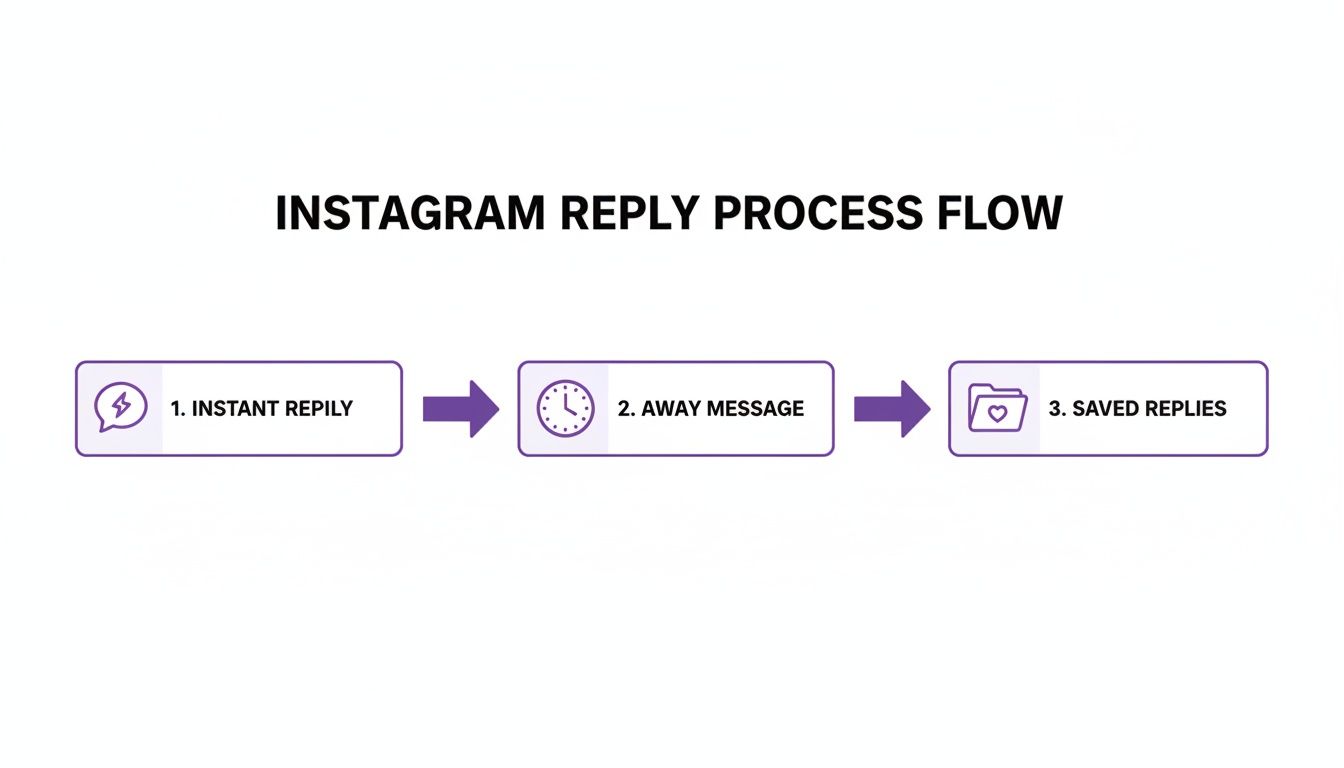
The diagram above outlines the foundational replies you can set up natively. AI tools take this core concept and layer on intelligent routing, lead qualification, and so much more.
Going Beyond Basic Keyword Triggers
Here’s the thing: advanced automation tools are incredibly smart. They can read the sentiment behind a message and know the difference between an angry customer, a spammer, and someone ready to buy.
This means you can automatically:
- Hide nasty or spammy comments from your posts.
- Flag urgent support DMs for immediate human review.
- Prioritize messages from users asking about pricing or availability.
This kind of intelligence instantly cleans up your inbox. Instead of your team wasting hours sifting through everything, the AI does the triage, making sure the most important conversations get to the right person, right away.
Real-World Scenarios With AI Automation
The real magic happens when you connect these tools to your content. Let's say you drop a new Reel showing off a product. With a good third-party tool, you can set a rule: anyone who comments "link" or "info" gets an immediate, personalized DM.
That DM can do more than just send a link. It can include a special discount code to nudge them toward a purchase or a friendly follow-up question to keep the conversation going. It’s a seamless handoff from public engagement to a private, one-on-one sales conversation, striking while the iron is hot.
This is what turns passive viewers into active customers. You capture their interest at its absolute peak, which drastically shortens the sales cycle and boosts your conversion rates. Different tools handle this differently, so it's worth checking out how the ShortGenius platform and others approach comment-to-DM automation.
The Tangible Business Impact
Let's talk numbers, because this is about more than just convenience. The data shows that brands using smart automation can process 10 times more interactions without adding more people to their payroll. They do this by using smart queues that manage reply volume and keep them in line with Meta's platform policies.
The impact on sales is just as impressive. We've seen comment-to-DM flows boost close rates by 18%. Why? Because that instant, private conversation builds trust way faster than a public comment thread ever could.
And there’s a bonus: automated accounts often see engagement signals jump by 40%. This tells the Instagram algorithm your content is valuable, which can lead to 2-3 times more reach on your Reels and posts.
The takeaway is clear: Advanced automation isn't just a time-saver. It's a growth engine. It converts more leads, expands your organic reach, and delivers a standout customer experience.
Feature Comparison: Native vs Third-Party AI Tools
When deciding whether to stick with Instagram's built-in options or invest in a more powerful tool, it helps to see a direct comparison of what you get. The native tools are great for getting started, but third-party platforms are built for growth and scale.
Here’s a breakdown of how they stack up:
| Feature | Instagram Native Tools | Third-Party AI Tools (e.g., FeedGuardians) |
|---|---|---|
| Basic Auto-Replies | Yes (Instant Reply, Away Message) | Yes, fully customizable and contextual |
| Keyword Triggers | Limited (FAQs) | Advanced, with multi-keyword logic |
| Sentiment Analysis | No | Yes (detects positive, negative, neutral intent) |
| Comment Moderation | Manual or limited filtering | Automated (hide spam, flag urgent issues) |
| Comment-to-DM | No | Yes, with personalized flows |
| CRM Integration | No | Yes (connects to HubSpot, Salesforce, etc.) |
| Lead Qualification | No | Yes (tags and routes leads automatically) |
| Analytics & Reporting | Basic insights | In-depth performance metrics (ROI, conversions) |
As you can see, the difference is significant. While native tools handle the absolute basics, dedicated AI platforms provide the intelligence and integrations needed to turn your DMs into a predictable revenue channel.
Choosing the Right Platform for Your Needs
With a growing number of tools on the market, how do you pick the right one? Platforms like FeedGuardians are designed specifically for brands that need to manage high volumes of comments and DMs, using AI to cut through the noise and zero in on what matters.
When you're shopping around, look for these critical features:
- Intent and Sentiment Analysis: Can it tell a sales lead from a customer service problem?
- Workflow Builder: Is it easy to create your own conversational flows without needing a developer?
- Integrations: Does it play nice with your CRM, e-commerce platform, and other tools?
- Analytics and Reporting: Will you get clear data on what’s working and what’s not?
The best tool for you will depend on your primary goal—whether that's generating more leads, providing faster support, or driving direct sales. For a side-by-side look at the top players, check out our guide on comparing social media automation tools. It'll help you pinpoint the features you actually need to grow.
Writing Auto-Replies That Don't Sound Like a Robot

Let's be honest—the biggest pitfall of any auto reply dm instagram strategy isn't the tech. It’s sounding like a cold, uncaring machine.
The best automation feels like a genuine, helpful interaction. Crafting copy that truly connects with your audience is what separates a frustrating dead end from a useful experience that actually gets them to take the next step. It all comes down to a few core ideas: stay true to your brand voice, make people feel seen with personalization, and guide them with a natural flow.
Injecting Your Brand Voice
Your DMs should never read like a legal disclaimer. The language you use in your automated replies has to feel like it’s coming from the exact same brand your followers see in your posts, Reels, and Stories.
Is your brand voice fun and a little quirky? Load up on emojis and keep the language playful. Or are you more professional and informative? Then stick to clear, concise, and helpful messages. The goal here is consistency.
- Casual Brand Example: "Hey [Username]! 👋 Thanks for the follow! So glad to have you here. Got any questions or just wanna say hi? We're all ears! 👂"
- Professional Brand Example: "Welcome, [Username]. We appreciate you following our page. Our team is here to assist with any questions you may have about our services."
Getting this right is a huge part of creating a seamless customer experience. For a deeper dive, check out our article on the best practices for social media engagement.
The Power of Personalization
Nobody likes getting a message that kicks off with "Dear valued customer." It’s an instant turn-off.
The simplest way to make an auto-reply feel more human is by using the person's name. Nearly all third-party automation tools provide personalization tags, like [Username], that will automatically pull in the user's Instagram handle.
This one small detail makes a massive psychological difference. It immediately shows you're talking to them, not just blasting a generic template at them. It shifts the entire dynamic from a broadcast to a one-on-one conversation, which is what DMs are all about.
Key Takeaway: Personalization is non-negotiable. Using a person's name in your opening line is the bare minimum for making an automated message feel authentic. It immediately builds rapport and increases the chances they'll continue the conversation.
Designing a Helpful Message Flow
A great auto-reply doesn't just answer a single question; it anticipates the next one. You have to think about what a user might want to do after their initial query and gently guide them there with a clear call-to-action (CTA).
For instance, if someone slides into your DMs asking about pricing, your automated flow could look something like this:
- Acknowledge & Answer: "Hi [Username]! Thanks for asking. Our product starts at $49. You can see all the features and pricing tiers right here."
- Provide the Link: Give them a clear, clickable button or a direct link to your pricing page.
- Offer More Help: Finish with an open-ended question. "Does that help answer your question, or is there anything else I can find for you?"
This structure is helpful, direct, and keeps the conversation alive. The data backs this up, too. We've seen that reply rates in Instagram DM automation can hit 50-60%—absolutely crushing typical email open rates. Performance marketers have even seen sales bumps of 15-22% just by sending product links to users who comment on a Reel. You can read the full findings on DM automation growth to see the potential.
Ultimately, writing an effective auto-reply is less about technology and more about empathy. Put yourself in your customer's shoes. What would make their experience faster, easier, and more enjoyable? Build your messages around that simple question, and your automation will become an incredible tool for building real relationships.
Common Automation Mistakes and How to Avoid Them
Setting up an auto reply DM on Instagram can be a game-changer, but let's be honest—it's easy to get it wrong. A poorly planned automation strategy can backfire, annoying potential customers and making your brand look spammy. It might even land your account in hot water.
The whole point is to be helpful, not robotic. Your automations should feel like a timely, helping hand, not a digital wall. I've seen brands make the same handful of mistakes over and over, so let's walk through them and, more importantly, how you can sidestep them completely.
The Spam Trap: Sending Unsolicited DMs
This is the big one. The absolute number one mistake is using automation to blast out promotional messages to people who didn't ask for them. Instagram's rules are very clear: automation is for responding to an action—a comment, a story reply, a message. It's not for cold, outbound marketing.
Think about it. Sliding into someone's DMs with a sales pitch just because they followed you feels desperate. It's a surefire way to get reported, ignored, and break any trust you were hoping to build.
Rule of Thumb: Your automation needs a trigger from the user. If they comment "DEALS" on your Reel, that's an invitation. If they DM you a question, that's an invitation. A simple follow is not. Respect the inbox.
Forgetting the Human Handoff
Automation is brilliant for handling the first 80% of conversations—the FAQs, the quick greetings. But it can't solve every problem. Nothing is more frustrating for a customer than being stuck in an endless loop with a bot when they have a complex or sensitive issue.
You absolutely must have a clear and easy escape hatch to a real person.
- Offer an out. A simple "Type 'agent' to speak with our team" at the end of your automated message works wonders.
- Listen for frustration. Set up keywords like "help," "issue," or "complaint" to automatically flag a conversation for your support team.
- Don't fake it. If the bot doesn't understand, have it say so. "I'm not sure about that, but let me get a human expert to jump in and help you out" is so much better than a generic "I don't understand."
Without this handoff, you make people feel unheard and trapped. That's the exact opposite of what good customer service should be.
Overly Aggressive or Frequent Replies
Just because you can reply instantly doesn't always mean you should. Firing off too many automated messages in a short time feels aggressive and overwhelming. This is especially true with comment-to-DM features. If someone leaves three comments on your post, you don't want to spam their inbox with three separate DMs.
Good tools let you control this. For instance, you can set a rule to send only one automated DM to a user per 24-hour period, no matter how many times they comment. Another thing to watch out for is using tools that look and act like spam bots, which can get you in trouble. You can learn more about the risks by reading about bots commenting on Instagram and why to avoid that approach.
Here's a pro tip: add a slight, randomized delay of a minute or two before your auto-reply sends. This tiny buffer makes the exchange feel far more natural and less like an instant, robotic reflex.
Using Generic and Impersonal Copy
The final major pitfall is writing auto-replies that sound like they came from a corporate manual. Cold, generic messages that don't acknowledge the user are a massive missed opportunity to build a real connection.
Remember where you are—Instagram is a personal, visual, and social platform. Your DMs need to reflect that.
- Use their name. Always start your greeting by including the user's name (
[Username]). It’s a small detail that makes a huge difference. - Match your vibe. Write in the same tone you use in your captions and Reels. If you use emojis there, use them here.
- Mix it up. Create a few different versions of your most common replies. A good automation tool can cycle through them randomly so you don't sound like a broken record.
Automation is a tool to enhance your communication, not replace it. By steering clear of these common mistakes, you can build an auto reply DM Instagram system that actually strengthens customer relationships and helps you grow.
Got Questions About Instagram DM Automation? We’ve Got Answers.
Jumping into Instagram DM automation can feel like stepping into a new world. You’ve probably got a ton of questions floating around. Is it safe? What's the right way to do it? How do I even know if it's working? It’s completely normal to wonder about the rules, the risks, and the real-world results.
Let's cut through the noise and get straight to the answers brands ask us all the time when they're building out their auto reply DM Instagram strategy. We'll cover everything from keeping your account safe to actually measuring your success.
Can Instagram Actually Ban You for Using Auto-Reply DMs?
This is the big one, and thankfully, the answer is pretty straightforward: no, you won't get banned for using official features or a Meta-approved third-party tool. Instagram and Meta actually want you to use these tools because it helps businesses talk to their customers more efficiently.
Where you can get into trouble is with spammy, aggressive behavior. The risk isn't in the automation itself, but in how you use it. If you start blasting unsolicited ads to people who have never interacted with you, you’re practically asking to get flagged.
The key is to use automation to respond to incoming messages, comments, and story replies—not to initiate spammy outbound campaigns. As long as you stick with reputable platforms that play by Meta's rules and always give users a clear path to talk to a human, you're in the clear.
What’s the Real Difference Between an Instant Reply and a Saved Reply?
They both help you respond faster, but they do completely different jobs. Knowing when to use each one is crucial.
Instant Reply: Think of this as your friendly, automated "we're open!" sign. It's a single, general greeting that fires off automatically the very first time someone slides into your DMs. Its only job is to acknowledge them right away and set expectations for when a real person will jump in.
Saved Reply: This is your cheat sheet for all those questions you get asked a million times a day. You can build a whole library of pre-written answers for things like "shipping info," "what's the price," or "return policy." You can pop these into a chat manually, or with smarter tools, have them trigger automatically based on keywords.
So, an Instant Reply is a one-time welcome mat, while Saved Replies are your go-to answers for specific, recurring questions.
How Do I Know if My Instagram Auto-Reply Strategy Is Actually Working?
If you just "set it and forget it," you're flying blind. Measuring your strategy is all about looking at the data to see what’s moving the needle for both your team and your bottom line.
A winning automation strategy isn't just about answering messages faster. It’s about reducing manual work, shortening the path to purchase, and leaving customers feeling heard and happy. Success is where efficiency meets a great customer experience.
To get started, keep an eye on these key performance indicators (KPIs):
| Metric | What It Really Tells You |
|---|---|
| Average Response Time | How quickly are you greeting potential customers? |
| Reply Rate | Are any DMs slipping through the cracks? This shows the percentage of messages getting a response. |
| Link Click-Through Rate (CTR) | Are people actually clicking the product links you send them? |
| Conversion Rate | The ultimate gut check: how many of those clicks are turning into actual sales or leads? |
More advanced tools can even track customer sentiment, giving you a clear picture of whether your automated chats feel helpful or just plain robotic.
Can Auto-Replies Really Be Personalized for Each User?
Yes, and honestly, you should be personalizing them. The level of personalization you can achieve, though, really comes down to the tools you're using.
Instagram’s built-in features are pretty basic here. You can’t, for example, automatically use a person's name in an Instant Reply, which can make it feel a bit cold.
This is where third-party platforms really pull ahead. They can easily pull in a user's name to make the greeting feel personal (e.g., "Hey Jessica, thanks for reaching out!"). The best AI-powered systems take it a massive step further by analyzing the user’s actual question to provide a relevant, contextual answer that feels like it was written just for them. It’s the difference between a generic FAQ and a truly helpful conversation.
Ready to turn your Instagram DMs into a sales and support machine that works 24/7? FeedGuardians uses AI to hide spam, flag hot leads, and give customers instant, intelligent answers. Stop letting good leads go cold in your inbox.
Tired of manually moderating comments?
FeedGuardians automates spam filtering, responds to customers, and protects your brand — setup in 3 minutes.