
Quick Summary
| Key Insight | What You Need to Know |
|---|---|
| It builds richer customer | It builds richer customer profiles. You can now add social context—like their sentiment, interests, and online influence—right alongside their purchase history and contact info. |
| How Social CRM Creates a True 360-Degree View of Your Customer | Think of all your customer information like scattered puzzle pieces. The purchase history is in one box, support tickets are in another, and then you ... |
| Choosing Your Social CRM Integration Strategy | Connecting your social media to your CRM might sound like a huge technical project, but it’s really just about picking the right bridge to connect t... |
| Automating Your Social Engagement and Support | Connecting your CRM and social media is a great start, but the real magic happens when you bring automation into the mix. Let's be honest, manually tr... |
| Managing Privacy and Building Customer Trust | When you connect your social media to your CRM, you suddenly have a flood of new customer data. This is powerful stuff, but it's also a huge responsib... |
| Common Questions About Social CRM | So, you're sold on the idea of social CRM, but the practical side of things feels a bit fuzzy. How do you actually flip the switch and get started? Wh... |
Bringing your customer relationship management and social media platforms together is about connecting the dots. It’s how you turn the firehose of tweets, comments, and DMs into a clear, actionable story for every single customer. Suddenly, social media isn't just a megaphone; it's your most valuable listening device.
Connecting Social Chatter to Your Bottom Line
Think of your Customer Relationship Management (CRM) system as your business's central memory. It faithfully logs every purchase, every support ticket, every little detail. Meanwhile, your social media channels are a sprawling, non-stop town hall meeting where everyone is talking about you, your competitors, and what they need.
When these two worlds don't talk to each other, you're flying blind. Your support team has no idea a frustrated customer already blasted their issue all over Twitter. Your marketing team can't spot the happy customers who are also your most vocal fans online.
Why This Connection is a Game-Changer
Hooking up your CRM and social media creates one complete, 360-degree view of your customer. It’s like giving that old-school neighborhood shopkeeper, who knew everyone by name, a digital superpower to manage thousands of relationships at once. This link between customer relationship management and social media isn't just a nice-to-have anymore; it's a must-have.
When businesses integrate social media with their CRM, they often see a 20% to 40% jump in spending from those customers. That's proof that smart, data-informed engagement directly grows your revenue.
This integration lets you get ahead of the conversation. Instead of just reacting to problems, you can anticipate needs, defuse issues before they blow up, and spot genuine sales opportunities as they happen.
From Social Noise to Real Insight
Every single social interaction becomes a breadcrumb of valuable data. A complaint on Facebook isn't just a PR fire to put out—it's a data point that gets logged in the CRM, instantly flagging the customer's account manager. A glowing review on Instagram is more than a nice ego boost; it's your chance to identify a brand champion and start tracking their impact.
This whole process is driven by systematically keeping an eye on online conversations. To really get a handle on this, it’s worth digging into the basics of what is social listening and how it feeds directly into your CRM strategy.
In the end, bringing these systems together achieves a few critical things:
- It builds richer customer profiles. You can now add social context—like their sentiment, interests, and online influence—right alongside their purchase history and contact info.
- It levels up your customer service. Support agents get the full story. They can see a customer's recent angry tweets and their past support tickets all in one screen, leading to quicker and more personalized solutions.
- It uncovers hidden sales opportunities. By monitoring social media for buying signals (like "can anyone recommend a good...?"), you can automatically create new leads in your CRM for the sales team to pounce on.
How Social CRM Creates a True 360-Degree View of Your Customer
Think of all your customer information like scattered puzzle pieces. The purchase history is in one box, support tickets are in another, and then you have a chaotic jumble of tweets, DMs, and Facebook comments in a third. It's impossible to see the whole picture.
Social CRM is what brings all those pieces together on one table.
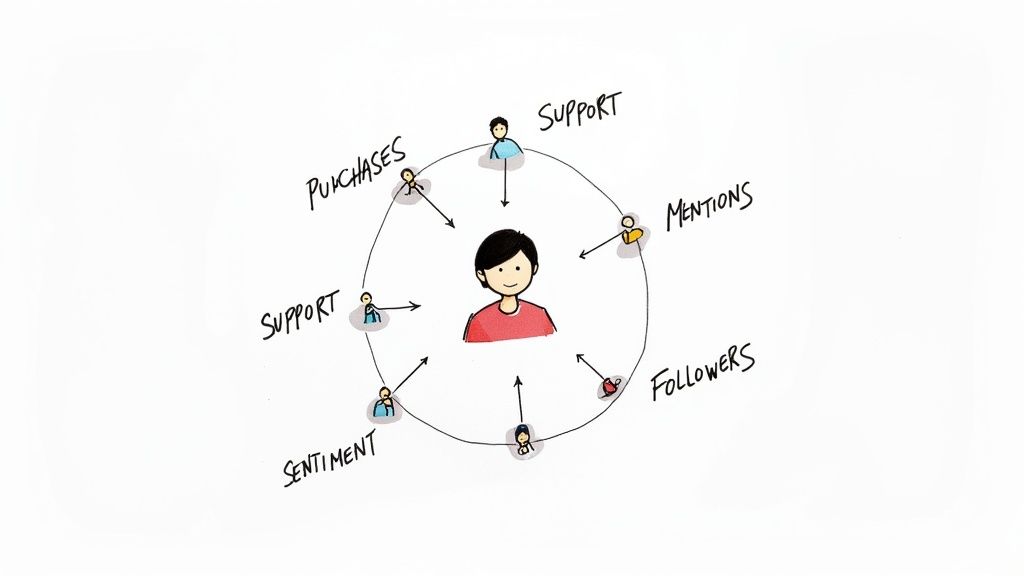
Suddenly, you have a unified, 360-degree customer profile. It’s a living, breathing record that combines traditional data (like what they bought) with rich social insights (like what they think about what they bought). This is the only way to get a complete picture of who your customer is, what they care about, and how they feel about you right now.
Moving from Transactions to Relationships
Without this unified view, your customer interactions feel disconnected and purely transactional. Imagine a support agent seeing a customer's recent order but completely missing the fact that the same person has been complaining on Twitter for three days about a shipping delay. That gap in context is exactly where frustration boils over and loyalty dies.
Now, picture that same agent armed with a social CRM. Before they even start typing a reply, they can see the customer's social activity, recent brand mentions, and overall sentiment. They can address the real problem—the frustration—instead of just the surface-level issue.
This complete understanding lets you shift from reactive problem-solving to proactive relationship-building. You’re no longer just closing tickets; you’re showing customers you see them, you hear them, and you value their entire experience.
This small change has a massive impact across the entire company, helping every team build stronger, more meaningful connections with the people they serve.
How Every Team Wins
A 360-degree view isn’t just a support tool; it empowers every single customer-facing department.
- Customer Support: Agents get the full story behind every ticket. This leads to faster resolutions, fewer back-and-forths, and a massive drop in customer frustration.
- Marketing Teams: They can easily spot happy customers and brand advocates from social praise. This feedback can be used to amplify positive sentiment or build lookalike audiences to find more of their best customers.
- Sales Teams: Social listening tools connected to the CRM can flag buying signals—like someone asking for recommendations in your product category. These get routed directly to sales as warm, qualified leads.
- Product Teams: Raw, unfiltered feedback from social media becomes a direct line to customer needs and pain points. This is pure gold for prioritizing new features and guiding innovation.
This integrated approach is quickly becoming the standard. The global Social CRM market was valued at $150.17 billion and is expected to jump to $231.08 billion, which tells you just how critical this connection is. To truly build a comprehensive understanding, exploring advanced features like social media contact management is the next logical step. It helps turn all that data into something your teams can actually use.
Choosing Your Social CRM Integration Strategy
Connecting your social media to your CRM might sound like a huge technical project, but it’s really just about picking the right bridge to connect two of your most powerful tools. Think of it like setting up your smart home—you can use the app that came with your smart speaker, or you can use a central hub that links everything from your lights to your thermostat. The goal is the same: making sure everything talks to each other smoothly.
The path you take will come down to your budget, how comfortable your team is with technology, and how much you need to customize things. Each method works, but one will probably be a much better fit for where your business is at right now.
H3: Starting with Native Integrations
The most straightforward way to get started is with a native integration. This is basically a built-in connector that your CRM provider, like HubSpot, Salesforce, or Zoho, has already created. They’re designed to be "plug-and-play," meaning you can get them running with just a few clicks and start pulling social media data right into your customer profiles.
This approach is perfect for teams that value simplicity and speed. For example, a native integration could automatically create a new lead in your CRM the moment someone DMs your brand on Instagram. It’s a clean, direct way to make sure those valuable social conversations don't just disappear into the void.
A native integration is like a pre-built bridge, designed by your CRM's own architects to connect perfectly with the big social platforms. You don't have to deal with any middlemen, making it the simplest way to get your data in one place.
The downside? Native integrations can be a bit rigid. They usually only play nice with the biggest social networks and might not have the deep, custom features a fast-growing business needs. If you find yourself wanting to build more complex workflows, it’s time to look at other options.
H3: Using Third-Party Connectors for Flexibility
When the built-in options just don’t cut it, third-party connectors are your best friend. Tools like Zapier, Make, or Integrately act like universal translators, letting pretty much any two apps talk to each other. They offer incredible flexibility, allowing you to design custom data flows between your social accounts and your CRM.
Let's say you want a really specific workflow: every time someone on Twitter mentions your brand with a negative tone and uses the word "broken," you want to automatically create a high-priority support ticket in your CRM and send a heads-up to your team's Slack channel. That’s exactly where a third-party connector shines. You get complete control over what happens to your data and when.
These tools are incredibly powerful, but they do add another tool to your stack and usually have their own subscription fees. They take a bit more effort to set up, but they open up a world of possibilities for fine-tuning your entire customer management process. For smaller teams just getting their feet wet, some of the simpler social media management software for small business can be a great starting point before needing this level of advanced automation.
Deciding between a native or third-party approach depends on your specific needs. Here's a quick breakdown to help you compare.
Comparison of Social CRM Integration Methods
| Integration Method | Best For | Pros | Cons |
|---|---|---|---|
| Native Integration | Teams wanting a simple, quick setup with a major CRM platform. | Easy to configure, reliable, often included with your CRM subscription. | Limited customization, usually only supports major social networks. |
| Third-Party Connector | Businesses needing custom workflows, automation, and connections to niche apps. | Highly flexible, connects almost any tool, allows for complex automation. | Can be more complex to set up, adds another subscription cost, relies on a third party. |
| Custom API Development | Large enterprises with unique needs and in-house development resources. | Complete control and customization, built exactly to your specifications. | Expensive, time-consuming, requires ongoing maintenance and technical expertise. |
Ultimately, the best choice is the one that solves your immediate problems without creating new ones. Start simple and expand as your needs evolve.
H3: Mapping the Data Journey
No matter which integration method you pick, the information flows along a similar path. Once you understand this journey, the whole process feels a lot less like magic.
- Capture: It all starts when a customer interacts with you on social media—a public tweet, a comment on a Facebook post, or a DM. Your integration tool is always listening for these events.
- Match: The system then tries to connect that social media profile (like @janedoe on Twitter) to a contact already in your CRM. It will look for clues like matching email addresses, names, or other unique details you’ve stored.
- Log and Enrich: If it finds a match, the social interaction is logged right on that customer's timeline in the CRM. If there’s no match, it will usually create a new contact. This is also where data enrichment happens, adding cool social details like their follower count or bio to their CRM profile.
This simple process turns a fleeting social media interaction into a permanent and valuable piece of your customer's story, accessible to your entire team.
Automating Your Social Engagement and Support
Connecting your CRM and social media is a great start, but the real magic happens when you bring automation into the mix. Let's be honest, manually tracking every single online conversation is impossible. Smart automation is like giving your team a superpower—it acts as an intelligent filter, cutting through the noise to pinpoint the moments that truly matter.
This isn't about setting up an army of robots to talk to your customers. It’s about using technology to smartly triage conversations so your team can spend their time on high-value, human interactions. Think of it as an expert assistant who reads every comment, tweet, and DM, then neatly organizes them by urgency and opportunity.
Creating Smart Workflows for Support and Triage
The heart of social CRM automation is building simple "if-this, then-that" workflows. These are just rules that kick off specific actions based on things like keywords, customer sentiment, or user behavior. The whole point is to get conversations to the right person or department instantly, without anyone having to lift a finger.
For example, you could set up a workflow that keeps an eye out for words like “broken,” “frustrated,” or “doesn’t work.” When a social media post with one of those words pops up, the system can automatically:
- Create a high-priority support ticket right inside your CRM.
- Assign that ticket to the correct support queue.
- Ping a dedicated Slack channel to alert the team to an urgent issue.
This process ensures that critical problems get tackled right away, often before a customer's frustration has a chance to boil over. You can dive deeper into building these kinds of systems in our complete guide: https://feedguardians.com/blog/customer-service-automation-complete-guide-2025.
Automation ensures no cry for help goes unheard. It transforms a chaotic social feed into an organized queue, directing your team’s attention precisely where it's needed most, turning potential crises into opportunities to demonstrate excellent service.
This infographic shows a simple flow of how different integration methods—native connections, third-party connectors, and data enrichment—all feed into these automated processes.
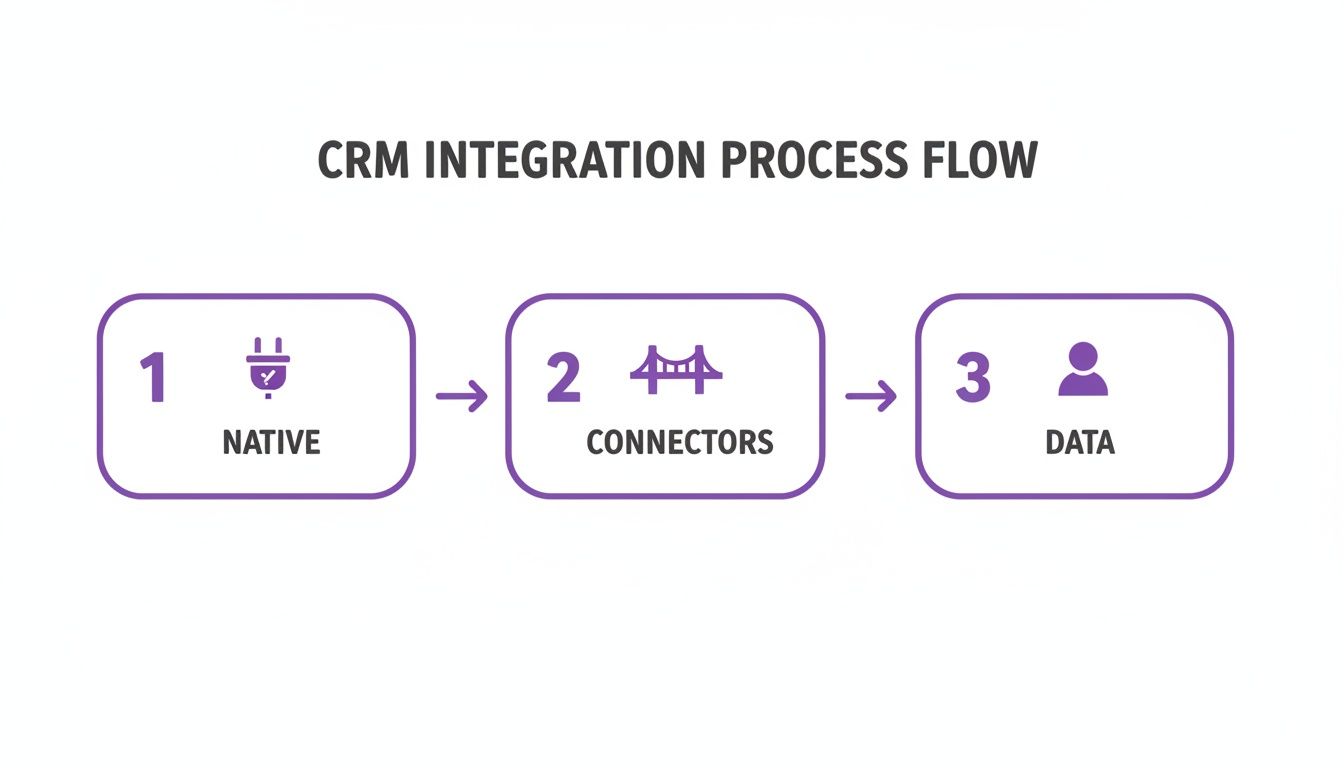
This visual helps illustrate how raw social interactions are captured and processed, paving the way for the sophisticated automation that drives modern customer support.
Leveraging Sentiment Analysis for Proactive Engagement
Modern social CRMs go beyond just looking for keywords. They use sentiment analysis to get a read on the emotional tone of a conversation, figuring out if a comment is positive, negative, or neutral. This adds a whole new layer of intelligence to your routing.
- Negative Sentiment: A comment flagged as negative can instantly trigger an alert for a senior support agent or community manager. This means a real person can jump in quickly to de-escalate the situation.
- Positive Sentiment: A glowing review or a happy shout-out can be automatically sent over to the marketing team. They can then reach out to the customer for a testimonial, share the post, or just say thanks.
- Neutral Sentiment: General questions or inquiries can be routed into the standard support queue for a routine, timely response.
This kind of smart sorting ensures your biggest fires get put out first, while also making sure you never miss a chance to celebrate your wins and build up your brand advocates.
Automating Lead Generation and Sales Opportunities
Automation isn't just for putting out fires; it's a powerful engine for your sales pipeline, too. By setting up workflows that listen for buying signals, you can turn casual social conversations into qualified leads.
Here are a couple of real-world examples:
- Competitor Mentions: You can create a workflow that tracks mentions of your top competitors, especially when they’re paired with words like “alternative” or “switching.” These posts can be flagged as potential leads and sent straight to a sales rep's inbox.
- Problem-Based Searches: Your team can monitor for people discussing problems your product solves. For instance, a software company could track phrases like “how do I manage my social media comments?” and automatically create a new lead in the CRM for a salesperson to follow up with.
This proactive approach helps you find potential customers at the exact moment they’re looking for a solution. A great example of this in action is automating ticket responses with AI, which makes both support and sales follow-ups faster and more consistent.
The need for speed is real. Research shows that 80% of consumers use social media to engage with brands, and 40% of them expect a reply within an hour. Automation isn't a luxury anymore; it's a necessity for meeting today's customer expectations. By automating the first few steps of engagement, you set your team up to win.
Measuring the ROI of Your Social CRM
So, how do you prove that all this work connecting your CRM and social media is actually worth it? Likes and new followers are great for morale, but they don't exactly pay the bills or impress the C-suite. To show the real impact, you have to look past those surface-level numbers and focus on the Key Performance Indicators (KPIs) that directly affect the bottom line.
Think of it this way: your social CRM strategy is an engine. Vanity metrics tell you how loud the engine is revving, but ROI metrics tell you how far and how fast it’s actually moving your business forward. This means tracking numbers that tell a clear story about efficiency, customer happiness, and—most importantly—revenue.
Key Metrics for Support and Satisfaction
One of the first and most obvious places you'll see a return is in customer support. When you can jump on issues faster and resolve problems right there on social media, you keep customers happy, reduce churn, and build some serious loyalty.
Start by tracking these essential support KPIs:
- Average Social Response Time: How long does it take your team to reply to a customer's comment or message? A speedy response is one of the biggest drivers of customer satisfaction.
- First Contact Resolution Rate: What percentage of issues get completely solved in that very first interaction? A high number here is a huge win—it means your team is efficient and customers aren't stuck in a frustrating back-and-forth.
- Social Customer Satisfaction (CSAT) Scores: After you help someone, send them a quick, one-question survey. This gives you a direct measurement of how happy people are with the support they received.
When you track these metrics, you’re proving that your social CRM isn't just for listening; it's an active tool for making and keeping customers happy.
Tying Social Activity Directly to Revenue
Ultimately, the strongest proof of your strategy's value is its impact on the cash register. By connecting social activity to your CRM, you can finally draw a straight line from a tweet or an Instagram DM all the way to a closed sale.
Businesses investing in comprehensive social CRM strategies experience customers spending 20% to 40% more compared to those without responsive social engagement. These statistics prove that social CRM is a fundamental requirement for revenue growth. Discover more insights about these findings on sprinklr.com.
To get this clear financial picture, you need to monitor revenue-focused metrics:
- Social Media Lead Conversion Rate: Out of all the leads that came from your social channels, how many actually became paying customers? Your CRM is the source of truth here, tracking a lead from their first social touchpoint to the final invoice.
- Customer Lifetime Value (CLV) by Acquisition Channel: Is a customer who found you on TikTok more valuable over their lifetime than one who came from a Google ad? Segmenting CLV by channel proves the long-term financial payoff of your social efforts.
Monitoring these numbers changes the conversation from "we got a lot of likes this month" to "our Instagram campaign generated $50,000 in new revenue this quarter." It’s also important to understand the feeling behind all these interactions. To get a handle on that, you can explore various social media sentiment analysis tools that help put a number on customer emotions.
This is the kind of hard evidence that justifies your budget and proves the undeniable value of a smart social CRM strategy.
Managing Privacy and Building Customer Trust
When you connect your social media to your CRM, you suddenly have a flood of new customer data. This is powerful stuff, but it's also a huge responsibility. Every tweet, comment, and DM you save is a sign of trust from your customer, and keeping that trust is everything.
Let's be clear: handling this data properly isn't just good ethics, it's the law. Regulations like Europe's General Data Protection Regulation (GDPR) and the California Consumer Privacy Act (CCPA) have sharp teeth, with strict rules on how you collect, store, and use personal info.
Navigating Data Compliance
Messing this up can lead to eye-watering fines and a PR nightmare you really don't want. The only way to win is to build your social CRM strategy with privacy at its core from the very beginning. This isn't about avoiding penalties; it's about building a brand that people actually feel safe with.
You have to be completely upfront about what data you're collecting and why you need it. A wishy-washy privacy policy just won't fly anymore. Customers must give you clear, informed consent before you start using their info for marketing or anything else.
Think of data privacy as the foundation of your digital relationship with customers. If that foundation is cracked, everything you build on top of it—from personalized marketing to proactive support—is at risk of collapsing. Trust is earned in drops and lost in buckets.
Best Practices for Ethical Data Handling
To keep your customers—and your business—safe, a few ground rules are essential. Sticking to these practices helps you stay on the right side of the law and shows your audience you take their privacy seriously.
- Practice Data Minimization: Only collect what you truly need. I know it's tempting to grab every data point you can, but more data means more risk. If you don't need someone's location to answer their question, don't ask for it and don't store it.
- Prioritize Data Security: Make sure your CRM and any connected tools are locked down tight. We're talking encryption, strict access controls, and making sure only the right people on your team can see sensitive customer details.
- Maintain Transparency: Be an open book about how you handle data. Your privacy policy should be easy to find and even easier to understand. And, it should be simple for users to ask for a copy of their data or request to have it deleted.
It’s also critical to understand the difference in how you use data. Looking at anonymized, big-picture social data to spot market trends is one thing. Using a specific person's private information to help them directly is something else entirely. For a deeper dive, you can explore detailed guidelines on effective social media content moderation, which covers some of these principles.
Ultimately, a strong data governance policy isn't just a legal checkbox. It's how you build and protect the customer trust your business relies on to grow.
Common Questions About Social CRM
So, you're sold on the idea of social CRM, but the practical side of things feels a bit fuzzy. How do you actually flip the switch and get started? What happens when a customer conversation jumps from a public tweet to a private DM? And is this just for the big guys with massive budgets?
Let's tackle these common questions head-on. Think of this as your quick-start guide to clear up the confusion and show you how to make this work for your business.
What Are the First Steps to Connect Social Media to Our CRM?
Getting this set up is less about hardcore technical skills and more about being smart with your strategy. You can lay a solid foundation by following three straightforward steps.
Figure Out Your "Why" and Pick a Home Base: Before you touch any software, ask yourself what you’re trying to accomplish. Is it all about lightning-fast customer support? Or maybe you're focused on sniffing out new sales leads. Your main goal dictates everything that comes next. Then, decide where your team will "live"—will your existing CRM be the central command center, or will a dedicated social media tool be your primary dashboard?
Choose How You'll Connect the Dots: As we covered earlier, you’ve got options here. Can you get by with a simple, one-click native integration that’s already built into your CRM? Or do you need the power of a third-party connector like Zapier to create more custom workflows? Always start with the simplest tool that gets the job done.
Set Up One or Two Simple Automations: Don’t try to boil the ocean. Start small with a couple of high-impact rules. A perfect first step is to build a workflow that automatically creates a support ticket in your CRM anytime someone tweets at your brand and includes words like "help" or "broken."
How Do You Track a Conversation That Moves Channels?
This is where the magic really happens. We all know how it goes: a conversation starts as a public tweet but needs to jump into a private direct message (DM) to share an order number or email address. Without a social CRM, those look like two completely separate conversations.
A social CRM is like a universal translator that keeps a running diary of every customer chat. It stitches the conversation together, so when a customer slides from a public mention into your DMs, their entire history comes with them. It all lives under one unified profile.
The system is smart enough to match the social media handle (like @customer_name) across different interactions. When that same user sends you a DM, the platform recognizes them and just adds the new message to the existing conversation thread in your CRM.
This gives your team a clean, chronological timeline of the entire interaction. Your support agent sees the first public tweet and the private DM right after it, all in one place. No more asking customers to repeat themselves—just the full context needed to solve their problem fast.
Is Social CRM Only for Large Companies?
This is probably the biggest myth out there. While giant corporations do use enterprise-level systems that cost a fortune, the market is packed with affordable, scalable tools built specifically for small and medium-sized businesses.
Many of the CRMs you already know, like HubSpot or Zoho, have free or low-cost plans that come with basic social media integrations. Plus, many social media management tools have great CRM-like features built right in, at a price point that won't break the bank.
The trick is to start with a focused goal. A small e-commerce shop doesn't need a super-complex system with AI-powered sentiment analysis. They can get a huge win just by using a tool that funnels all their Instagram DMs and Facebook comments into a single inbox, making sure no sales lead or customer question ever gets lost in the shuffle.
The best part? This whole approach grows with you. As your business expands and the social chatter gets louder, you can upgrade your tools and add more sophisticated automations. Social CRM isn't a massive, one-time investment; it's a flexible strategy you can build on over time.
Ready to stop missing sales opportunities and customer questions in your comments? FeedGuardians uses AI to automatically manage your social media comments, hiding spam, identifying purchase intent, and ensuring your team responds to the conversations that matter most. See how FeedGuardians can clean up your comments and boost your conversions.
Tired of manually moderating comments?
FeedGuardians automates spam filtering, responds to customers, and protects your brand — setup in 3 minutes.