
Quick Summary
| Key Insight | What You Need to Know |
|---|---|
| Customer questions get answered | People often scan the comments for real-world answers about products or services before they even think about buying. |
| Loyal fans are made | When you reply thoughtfully, you make people feel heard. That’s how you turn a casual follower into a true brand advocate. |
| You get priceless feedback | Your audience will tell you exactly what they love (and what they don't). This is a direct line to some of the best market research you'll ever get. |
If you want to get more comments on Instagram, you have to stop thinking like a broadcaster and start acting like a conversation starter. It's about creating posts that actively invite a response, sharing things your audience genuinely connects with, and being present in your own community.
The real secret? Make your comment section a destination, not an afterthought.
Why Instagram Comments Are Your New North Star
For years, we all chased likes. They were the easy, feel-good metric. But as Instagram's algorithm got smarter, the game changed. Now, a far more meaningful signal of a real connection with your audience is the comment. A "like" is a passive nod. A comment is a deliberate action—someone stopped scrolling, thought about what you said, and took the time to type out a reply.
That distinction is everything.
When a user invests that kind of effort, the Instagram algorithm takes notice. It sees that your content is sparking actual discussion and rewards it with greater reach. More comments signal to the platform that what you're posting is valuable, which helps get it in front of more people.
Building Social Proof and a Real Community
Every single comment on your post is a form of powerful social proof. When new people discover your profile, they see an active, thriving community and are far more likely to trust your brand and jump into the conversation themselves. It’s a classic feedback loop: engagement breeds more engagement.
Start thinking of your comment section as your digital town square. It’s where:
- Customer questions get answered: People often scan the comments for real-world answers about products or services before they even think about buying.
- Loyal fans are made: When you reply thoughtfully, you make people feel heard. That’s how you turn a casual follower into a true brand advocate.
- You get priceless feedback: Your audience will tell you exactly what they love (and what they don't). This is a direct line to some of the best market research you'll ever get.
The goal isn't just to rack up a high comment count. It's to strategically cultivate a space for valuable conversations that actually move your brand forward.
Standing Out in a Crowded Feed
Even as overall engagement rates on the platform can be a bit of a rollercoaster, comments have remained a surprisingly stable and critical metric for brands. One recent study showed the average post received 15.66 comments, which was actually a small increase from the year before.
This tells us something important: while it might be more competitive than ever to earn a comment, the ones you do get come from higher-intent, more engaged users. These are the people who matter.
At the end of the day, a lively comment section is one of the clearest signs of a healthy, growing brand on Instagram. To really nail this, you need to understand the fundamentals of how to get more engagement on Instagram. And for a broader look at building your audience, check out our guide on https://feedguardians.com/blog/how-to-improve-social-media-engagement.
Laying the Groundwork for a Buzzing Comment Section

Before we even touch on captions or calls to action, let's get one thing straight. Trying to boost your Instagram comments without truly understanding who you're talking to is like throwing a party without sending invitations. You can create the most incredible content, but if it doesn't land with your specific audience, you’ll just hear crickets.
The real key to unlocking a lively comment section is to get inside your ideal follower's head. We need to go way beyond basic demographics. What are they struggling with? What makes them stop their scroll? What kind of conversation are they dying to have?
Figure Out What Makes Your Audience Tick
To really connect, you have to dig into the "why" behind their follow. Don't just make assumptions—go find the answers. Your existing audience, even a small one, is the perfect place to start.
Here's how you can gather those crucial insights:
- Run polls in your Stories. This is the easiest way to get direct feedback. A fitness coach, for instance, could ask, "What's your biggest workout roadblock? A) No time, B) Zero motivation."
- Sift through your DMs and past comments. Look for patterns. Are people asking the same questions over and over? That’s your content roadmap right there.
- Create a quick survey. Use a simple tool like Google Forms and maybe offer a small discount for their time. Ask them what they love seeing from you and what they wish you'd post more of.
The best content ideas aren’t invented; they’re discovered. Pay close attention to the exact words and phrases your audience uses. That’s how you create posts that feel like you’re reading their minds.
When you nail their motivations, your content stops feeling like an ad and starts feeling like a helpful, two-way conversation.
Snoop on Your Competitors’ Comment Sections
Think of your competitors' accounts as a free focus group. Their comment sections are an unfiltered look into the mind of your shared target audience. Don't just glance at their posts; dive deep into who is commenting and what they're saying.
While you're there, ask yourself a few questions:
- Which posts spark genuine, back-and-forth conversations?
- Are people asking questions that go unanswered? (Hint: You can answer them!)
- What topics or post formats are total duds?
This isn’t about copying what they do. It's about finding gaps you can strategically fill. If you see their post about a new product is flooded with questions on how to use it, that's your cue to create a killer tutorial Reel that solves that exact problem.
Lock in Your Core Content Pillars
Okay, now that you're armed with audience insights and competitive intel, it's time to define your content pillars. These are the 3-5 core themes you'll consistently talk about. They keep your content focused, relevant, and establish you as the go-to expert in your niche.
For a brand like ours at FeedGuardians, our pillars might look like this:
- Community Management Tactics: Actionable advice on building an engaged community.
- Social Media Automation: How-to guides for scaling your efforts with the right tools.
- Top-Tier Customer Service: Best practices for handling customer interactions on social.
- Brand Protection Strategies: Discussing why moderating spam is crucial. Our guide on handling bots commenting on Instagram is a great example of this pillar in action.
Remember, comment activity can be unpredictable. You might be surprised to learn that some government-sector accounts see massive engagement, proving that authoritative, informational content can really get people talking. Given that 44% of users use Instagram to find product recommendations, your comment section is prime real estate for building social proof.
With a solid foundation built on deep audience knowledge and clear content pillars, you’re no longer just hoping for comments—you're strategically inviting them.
Crafting Content and Captions That Beg for a Reply
Once you know who you’re talking to, the real creative work begins. Getting more comments isn’t about some secret formula; it’s about intentionally creating posts and writing captions that feel like they're missing something without your audience's input.
Think of your caption as the opening line of a conversation, not just a description of the photo or video. Your job is to shift people from passively scrolling to actively participating. This takes a smart mix of eye-catching visuals, good storytelling, and a clear, compelling call-to-action (CTA).
Move Beyond the Basic Call to Action
Let's be honest: just dropping "Comment below!" at the end of your post isn't going to cut it anymore. It’s direct, sure, but it’s also lazy and incredibly easy for people to scroll right past. To genuinely drive comments, your CTA needs to be specific, easy to answer, and feel like a natural extension of the post itself.
Instead of a generic command, frame your CTA as a genuine invitation for people to share their own unique take. A powerful CTA doesn't just ask for a comment; it makes people want to share.
Here’s how you can level up your CTAs:
- Ask for a specific choice: "Which of these two designs do you prefer—A or B? Let us know why in the comments."
- Prompt a personal story: "We've all had a productivity hack that completely changed the game. What’s the one that worked for you?"
- Create a fill-in-the-blank: "My go-to coffee order to start the week is a _______. What's yours?"
These prompts work because they validate your follower's opinion and make them feel like a valued part of the community, not just another number.
Master the Art of Asking the Right Questions
Asking questions is hands-down the most reliable way to get comments, but the kind of question you ask makes all the difference. The sweet spot is a question that's open-ended enough to invite a real response but simple enough that someone can answer it in a few seconds.
For example, a home decor brand could post a photo of a stunning living room. A weak CTA is just "Thoughts?" A far better approach would be, "What’s the one piece in this room you'd add to your own home?" It’s specific, personal, and doesn't require a ton of mental energy to answer.
The best questions spark a little bit of self-reflection. When you can make someone pause and think about their own experiences or preferences, they're far more likely to share them with you.
Try mixing up the types of questions you ask. Simple "This or That" style questions are brilliant for racking up a high volume of quick comments. On the other hand, more open-ended questions can spark deeper, more meaningful conversations. A pet brand, for instance, could easily ask, "Cat person or dog person? Let the debate begin!"
Use Visual Storytelling to Drive Replies
Your visuals—whether it’s a Reel, a static image, or a carousel—need to do more than just stop the scroll. They should set the stage for the exact conversation you want to have in the comments. Visuals that present a problem, tell a story, or show a transformation are natural comment magnets.
A carousel post is perfect for this. You can use the first few slides to build a narrative or outline a common challenge, then use the final slide for a direct and relevant call for comments.
Imagine a B2B software company using this strategy:
- Slide 1: "Feeling swamped by your marketing to-do list?" (Hooks them with a common problem)
- Slide 2: "You're not alone. The average marketer uses over 12 different tools daily." (Adds context and validation)
- Slide 3: "Our platform brings your entire workflow into one place." (Presents the solution)
- Slide 4: "What’s the one marketing task you wish you could automate forever? Drop it below." (The perfect, engaging CTA)
This format guides the user on a quick journey, making the final question feel like a natural conclusion instead of a random ask. As conversations get going, remember that engaging effectively is crucial. Knowing the basics, like how to tag someone in an Instagram comment, helps you keep the momentum going and bring more people into the discussion.
Content Formats and High-Engagement CTA Templates
To make this even more practical, I've put together a quick-reference guide. It matches popular Instagram content formats with proven CTA templates designed to get people talking.
| Content Format | Primary Goal | CTA Template Example |
|---|---|---|
| Tutorial Reel | Educate and solve a problem | "Did you already know this trick? Let me know one other challenge you're facing with [Topic]!" |
| Carousel Story | Share a narrative or transformation | "What's one piece of advice you'd give to your younger self? Share it with our community." |
| Behind-the-Scenes | Build authenticity and trust | "This is what a typical Tuesday looks like for us. What's one thing that surprised you?" |
| User-Generated Content | Showcase community and build proof | "We love seeing how you use our products! Tag a friend who needs to see this amazing shot." |
Think of these as starting points. The key is to adapt the template to your specific content and your brand's unique voice. The more relevant and authentic the ask, the more likely you are to get a reply.
Proactive Engagement Strategies to Get People Talking
Great content is just the starting point. If you really want to fill your comment section, you can't just post and walk away. You have to be an active participant in your own community, sparking conversations and creating real opportunities for people to connect.
Think of your comments not as a notification to clear, but as a live focus group. The moments right after you hit "Publish" are your biggest opportunity.
Master the “Golden Hour”
That first hour after a post goes live is critical. It's when the Instagram algorithm is paying closest attention, watching to see how people react. A burst of early comments tells the algorithm your content is a hit, which can earn you a prime spot on your followers' feeds and even the Explore page.
So, what do you do? Plan to stick around for at least 30-60 minutes after you post. Your one and only job during this time is to reply to every single comment that comes in, as fast as you can.
This simple act accomplishes two things:
- It instantly doubles your comment count. Your reply counts just like any other comment.
- It gets the conversation rolling. When users see you’re live and responding, they’re much more likely to add their own two cents.
Responding quickly shows you're actually listening. It turns a static post into a live, back-and-forth conversation, which is precisely what both the algorithm and your audience love to see.
This immediate feedback loop can turn a few early comments into a flood. To dig deeper into what gets people talking, check out these proven strategies to increase engagement on Instagram.
Spark Excitement with Giveaways and Collabs
Sometimes your audience just needs a little push. A well-timed incentive can work wonders, driving a ton of comments in a short period and training your followers to interact with your posts.
The classic giveaway is a powerhouse for a reason. Asking people to comment as a way to enter is incredibly effective. Imagine a skincare brand giving away a product set with these simple rules:
- Follow us.
- Like this post.
- Comment and tag a friend who needs some pampering!
This structure not only boosts your comment count but also expands your reach organically through tags. You can also team up with another creator in your space for a joint giveaway. This introduces your profile to a whole new audience that's already warmed up and ready to engage.
Give Engagement to Get Engagement
It really is a two-way street. If you want people to leave comments on your posts, you need to show up on theirs. Become an active member of your own community.
Make it a daily habit to scroll your feed and leave genuine, thoughtful comments on posts from your followers, especially your biggest fans and ideal customers. Don’t just drop a fire emoji and run. Ask a meaningful question, share a relevant thought, or offer a real compliment. This simple act of reciprocity keeps your brand visible and makes people feel valued, making them far more likely to return the favor.
Steer the Conversation by Pinning Comments
The pin feature is a surprisingly powerful and often-overlooked tool. When you pin a comment, it sticks right at the top of the thread, becoming the first thing anyone sees.
This is your chance to direct the conversation. You can use it to:
- Spotlight a great question: Find a comment that opens the door for a deeper explanation and pin it with your detailed reply.
- Show off a glowing review: If a customer leaves a fantastic testimonial, pin it for everyone to see. It’s instant social proof.
- Set the right tone: Pin a comment that perfectly captures the kind of discussion you want to foster.
Pinning insightful comments establishes the standard for the conversation you want to have, encouraging others to leave higher-quality replies. And remember, engagement isn't limited to your grid. Our guide on commenting on Instagram Stories has even more ideas for building those all-important relationships.
Scaling Your Conversations With Intelligent Automation
So, your hard work is paying off and the comments are rolling in. That’s fantastic news. But it also presents a new, very real problem: how do you manage the flood?
When you’re only getting a handful of comments, replying manually is personal and powerful. But when you’re facing hundreds or even thousands of comments on every post, that personal touch quickly becomes an operational nightmare. Your team gets bogged down, response times lag, and opportunities slip through the cracks.
This is exactly where smart automation comes into play. It’s not about replacing human connection with robotic, generic replies. It’s about building a system that filters out the noise so your team can focus their energy on the conversations that actually move the needle. You're essentially transforming comment management from a reactive chore into a proactive growth strategy.
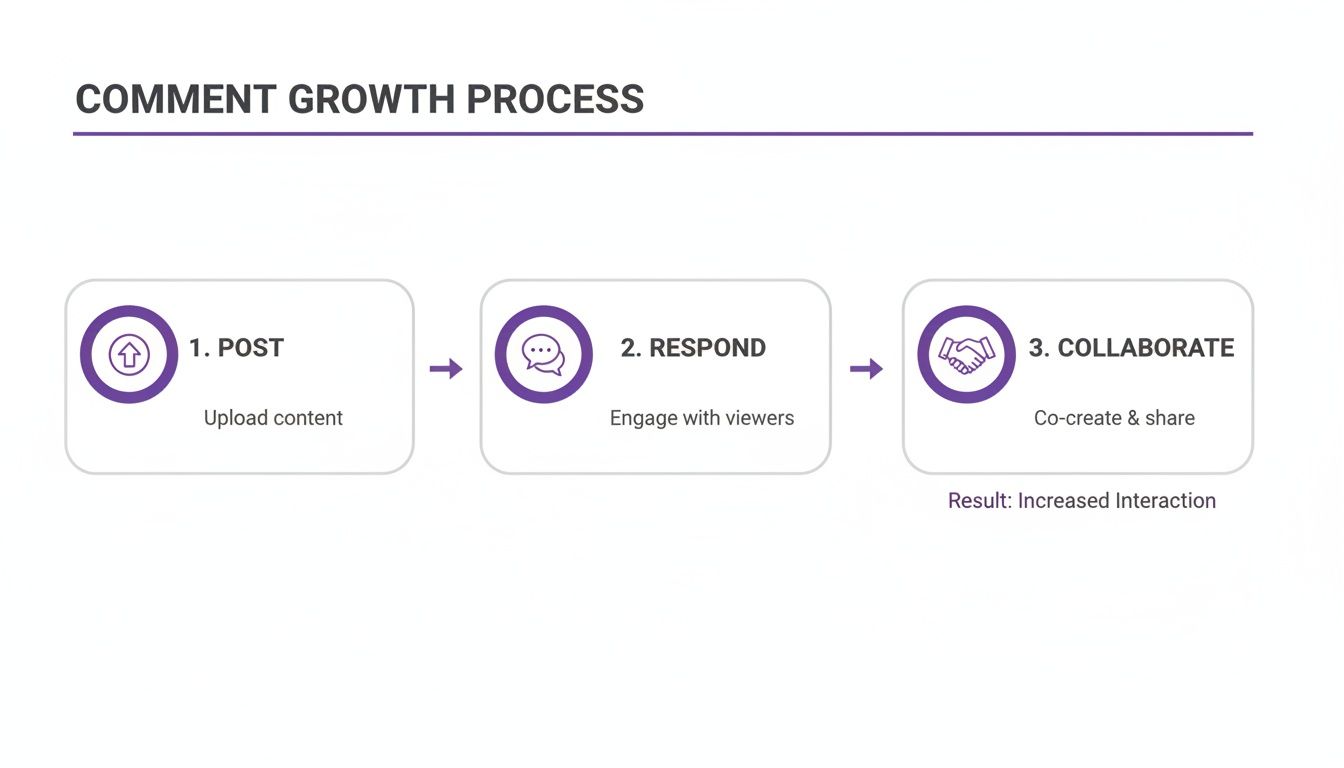
The process is a continuous loop: you post great content, respond to the community, and collaborate to drive even more interaction. Automation just makes that loop run faster and more efficiently, without burning out your team.
First, Protect Your Community from Spam and Negativity
One of the biggest headaches that comes with a growing account is the inevitable surge in spam. The more visible you become, the more your comment section attracts bots, scammers, and trolls. Those "DM to collab" or "Send this pic to @FakePromoPage" comments can quickly drown out genuine conversation, making your brand look unprofessional and, frankly, a bit spammy itself.
Manually deleting every single one is a soul-crushing game of whack-a-mole. This is where automation delivers immediate, tangible relief.
Using a tool like FeedGuardians, you can set up filters to instantly hide unwanted comments based on specific keywords, phrases, or even emojis. It’s your first line of defense.
Here’s what that actually does for you:
- Keeps your brand safe: You can instantly hide comments containing profanity, hate speech, or even competitor mentions. This keeps the space positive and welcoming for your actual audience.
- Filters out the junk: All those comments from bot and scam accounts get hidden automatically. Your comment section stays clean and focused on real people.
- Preserves your engagement metrics: Hiding a comment removes it from public view but doesn't delete it. This is a subtle but important distinction—the Instagram algorithm still counts it as engagement, but your followers are shielded from the clutter.
Getting this defensive layer in place is crucial. It ensures your team’s valuable time is spent connecting with real followers, not fighting off bots.
Turn Comments Into Conversions, 24/7
Beyond just cleaning up the spam, modern automation tools are smart enough to spot and act on commercial opportunities in real-time. Your comment section is a goldmine of buying signals—people asking about price, stock levels, shipping, or product details. Leaving those questions hanging for hours is like letting a customer stand at the register with their wallet out while you ignore them.
AI-powered tools can actually understand the intent behind a comment, distinguishing between a simple compliment and a direct purchase question. This lets you build rules that trigger specific, helpful actions in seconds.
Let’s walk through a real-world scenario for an e-commerce brand:
- A follower comments on your post featuring a new dress: "OMG I love this! Does it come in black?"
- The automation tool instantly spots the product question with keywords like "come in" and "black."
- It triggers a pre-written, friendly public reply: "Great question! It does come in black. We’ll send a DM with the link right over to you."
- At the exact same time, it sends a private message to that user with a direct link to the black dress on your website.
This entire exchange happens instantly, whether it’s 2 PM or 2 AM, without a human lifting a finger. The customer gets an immediate, helpful answer that pushes them toward a purchase, and your team is freed up to handle more complex conversations.
How to Set Up Your First Automation Rules
Getting started is far less complicated than you might imagine. A good comment management platform gives you a straightforward, visual interface to build these rules without touching a single line of code.
You just need to define your conditions (the triggers) and the action the system should take.
Here’s a simple, practical way to start:
- The Spam Filter Rule: Create a rule to automatically hide any comment containing common spam phrases like "send me this," "promo," or "DM for collab."
- The FAQ Rule: Pinpoint your top 3-5 most frequently asked questions ("how much is this?," "do you ship to Canada?"). Build rules that detect keywords for these questions and post a standardized, helpful public reply.
- The Urgent Issue Rule: Set up a rule that flags comments with words like "broken," "doesn't work," or "complaint." Instead of an auto-reply, have it notify a specific team member so they can provide a high-priority, human follow-up.
Intelligent automation isn’t about faking engagement. It's about building a system that allows you to deliver better, faster, and more consistent service to your community at a scale you could never achieve manually.
By implementing these systems thoughtfully, you can make sure no customer question goes unanswered and no sales opportunity is missed. To dive deeper, our complete Instagram comment automation guide walks through more advanced strategies and setup examples. It's the key to not just getting more comments, but being able to manage them effectively as you grow.
Your Top Instagram Comment Questions, Answered
Even the most seasoned marketers have questions when it comes to cracking the code of Instagram engagement. It’s part art, part science, so let's clear up a few of the most common sticking points I hear from people trying to get more comments.
How Many Comments Should I Actually Aim For?
This is probably the question I get asked the most, and my answer is always the same: stop focusing on a magic number. Instead, you should be obsessed with your comment rate—that’s your total comments divided by your total followers. The real win is seeing that percentage climb month over month.
Think about it this way: five thoughtful comments asking about your product are worth a hundred generic "great post!" replies from a contest. Quality is where the real value is. You can glance at industry averages to get a feel for where you stand, but your true benchmark should be your own progress and the caliber of the conversations you're starting.
A healthy comment section isn’t defined by a number. It's a living, breathing space that reflects a genuinely connected community. Focus on sparking real dialogue, and the numbers will naturally grow.
Is Buying Comments a Good Idea to Kickstart Engagement?
Let me be blunt: absolutely not. Buying comments is the fastest way to sabotage your account's reputation and long-term health. It's a tempting shortcut, but it leads straight off a cliff.
Instagram's algorithm is smarter than you think and can easily spot this kind of inauthentic activity. Once it does, you can expect your organic reach to plummet on all future posts. Even worse, it instantly shatters the trust you’ve built with your real audience. Sustainable growth is earned, never bought.
What's the Perfect Caption Length for Driving Comments?
There’s no one-size-fits-all answer here. The right caption length is however long it takes to deliver value and set up a compelling call-to-action—not a word more, not a word less.
The format of your post should be your guide:
- For Carousels: Don't be afraid to go long. A detailed, story-driven caption can add incredible depth and context to your visual narrative, keeping people engaged from one slide to the next.
- For Reels: Keep it short and snappy. The video is the star of the show, so your caption should get straight to the point and ask for a quick response.
No matter the length, two things are non-negotiable: a killer hook in the first sentence to stop the scroll, and a direct question at the end to guide the conversation. The only way to find your brand's sweet spot is to experiment with different lengths and see what your audience actually responds to.
Should I Ask Open-Ended or Closed-Ended Questions?
You need both, but you have to be strategic about when you use each one. They serve very different purposes in your engagement playbook.
Closed-ended questions—like a simple "This or That?" or a poll—are your go-to for generating a high volume of fast, low-effort replies. They're perfect for giving your post an immediate engagement boost.
On the other hand, open-ended questions like, "What's the biggest challenge you're facing with X?" demand more from your audience. You'll likely get fewer replies, but the ones you do get will be packed with high-quality customer insights. These are the comments that spark genuine back-and-forth conversations. A well-rounded content strategy uses a healthy mix of both.
Ready to stop fighting spam and start scaling real conversations? FeedGuardians uses AI to automatically hide junk comments and provide instant, helpful replies to your customers, 24/7. See how it works at FeedGuardians.com.
Tired of manually moderating comments?
FeedGuardians automates spam filtering, responds to customers, and protects your brand — setup in 3 minutes.