
Quick Summary
| Key Insight | What You Need to Know |
|---|---|
| Tarnished Brand Reputation | When potential customers scroll through your comments and see spam or toxic arguments, they’ll start associating your brand with that chaos. |
| Wasted Ad Spend | You're paying to boost your content, but that money is also amplifying all the junk comments right alongside it. It's like paying someone to work against your own marketing goals. |
| Eroding Customer Trust | Your real followers can feel alienated or unsafe, making them less likely to engage or buy from you down the line. |
| Drained Team Resources | Your social media managers get stuck playing whack-a-mole with spammers instead of focusing on what really matters—building a community and growing your brand. |
Let's be honest: leaving your TikTok comments section unchecked is like leaving the front door of your business wide open. Sure, you might get a lot of foot traffic, but you're also inviting in chaos that can seriously damage your brand and sink your ad campaigns.
Going viral is the goal, but it comes with a catch. That explosion in reach often brings a flood of spam, scams, and just plain negativity. Learning how to limit comments on TikTok isn't about shutting down conversation—it's about smart brand protection.
Why You Need to Get a Handle on Your TikTok Comments
Think of an open comments section as a brand vulnerability. TikTok’s algorithm can make a video blow up overnight, attracting thousands of comments in a matter of hours. While that’s fantastic for visibility, it also makes you a massive target for junk comments that can instantly hijack your message.
The real issue is the sheer scale of it all. As your brand grows, trying to manually sift through every single comment becomes completely unsustainable. That's when the real problems begin.
The Hidden Costs of a Messy Comment Section
When your comments are a free-for-all, the consequences are very real and go far beyond just looking unprofessional. It directly hits your bottom line and how people see your brand.
- Tarnished Brand Reputation: When potential customers scroll through your comments and see spam or toxic arguments, they’ll start associating your brand with that chaos.
- Wasted Ad Spend: You're paying to boost your content, but that money is also amplifying all the junk comments right alongside it. It's like paying someone to work against your own marketing goals.
- Eroding Customer Trust: Your real followers can feel alienated or unsafe, making them less likely to engage or buy from you down the line.
- Drained Team Resources: Your social media managers get stuck playing whack-a-mole with spammers instead of focusing on what really matters—building a community and growing your brand.
This isn't just a small annoyance; it's a huge problem. Our own data shows that a shocking 44% of all comments on TikTok ads need to be hidden because they're spammy or toxic. The scale of this problem proves you can't just ignore it and hope for the best.
This isn't about censorship; it's about curation. When you filter out the noise, you're creating a space where real customers can connect, your brand's message is clear, and your community can actually thrive.
At the end of the day, managing your comments is a core part of brand safety. It protects your marketing dollars, nurtures a positive community, and makes sure your content can do its job. To get a better grip on handling these kinds of users, take a look at our guide to dealing with social media trolling.
Using TikTok's Built-In Comment Controls
Before you even think about third-party tools, your first stop for managing comments on TikTok should be the app itself. The native settings are your frontline defense, and honestly, they're surprisingly robust. Mastering these is the foundation of any good moderation strategy.
What’s great is that TikTok gives you options. You can set broad, sweeping rules for your entire account or get granular and tweak settings for a single video that’s blowing up. This means you can be flexible, adapting your approach whether you're in the middle of a huge product launch or just posting your daily behind-the-scenes content.
Account-Level Comment Settings
Think of your account’s privacy settings as your main control panel. This is where you set the default rules for who gets to chime in on your videos. It’s a simple, set-it-and-forget-it way to establish a baseline for all your future posts.
You’ve got three choices here:
- Everyone: This is the standard setting for public accounts. It opens the floodgates, which is great for engagement but can also invite a lot of noise and spam.
- Followers: A smart middle ground. This limits comments to people who have already bought into your brand by following you, instantly creating a more controlled community vibe.
- No One: This turns off comments completely, across the board. It’s a useful panic button in a crisis, but it also kills all conversation, which isn't ideal for engagement.
For most brands, setting this to "Followers" is a savvy move. It helps cultivate a genuine community and significantly cuts down on random, off-topic comments from users who have no real connection to your brand.
Managing Comments on Individual Videos
Sometimes, a single video just hits different. Maybe you’ve touched on a sensitive topic, or a post is unexpectedly attracting trolls. For these one-off situations, TikTok lets you override your account-wide settings for specific videos.
You can do this either before you post or after it's already live. On the final screen before publishing, you'll see a toggle for "Allow comments." Just flip it off if you want that video to be a one-way broadcast from the start.
If a video is already out in the wild and collecting negative attention, don't worry. Just go to the video, tap the three dots to open the options, and find the privacy settings to adjust comment permissions right there. This kind of flexibility is crucial for reacting in real-time.
Using Keyword Filters for Proactive Moderation
This is where you can start getting really strategic. TikTok’s "Filter Comments" feature is basically your own personal bouncer, automatically hiding comments containing specific words or phrases you’ve flagged.
To get the most out of this, you need to build a solid keyword blocklist. And I’m not just talking about blocking swear words. A truly effective list for an e-commerce brand should include things like:
- Spammy phrases like “check my bio” or “follow for follow”
- Names of your direct competitors (to stop them from poaching your audience)
- Negative or sensitive terms related to your products
- Common misspellings of all the above
You can add up to 500 keywords, so don't be shy. Think of it like training your email's spam filter—the more targeted your list, the cleaner your comment section will be. The core ideas behind filtering unwanted content are pretty universal across platforms. We actually cover similar principles in our guide on how to disable comments on Facebook.
A word of caution: There's also a "Filter all comments" option. This is the nuclear approach. It holds every single comment for your manual review. While it offers complete control, it’s incredibly time-consuming and just isn't realistic for any brand with a decent-sized audience.
Creating a Proactive Moderation Workflow
Flipping on a few keyword filters is a decent first step, but it’s far from a complete brand safety strategy. If you really want to limit comments on TikTok effectively, you need a clear, repeatable workflow your team can actually follow. This turns moderation from a reactive headache into a proactive system for protecting your brand's reputation.
The first move is to establish your official rules of engagement. Your team needs to be on the same page about what gets instantly deleted and what deserves a thoughtful reply. This clarity is the bedrock of any plan that's going to scale.
For example, a comment packed with spam links or outright hate speech is a no-brainer—it’s gone. But what about a slightly negative product review? Or a question that feels a little passive-aggressive? Without a plan, one moderator might delete it while another engages, creating a jarring and inconsistent brand voice.
Building Your Moderation Decision Tree
To keep everyone on the same page, a decision tree is your best friend. It’s essentially a simple flowchart that removes the guesswork, allowing your team to act quickly and with confidence. The whole point is to standardize how you handle the common comment scenarios your brand runs into every day.
This simple flowchart helps visualize the decision-making process for handling comments on a new video, from initial filtering to final action.
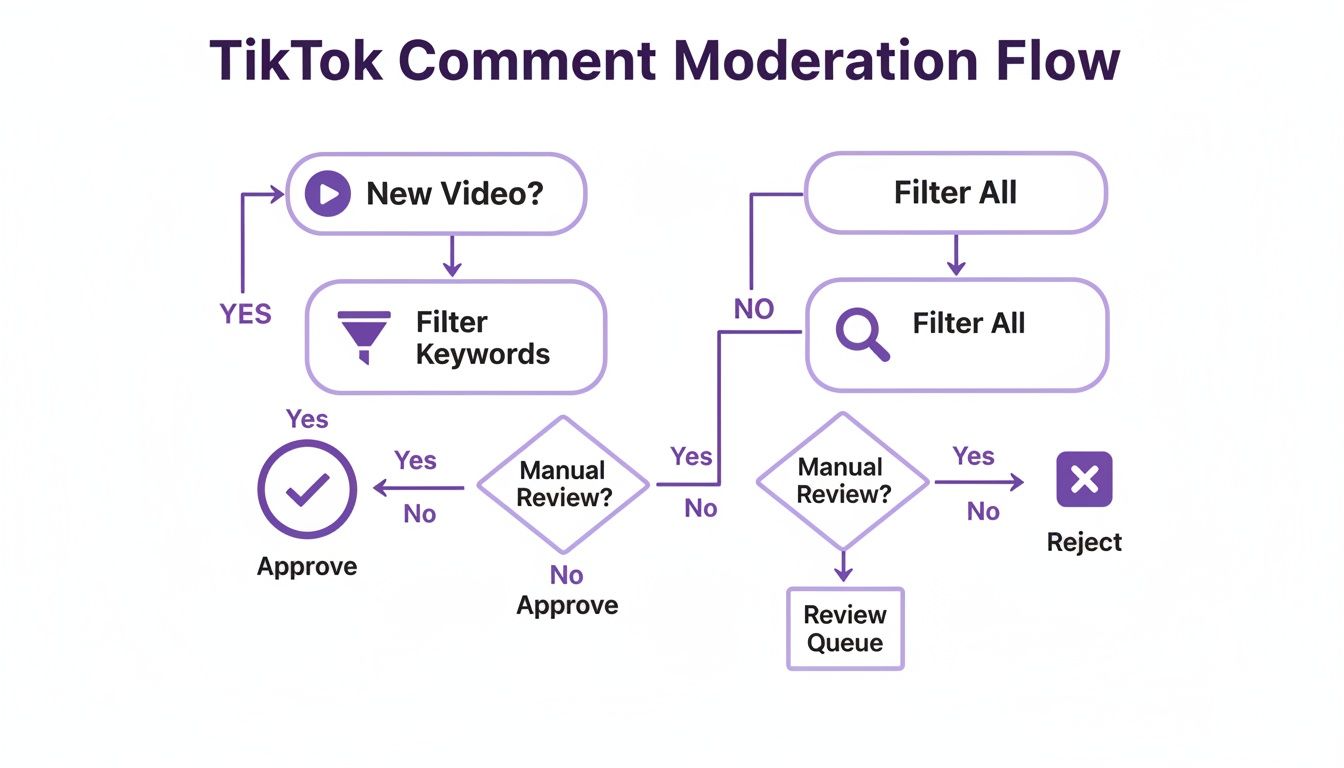
This process creates a clear path for reviewing and acting on every single comment, ensuring nothing slips through the cracks.
Your decision tree should spell out exactly what to do for different types of comments:
- Spam & Scams: Any comment with a shady link or trying to push another account gets an instant delete and the user gets blocked. No exceptions.
- Customer Service Questions: Real questions about orders or products need to be flagged and escalated to your support team right away. Don't leave customers hanging.
- Negative Feedback: Constructive criticism is an opportunity. It should get a thoughtful, public reply to show you're listening. Unconstructive trolling, however, should be hidden or deleted.
- Positive Engagement: Genuine praise and positive comments should be liked or replied to quickly. This is how you build a loyal community.
A documented workflow doesn't just create consistency; it empowers your team. When everyone knows the playbook, they can act decisively to protect the brand and nurture the community without constant oversight.
Putting these guidelines in writing is non-negotiable. This document becomes the single source of truth for your social media content moderator and ensures everyone on the team—now and in the future—handles interactions the right way. To really level up your system, you should also be mastering TikTok social listening to stay on top of the broader conversation and sentiment around your brand.
When TikTok's Native Tools Just Can't Keep Up
Look, TikTok’s built-in moderation tools are a decent starting line. For a personal account or a small brand just getting its feet wet, they get the job done. But the second your brand starts to see real growth and engagement, you'll feel those tools start to buckle under the pressure.
Think of the basic keyword filters as a simple chain-link fence. Sure, they'll stop the most obvious troublemakers, but anyone with a bit of creativity can easily find a way around them.
Spammers and trolls are always a step ahead. They’re masters of intentional misspellings, clever emoji combinations, and the latest slang, all designed to slip right past your carefully chosen keyword list. Your filter for "scam" is powerless against "sc@m" or "this is a skam," leaving your comment section wide open.
The Breaking Point Every Brand Faces
Picture this: your new ad campaign is a runaway success. It's going viral, and comments are flooding in by the thousands every hour. This is the exact moment when TikTok’s native tools don't just bend—they break.
For a brand, this isn't a minor headache; it's a full-blown crisis that hits your bottom line. The manual review process becomes a frantic, impossible game of whack-a-mole, and the basic filters simply can't cope.
This leads to some very real, very expensive problems:
- Wasted Ad Spend: You're paying good money to boost your content, but that budget is also amplifying every single negative, spammy, or harmful comment that gets through.
- Buried Sales Opportunities: Genuine questions from potential customers—"Do you ship to Canada?" or "Is the blue one in stock?"—get buried under a mountain of junk. Those are lost sales.
- The 24/7 Problem: Trolls and spammers don't clock out at 5 PM. Without round-the-clock moderation, your brand is vulnerable overnight, on weekends, and during holidays.
Even with its own sophisticated systems, TikTok is dealing with an incredible volume of content. In just one quarter, the platform removed over 121 million videos for violations, with an impressive 93% caught before a user even reported them. But that number alone shows you just how much risky content is out there, and plenty of it still slips through the cracks into your comments.
Shifting from Manual Defense to Smart Automation
This is precisely where AI-powered moderation stops being a "nice-to-have" and becomes a critical investment. If you're serious about protecting your brand and your ad spend on a platform as chaotic as TikTok, you can't win by relying on manual checks and simple filters alone.
A truly smart system does more than just block a list of words; it understands context and intent. It can tell the difference between a sophisticated spam bot and a frustrated customer who needs help.
This allows you to automatically hide the junk while flagging the important customer service questions for your team to handle. It turns your comment section from a potential liability into a protected space where you can actually drive conversions. For a deeper dive, check out our complete guide on social media monitoring.
Automating Comment Management with AI
Let's be honest, the native TikTok tools are great for basic defense, but if you're serious about growth, it's time to go on the offense. Shifting to an AI-powered automation tool changes the game entirely. You stop playing whack-a-mole with trolls and start turning your comment section into a strategic asset for your brand. This is about so much more than just catching bad words; it’s about understanding what’s really going on in every single comment.
The real magic of advanced AI is its ability to understand context. It uses sentiment and intent analysis to figure out what a comment actually means. Is someone being sarcastic, or are they genuinely upset? Is that a casual question, or is it a hot lead asking where they can buy your product? That's the difference between a simple filter and truly intelligent moderation.
Key Features That Drive Real Results
The right AI tool doesn't just clean up your comments; it directly impacts your bottom line and brand health. Instead of just hiding spam, it actively protects your ad spend and surfaces sales opportunities you'd otherwise miss in the chaos.
These are the core features that really move the needle:
- Instant Spam and Harm Removal: The AI is your 24/7 guard, instantly hiding comments with scams, hate speech, or profanity. This keeps your comment section safe and welcoming for your actual community.
- Purchase Intent Detection: It spots buying signals like "Where can I buy this?" or "Do you have this in blue?" and flags them, sending these hot leads straight to your team before they lose interest.
- Automated Customer Service: You can set up automatic replies for common questions about shipping, returns, or store hours. It’s a simple way to slash response times and keep customers happy.
AI automation isn't about replacing your team; it's about empowering them. By handling the high-volume, repetitive tasks, it frees up your social media managers to focus on high-value interactions like building community and engaging with genuine customers.
Customizing AI to Fit Your Brand
Your brand is unique, so your moderation rules should be too. A huge advantage of AI is creating custom rules that fit your brand's voice and what you're willing to tolerate. This keeps your brand safe without accidentally stifling positive conversation.
For example, you could set a rule to automatically hide any comment that mentions a direct competitor. Or you might have another rule that flags any comment with words like "broken" or "disappointed" and sends an alert straight to your customer support team. This tailored approach is a far more advanced way of learning how to limit comments on TikTok because it works specifically for you.
This level of control gives you results you can actually see and measure. You'll build a cleaner, more positive community that trusts your brand and is more likely to convert. For anyone looking to explore this further, checking out different AI comment moderation tools will give you a great sense of what’s possible. And for those who want even more advanced options, TikTok automation bots can take your comment management to the next level.
Common Questions About Managing TikTok Comments
Even with a solid plan, you're bound to have questions about handling your TikTok comments. I get it. You want to protect your brand without accidentally killing your engagement. Let's tackle some of the most common questions that pop up for social media managers and e-commerce brands.
Will Limiting Comments on TikTok Hurt My Engagement?
This is the big one, and the short answer is: no, not if you're smart about it.
Flipping the switch and turning comments off completely? Yeah, that’ll hurt you. It signals to the TikTok algorithm that your content isn't sparking any conversation.
But using targeted filters or an AI tool to weed out spam, scams, and just plain nasty comments actually helps your engagement. You’re cleaning up the space, making it safer for real followers to jump in and have a genuine conversation. This leads to higher-quality interactions, which the algorithm loves way more than a high volume of junk comments.
You're not killing engagement; you're cultivating it. Think of it as pulling the weeds so the good stuff has room to grow. That sends a much stronger, more positive signal to the algorithm.
Can I Block Specific Users From Commenting on My Videos?
Absolutely. If you've got a repeat offender who consistently leaves toxic or spammy comments, blocking them is the most direct way to handle it. It's a must-have tool for dealing with those one-off trolls who seem determined to cause trouble.
Here’s how you do it:
- Navigate to the user’s profile page.
- Tap the three-dot menu in the top-right corner.
- Hit the "Block" option and confirm.
Once you block them, they can no longer see your videos, send you DMs, or comment on your posts. It's a perfect fix for individual troublemakers, but keep in mind, it won't stop a large-scale spam attack. For that, you need a broader strategy.
How Often Should I Update My Filtered Keywords List?
I'd recommend checking in on your keyword list at least once a quarter. That's a good rhythm to keep up with new slang, spam tactics, and a changing online conversation.
But don't be rigid. You need to be ready to act faster if the situation calls for it. For example, if you're about to launch a big ad campaign or you suddenly see a new kind of spammy comment getting through, update that list immediately. Spammers are always tweaking their methods with weird spellings and new emoji combos, so staying on your toes is crucial.
Is It Difficult to Set Up an AI Moderation Tool?
Not anymore. Most modern AI moderation tools are built to be incredibly easy to use. Honestly, you can usually get one up and running in just a few minutes, no technical background required.
The setup typically just involves connecting your TikTok account through a secure, official process. After that, you'll get a simple dashboard where you set your rules—telling the AI what to hide, what to flag for you to review, and maybe even what to reply to. You can have powerful, 24/7 protection working for you without a headache-inducing setup.
Stop playing defense against spam and start driving real results. With FeedGuardians, you can automate comment moderation to protect your brand, capture sales leads, and build a thriving community. See how our AI can transform your TikTok engagement by visiting https://feedguardians.com.
Tired of manually moderating comments?
FeedGuardians automates spam filtering, responds to customers, and protects your brand — setup in 3 minutes.