
Quick Summary
| Key Insight | What You Need to Know |
|---|---|
| Head to your profile | Head to your profile and tap the hamburger menu (the three horizontal lines) in the top-right. |
| Tap Settings and privacy | Tap Settings and privacy. |
| Scroll down to the | Scroll down to the "How others can interact with you" section and select Messages and story replies. |
| Tap on Story replies | Tap on Story replies. |
| From here, you can | From here, you can choose to Allow replies from people you follow or Don't allow replies at all. |
You can turn off comments on your Instagram Story either before you hit "post" or after it's already live. It's a simple settings tweak that lets you either disable replies for a single Story or set it as the default for all future Stories. This gives you total command over who can slide into your DMs.
Why You Should Care About Managing Story Replies
Instagram Stories are fantastic for connecting with your audience, but leaving replies wide open can invite chaos. Your direct messages can quickly become a dumpster fire of spam, harassment, and just plain noise. For anyone managing a brand account, this is more than a minor headache—it's a real business problem.
When unwanted messages pile up, they bury legitimate customer questions, hurt your brand's reputation, and drain your team's time and energy. Knowing how to turn off comments on an Instagram Story isn't just about reducing annoyances; it's a smart move for protecting your brand and managing your community effectively.
The Real Cost of Unmanaged Replies
Letting a flood of irrelevant messages into your inbox does more damage than you might think. Back in 2020, data showed that one in five Stories received a direct message reply, many of which were unwanted. Fast forward to a 2025 analysis, and we see that Story exit rates jump after the first slide. A big reason for this is viewer fatigue from all the disruptive, spammy interactions that just ruin the experience.
This constant noise can throw your key metrics out of whack. If your team is stuck deleting spam, they can't have meaningful conversations with actual customers. Keeping a handle on your overall engagement is vital, and boosting your Instagram interaction rate is much easier when you're not fighting a tidal wave of junk.
Taking control of your Story replies is a proactive step. It lets you protect your brand’s online space, make sure your message gets through clearly, and focus your energy on the conversations that actually matter.
A lot of the time, the problem comes down to bots and bad actors. To get a better grip on who's behind this, take a look at our guide on https://feedguardians.com/blog/whats-a-spam-account and learn how to spot them. By managing who can reply, you become your own bouncer.
The Easiest Way to Turn Off Instagram Story Comments
Sometimes you just need to post and go, without opening the door to a flood of DMs. Luckily, Instagram gives you direct control over who can reply to your Stories. Whether you need to shut down replies on a Story that’s already live or you want to make it a rule for everything you post, the settings are right at your fingertips.
A quick heads-up: it's best to do this from your phone. The desktop version of Instagram is pretty limited when it comes to managing Story settings. The good news is the steps are the same whether you're on an iPhone or an Android.
You can tackle this in two ways: tweak the settings for a single, live Story or set a default for all future Stories.
Adjusting Replies on a Live Story
Ever post a Story and immediately realize you don't want DMs about it? It happens. You can turn off replies even after your Story is up and running, giving you instant control if you’re suddenly getting spammed or just want some peace.
Here’s the quick fix:
- Pull up your current Story by tapping your profile picture.
- In the bottom-right corner, tap the three dots (the "More" menu).
- Choose Story Settings from the pop-up menu.
- Look for the "Replying" section. You'll see a few options for who can reply.
- Just select Off to disable replies completely.
That's it. The change is immediate. The "Send message" box will vanish for anyone who views your Story from that moment forward.
Setting Your Default Reply Preferences
If you consistently want to block comments on your Stories, changing your main account settings is the way to go. This is the "set it and forget it" method, perfect if you use Stories mostly for one-way announcements and don't need the back-and-forth.
To set your default preference:
- Head to your profile and tap the hamburger menu (the three horizontal lines) in the top-right.
- Tap Settings and privacy.
- Scroll down to the "How others can interact with you" section and select Messages and story replies.
- Tap on Story replies.
- From here, you can choose to Allow replies from people you follow or Don't allow replies at all.
Instagram rolled out these specific controls back in mid-2018, which was a huge deal. At the time, about one in five Stories was getting a direct message reply, and not all of them were friendly. If you're curious about the history and impact of this feature, you can explore key statistics. To get the full picture, our guide on commenting on Instagram stories also breaks down how these interactions work from the user's side.
Key Takeaway: You're in the driver's seat. Use Story Settings on a live Story for a quick fix, or adjust your main Messages and story replies settings to set a permanent rule for all new content.
Your Instagram Story Reply Options
Not sure which setting is right for you? This table breaks down your choices so you can pick the best level of control for your account.
| Setting Option | Who Can Reply | Best For |
|---|---|---|
| Allow Story replies from everyone | Anyone who sees your Story. | Public figures, creators, and brands focused on maximizing engagement and community interaction. |
| Allow Story replies from people you follow | Only accounts that you follow back. | Personal accounts or brands wanting to engage with a more curated, trusted community. |
| Don't allow Story replies | No one can reply directly to your Story. | Announcements, sensitive topics, or when you simply don't have the capacity to manage DMs. |
Ultimately, the right choice depends entirely on your goals for that specific Story or for your account in general.
When to Turn Off Story Replies for Your Brand
Deciding to turn off replies on an Instagram Story isn't about ignoring your audience. Far from it. It's a strategic choice to manage the conversation, protect your brand, and keep your message crystal clear. Knowing when to pull this lever is just as crucial as knowing how.
Think of it like being a bouncer for your own event. You wouldn't let just anyone wander into a private company meeting, right? The same logic applies to your digital space. For instance, if you're launching a sensitive new product or running a campaign around a serious social issue, disabling replies ensures your message doesn't get derailed by off-topic comments or negativity. It keeps the spotlight right where you want it.
Another time this is non-negotiable is when you're hit with a spam attack or a sudden flood of hateful messages. These things can spiral out of control fast, and shutting down replies gives your team room to breathe and manage the situation before your brand's reputation takes a hit.
Protecting Your Brand and Your Community
Let's be real—an unmonitored reply section can quickly become a dumpster fire. Instagram's own transparency reports have highlighted increases in hate speech removals, which shows just how toxic open forums can get. That kind of negativity directly hurts your brand, often causing engagement from your actual fans to drop. If you want to dive deeper into these trends, you can explore the full statistics from Hootsuite.
To make the decision easier, here's a quick visual guide to help you pick the right setting for any situation.
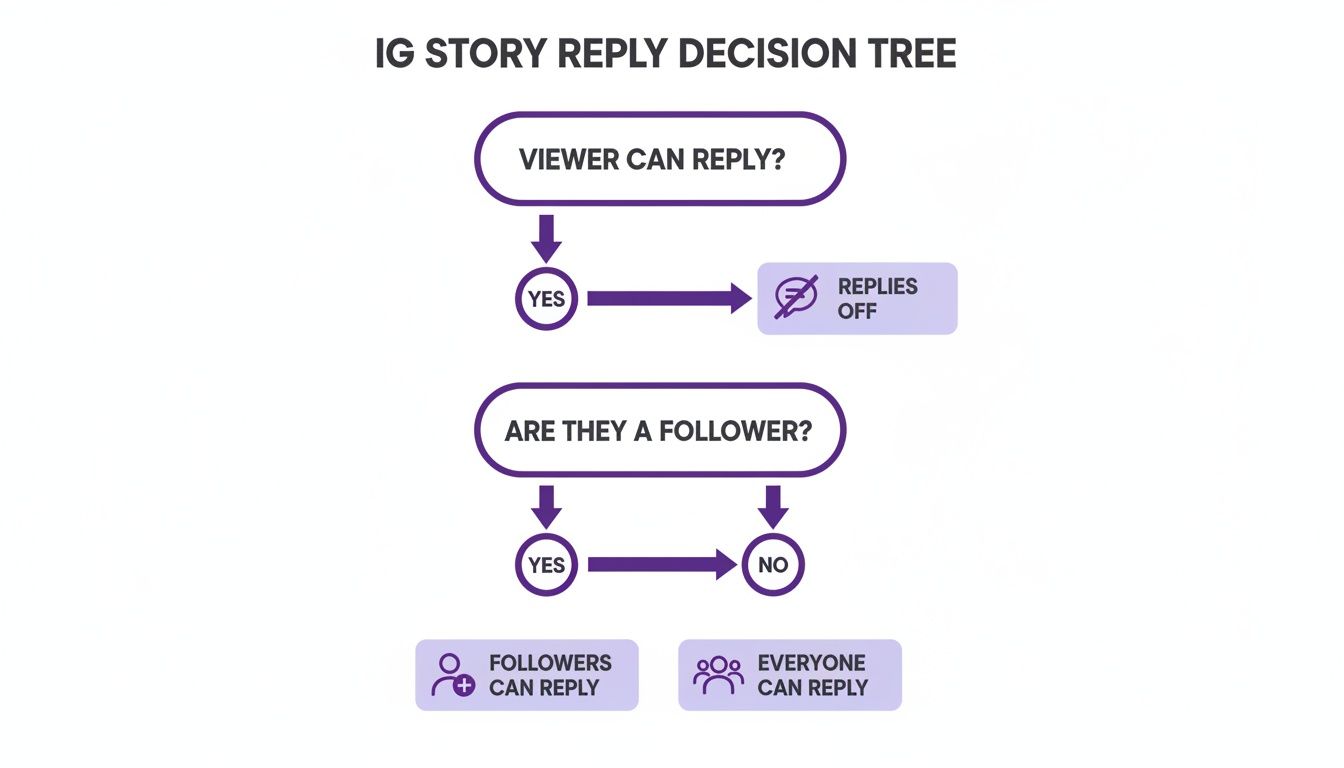
This flow chart helps you quickly figure out if you should allow replies from everyone, just your followers, or nobody at all, depending on what you're trying to achieve with your Story.
Here are a few specific times when turning off replies makes perfect sense:
- During a Brand Crisis: You need to get an official statement out, clean and simple, without it getting buried in noise.
- For Major Announcements: This prevents speculation and misinformation from spreading like wildfire in your DMs.
- When Your Team is Swamped: If you're a small crew, temporarily disabling replies can be a lifesaver. It prevents community manager burnout and ensures legitimate customer questions don't get lost in the chaos.
Expert Tip: Turning off replies doesn't have to mean shutting down engagement entirely. A smart move is to pair that reply-free Story with a poll, quiz, or question sticker. It lets you guide the conversation and gather feedback in a much more structured way.
At the end of the day, actively managing your Story replies is one of the many best practices for social media engagement. The goal is always to build a safe, positive space for both your brand and the people who genuinely support it.
Smart Alternatives to Turning Off Replies Completely

Sometimes, knowing how to turn off comments on an Instagram Story feels a bit like using a sledgehammer when all you really need is a scalpel. If completely shutting down the conversation feels too extreme, don't worry. Instagram has a few clever, more targeted ways to manage who can interact with you.
These features let you keep the door open for engagement but filter out the noise. Instead of a total shutdown, you can be more selective and create a more positive, controlled space for your community.
Curate a Vetted Audience with Close Friends
Instagram’s Close Friends feature is one of my favorite tools for building a tighter-knit community. It lets you share certain Stories with a handpicked list of followers, which feels much more personal and exclusive. For brands, this is a goldmine for sharing behind-the-scenes content, exclusive offers, or early product news with your most dedicated fans.
Because you’re curating this list yourself, the replies you get are almost always more meaningful and constructive. It’s a fantastic way to have high-quality discussions with a smaller, trusted circle.
Selectively Hide Your Story From Certain People
What if the issue isn’t your entire audience, but just a handful of disruptive accounts? This is where the "Hide Story From" feature comes in handy. It lets you prevent specific users from ever seeing your Stories in the first place, which naturally means they can't reply to them.
This is a surgical approach. It allows you to remove problematic accounts from the equation without penalizing the rest of your audience, keeping your community space healthy for everyone else.
It's also a more discreet and targeted option than blocking someone completely. If you find yourself dealing with negativity from the same few accounts, learning how to hide comments on Instagram across your profile can give you an even broader strategy for managing those unwanted interactions beyond just your Stories.
Guide the Conversation with Interactive Stickers
Instead of leaving the open-ended "Send Message" box at the bottom of your Story, you can steer the conversation using interactive stickers. This is a brilliant way to get structured feedback that’s often more valuable—and way easier to manage—than an inbox flooded with random DMs.
Try using some of these:
- Polls & Quizzes: Perfect for getting quick opinions or testing your audience's knowledge on a topic.
- Emoji Sliders: A fun way to gauge sentiment on a sliding scale for more nuanced feedback.
- Question Stickers: Ask your followers to submit specific questions for a Q&A session.
Using stickers turns passive viewing into active participation. It helps keep your engagement high while significantly cutting down on the risk of spam or irrelevant replies. It's the best of both worlds.
Automate Moderation to Keep the Conversation Going
Here's a common struggle for brands: you want the valuable feedback and connection that comes from Story replies, but who has the time to manually sift through all the spam and negativity? It can feel overwhelming. So, instead of turning replies off completely, what if you could keep them open and manage them effectively?
This is exactly where AI-powered comment moderation comes in. Think of these tools as a smart gatekeeper for your brand's DMs. They work around the clock to instantly hide spammy messages, filter out trolls, and deal with harmful comments before they ever become a problem. This helps you keep your community space positive and safe without lifting a finger.
Turn Replies Into Opportunities
But these tools do more than just block the bad stuff. The best ones are smart enough to recognize genuine engagement and turn it into real opportunities.
They can spot customer questions, flag messages that show someone is ready to buy, and even send urgent support issues directly to the right person on your team. Suddenly, your social media manager is free to focus on what matters most: building relationships.
By automating the grunt work, you can let the conversations flow while uncovering new leads and opportunities right from your Story replies. If you want to dive deeper into the tech, check out some of the top AI comment moderation tools on the market. And to make this part of a bigger plan, a guide on How to Schedule Instagram Stories can help you build a more efficient workflow from start to finish.
Got Questions About Story Replies? We’ve Got Answers
If you're managing an Instagram account, you've probably wondered about the ins and outs of Story replies. Here are some quick answers to the questions we hear most often.
Will Turning Off Replies Hurt My Reach?
Worried the algorithm will punish you for disabling replies? Don't be. Turning off replies won’t directly tank your reach.
In fact, it can sometimes help. If you’re getting a lot of spammy replies that cause people to exit your Story, disabling them might actually improve your completion rate.
You will lose that specific type of engagement, but you can easily balance it out. Just make sure to use interactive stickers—think polls, quizzes, and sliders. These all count as positive engagement signals to the algorithm, helping to keep your reach healthy.
Can I Disable Replies for Specific People?
Unfortunately, no. Instagram doesn't let you pick and choose who can and can't reply to a Story. Your only options are to allow replies from Everyone, People You Follow, or No One at all.
The best way to handle a specific problematic user is to use the "Hide Story From" feature. This completely blocks them from seeing your Stories in the first place, which naturally prevents them from replying. It’s a clean and effective solution.
Will People Know Comments Are Off?
Yes, they will. There won't be a big announcement, but the "Send message" bar at the bottom of your Story will completely disappear.
Anyone watching will still see the paper airplane icon to share your Story, but the option to type a reply will be gone. It’s a subtle but clear visual cue that replies are disabled.
Stop wasting time fighting spam and start focusing on genuine engagement. FeedGuardians uses AI to automatically hide harmful comments, detect customer questions, and protect your brand 24/7. Learn how to automate your comment moderation today.
Tired of manually moderating comments?
FeedGuardians automates spam filtering, responds to customers, and protects your brand — setup in 3 minutes.