
Quick Summary
| Key Insight | What You Need to Know |
|---|---|
| Community Management | Find and reply to urgent questions or complaints fast. This shows your audience that you’re listening and that you actually care. |
| Market Research | What are your customers’ biggest pain points? What features do they wish your product had? The answers are right there in the comments. |
| Lead Generation | You can spot buying signals from a mile away. Searching for keywords like "price," "how to buy," or "link" helps you find warm leads and guide them directly into your sales funnel. |
| Keywords | broken, doesn't work, issue, complaint, disappointed |
| Action | Automatically tag these as "Urgent Support" and send a notification to your customer service team. |
| Keywords | price, cost, how to buy, discount, link |
It's one of the most common frustrations on Instagram: you know someone left a specific comment, but finding it feels impossible. While Instagram doesn't offer a built-in search bar for comments, don't worry—you're not stuck. You can still find what you're looking for by manually scrolling, using your web browser's search feature, or turning to more powerful third-party tools.
These methods do more than just help you find a lost comment; they turn a chaotic feed into a wellspring of business intelligence.
Why You Need to Search Instagram Comments
It’s time to stop seeing your comments section as just a number on an engagement report. It’s a goldmine of raw, unfiltered feedback. Customer questions, sales opportunities, and genuine brand insights are all sitting there, waiting for you to find them. Learning how to search through these conversations efficiently gives you a massive strategic advantage.
Think about it from a practical standpoint. Let's say a clothing brand gets a few comments here and there asking for a certain item in a new color. Without a way to search, those requests are just isolated blips that are easy to miss. But by searching for terms like "blue version" or "new color," the brand can instantly see just how high the demand is and make smarter, data-driven decisions about their next product launch.
Unlock Hidden Business Opportunities
This isn't just about finding one specific user's comment. It's about tapping into a stream of valuable data that your competitors are probably overlooking. When you manage and analyze this feedback loop, your Instagram account transforms from a simple marketing channel into a core business intelligence tool.
The benefits spread across your entire operation:
- Community Management: Find and reply to urgent questions or complaints fast. This shows your audience that you’re listening and that you actually care.
- Market Research: What are your customers’ biggest pain points? What features do they wish your product had? The answers are right there in the comments.
- Lead Generation: You can spot buying signals from a mile away. Searching for keywords like "price," "how to buy," or "link" helps you find warm leads and guide them directly into your sales funnel.
By actively monitoring and searching through comments, you're essentially performing a simplified version of social listening. This proactive approach helps you understand brand sentiment and customer needs in real-time.
For anyone looking to go deeper, understanding what social listening is can provide the bigger picture of how this one tactic fits into a much larger strategy. Ultimately, mastering the ability to search your IG comments makes you more responsive, more strategic, and more connected to the community you've worked so hard to build.
Finding Comments Manually Inside the Instagram App
Let's be honest, searching for a specific comment on Instagram can feel like a real chore. There's no magic search bar for comments, but you do have a few built-in ways to hunt them down without leaving the app. This approach works best when you already have a good idea of which post the comment is on.
The most basic method? Good old-fashioned scrolling. You just open the post and start swiping through the comments. For a post with a handful of comments, this is no big deal. But if you're dealing with a viral hit, you'll be hitting "Load more comments" until your thumb gets tired.
Navigating High-Volume Comment Threads
When a post has hundreds or even thousands of comments, just scrolling won't cut it. You have to be a bit more strategic. I've found it helps to scan for visual cues—look for the profile pictures of people you recognize or keep an eye out for indented replies. It’s a bit of a grind, but sometimes it’s the only option you have without firing up another tool.
A much better way to find comments you're involved in is to use your notifications tab. If someone replied to you or mentioned you in a comment, it’s going to pop up right in your activity feed.
This is my go-to for finding direct replies or tracking down a conversation where someone tagged me. It essentially turns your notifications into a reverse-chronological search tool for your own interactions. To get the most out of this, make sure you know how to tag people in Instagram comments properly.
How Your Captions Affect Comment Volume
It's interesting how your own content strategy can make this manual search harder. With 36% of users now treating Instagram like a search engine, longer captions are becoming more common. In fact, posts with captions over 100 words can see 23% more comments. More engagement is great, but it definitely makes finding one specific comment a much bigger task. You can dig into more of these Instagram statistics and their impact if you want to fine-tune your approach.
While these built-in methods are fine for a quick look, you’ll quickly hit a wall if you need to find a specific keyword or search across all your posts at once. For that kind of heavy lifting, you’ll need to step outside the app and explore some more powerful techniques.
Using Your Browser for a Quick Comment Search
Sometimes the simplest solution is the best one. When you're tired of endlessly scrolling through comments on your phone, switching to your desktop browser opens up a surprisingly powerful, built-in tool that many people overlook.
It’s the humble "Find" function. You probably use it all the time on other websites, and it works just as well on Instagram. Just hit Ctrl+F on a Windows PC or Cmd+F on a Mac, and a search bar will pop right up. This lets you search for any text on the current page, including the comment section.
The Key to Making It Work
Here's the one catch: you have to load the comments first. Instagram is sneaky and only shows a handful of comments at a time to keep the page loading quickly.
Before you can search, you need to keep clicking the little "plus" icon (+) or the "View replies" link until all the comments you want to sift through are visible on your screen. It can take a minute for a popular post, but it's worth it.
Once everything is loaded, you can instantly find what you're looking for:
- Specific keywords: Need to find all the questions about "shipping" or "restock"? Just type it in.
- Usernames: Quickly check if a specific influencer or VIP customer has chimed in.
- Questions: This is my favorite trick. Just type a question mark "?" into the find bar, and it will highlight every single comment that asks a question. Brilliant.
This simple process turns a mind-numbing scroll-fest into a targeted keyword search. It's the perfect way to find exactly what you need without paying for fancy software.
Pro Tip: This technique is a game-changer for contests. If you've asked people to comment with a specific phrase like "I'm in!" or a certain emoji to enter a giveaway, Ctrl+F will find all the valid entries in seconds. No more manual counting.
Taking It Further with Browser Extensions
If you need a bit more muscle but aren't ready to invest in a paid platform, browser extensions can be a great middle ground. These are little add-ons for Chrome or Firefox that enhance the Instagram website with new features, sometimes including comment filtering or exporting.
A word of caution: be smart about security. Stick to extensions with lots of positive user ratings, a clear privacy policy, and recent updates. Never, ever give an extension your Instagram password directly. Legitimate tools will use official, secure ways to connect to your account.
While not as powerful as a dedicated platform, a well-chosen extension can make your efforts to search IG comments much more effective.
When You Need More Than Ctrl+F: Advanced Instagram Comment Searching
Let's be real. Manual searching and browser tricks are fine for a one-off task, but they hit a wall, and they hit it fast. If you're managing a brand with a decent following, you know that comments pile up quickly. Trying to scroll through hundreds of them on dozens of posts to find one specific question is a nightmare. It just doesn't scale.
This is exactly why dedicated social media management tools exist. They’re built to handle the chaos. By connecting directly to Instagram's API, these platforms pull all your comments into a single, organized dashboard. Suddenly, your messy comment section becomes a searchable, filterable database you can actually work with.
Why Third-Party Tools Are a Game-Changer
Instead of painstakingly checking one post at a time, these tools let you search your entire account at once. Think about finding every comment that mentions "price" from the last month. Doing that by hand? Forget it. With the right tool, it’s a matter of seconds.
But the real magic is in the automation and filtering. You can go way beyond a simple keyword search. We're talking about creating complex rules that automatically sort, flag, or even reply to comments based on what they say. It’s a proactive approach that saves a ton of time and makes sure no important conversation gets lost in the noise.
This is the big shift: moving from reactively scrolling through comments to proactively filtering them. It turns a tedious chore into a smart way to gather business intelligence.
Setting Up a Smarter Comment Management System
Getting started with a tool like FeedGuardians means you can have a system working for you around the clock. The setup is straightforward—you securely connect your Instagram Business Account, which gives the tool permission to access your public comment data via the API. Once you're connected, the fun begins.
You can create automated rules that act like a digital mail sorter for your comments. For instance, you could set up a rule that looks for any comment containing words like "buy," "order," or "how much." The tool can then automatically flag it as a sales lead, ensuring your team can jump on it right away.
This flowchart shows the basic manual process that these advanced tools completely automate for you.
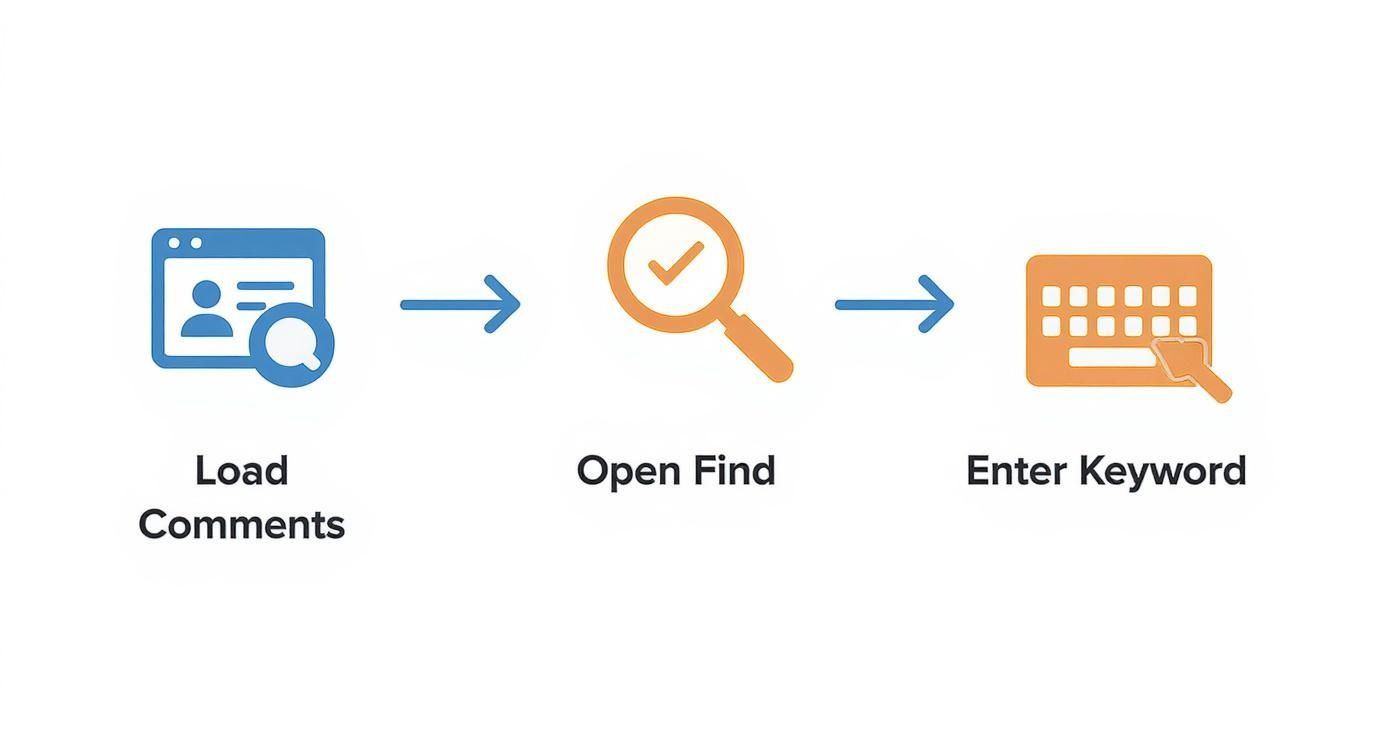
As you can see, the manual steps of loading, finding, and entering keywords are exactly what tools like this are designed to eliminate, saving you a massive amount of time and effort.
Creating Filter Templates That Actually Work
The real power here comes from building your own library of custom rules that fit your business. You're not just finding comments anymore; you're managing them automatically.
Here are a few practical examples to get you started:
Customer Service Alerts:
- Keywords:
broken,doesn't work,issue,complaint,disappointed - Action: Automatically tag these as "Urgent Support" and send a notification to your customer service team.
- Keywords:
Sales Lead Identification:
- Keywords:
price,cost,how to buy,discount,link - Action: Flag these as a "Hot Lead" and assign them to your sales or social media manager for a fast, helpful reply.
- Keywords:
Collecting Positive Feedback:
- Keywords:
love this,amazing,best product,thank you,highly recommend - Action: Tag these as "Testimonial" so you can easily find great user-generated content and positive reviews later on.
- Keywords:
The goal is to build a system that filters the signal from the noise, letting your team focus their energy on the comments that actually matter. To see more advanced strategies, check out our in-depth guide to Instagram moderation tools.
A Strategic Framework for Managing IG Comments
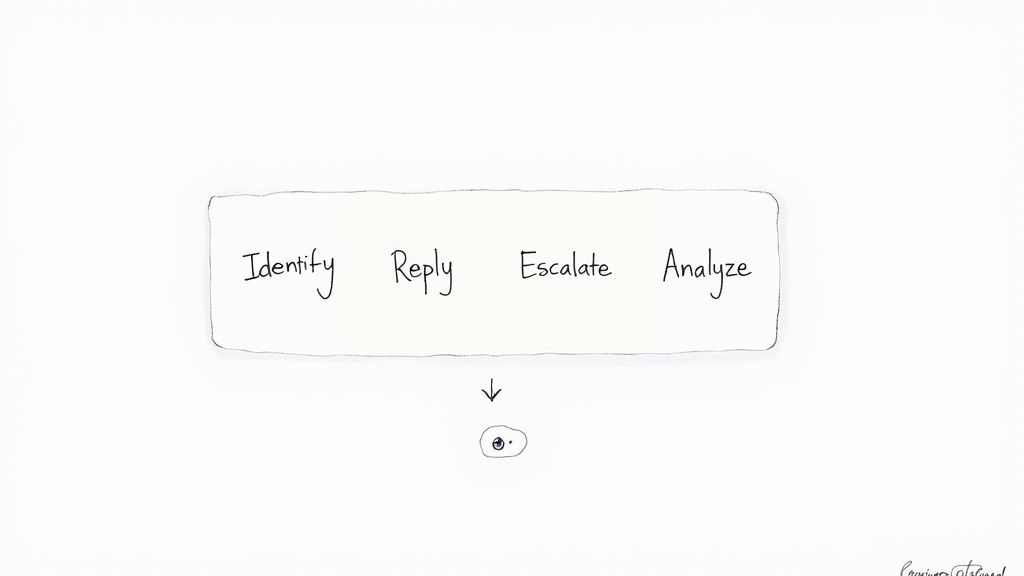
Finding the right comments is just the start—how you respond is what really moves the needle. Without a clear plan, your brand voice can get muddled, and your community won't feel heard. A solid strategy turns comment management from a daily chore into a powerful way to gather business intelligence.
It all begins with establishing clear guidelines for your team. What’s your brand's tone? Are you witty and casual, or more formal and supportive? Whatever you choose, make sure it’s consistent and reflects your brand identity, especially if multiple people are handling replies.
Next up, think about response times. Even just acknowledging a customer's question within a few hours can make a huge difference in how they see your brand. While not every comment needs an instant reply, you definitely want to have a plan for high-priority issues.
Sorting and Prioritizing Comments
Once you’ve got a way to search IG comments effectively, you need a system for sorting through what you find. Let's be real, not all comments are created equal. Knowing how to handle each type is essential.
Your framework should be a simple playbook for different situations:
- Public Engagement: Jump on positive feedback, simple questions, and general chit-chat with a public reply. This is your chance to shine.
- Hiding or Deleting: For anything spammy, offensive, or that leaks private info, don’t hesitate to hide or delete it. Keep your space clean.
- Reporting: If you see threats or comments that violate Instagram’s community guidelines, report them immediately.
This sorting process is a fundamental part of good social media management. It not only protects your community but also makes sure your team is spending their time on conversations that actually matter.
If you want to go deeper on this, our guide to social media content moderation lays out more detailed strategies for maintaining a healthy and constructive comment section.
Turning Comments into Actionable Data
A truly great comment strategy doesn't stop at replying. It involves looking for trends. Are you suddenly getting a ton of questions about a new product? Are people constantly asking for a specific feature? Tracking these patterns gives your marketing, sales, and product teams priceless insights.
This is especially critical for high-engagement formats like Reels. They’ve become a massive part of the platform—in 2025, over 2 billion users engage with them every month. With an average engagement rate of around 1.23%, Reels generate a huge volume of comments, likes, and shares for you to dig into.
By actively monitoring these comments, you transform audience feedback from simple interactions into a powerful engine for business growth.
Got Questions About Searching Instagram Comments? We’ve Got Answers.
Trying to find a specific comment on Instagram can feel like searching for a needle in a haystack. It’s a common headache, so let's clear up some of the most frequently asked questions about navigating and searching through IG comments.
So, Can You Actually Search Comments Directly on Instagram?
The short answer is no. Instagram doesn't offer a built-in search bar for comments, which is a source of frustration for many users. You can't just type in a keyword and find what you're looking for within the app. However, you can use workarounds like your browser's "Find" feature (Ctrl+F or Cmd+F) or, for more power, turn to a third-party tool.
Will My Instagram Comments Show Up on Google?
It's possible, yes. Since July 2025, Google began indexing public content from Instagram Business and Creator accounts, and that includes the comment sections. This means if you leave a comment on a public business post, it could potentially surface in Google search results if it hits the right keywords.
Is It Safe to Use Other Tools to Search Comments?
Using a well-regarded third-party tool is generally safe, but you absolutely have to be smart about it. The most important rule? A legitimate tool will never ask for your Instagram password. It will always use the official Instagram API and a secure, authorized login process.
Before connecting any tool to your account, do your homework. Check reviews, read the privacy policy, and make sure it’s a reputable service. Your account security is always priority number one.
How Can I Find a Comment from One Specific Person?
You've got a few options here, depending on how many comments you're dealing with.
- The Manual Scan: On a post with just a handful of comments, the easiest thing to do is simply scroll through and look for their username and profile picture.
- The Browser Trick: If you're on a computer, load as many comments as you can and then hit Ctrl+F (or Cmd+F on a Mac). Type in their username, and your browser will jump right to it. This is way faster than endless scrolling.
- Specialized Tools: For a truly efficient approach, comment management platforms let you filter all comments by username. This allows you to see every interaction from a specific person across your entire account in just a few clicks.
Why Can't I Find a Comment I Just Got a Notification For?
This is a super common and confusing issue! It almost always boils down to one of two things. The user might have posted the comment and then deleted it a moment later. Or, Instagram's own filters might have flagged it as spam or a policy violation and automatically removed it before you had a chance to see it.
Stop wasting time scrolling and start finding the conversations that matter. FeedGuardians uses smart automation to help you search, filter, and manage your comments at scale, turning your audience feedback into real business insights. Discover how FeedGuardians can clean up your comment section and uncover hidden opportunities today.
Tired of manually moderating comments?
FeedGuardians automates spam filtering, responds to customers, and protects your brand — setup in 3 minutes.