
Quick Summary
| Key Insight | What You Need to Know |
|---|---|
| Provider Type | Are you thinking of hiring a flexible freelancer, a full-service agency, or building your own in-house team? Each comes with a different price structure. |
| Business Size | The needs of a local coffee shop are completely different from those of a multinational corporation, and the pricing reflects that. |
| Choosing Your Team: Freelancers vs. Agencies vs. In-House | One of the biggest levers you can pull on your social media budget is deciding who will do the work. The right choice really comes down to your budget... |
| How Location and Expertise Shape Your Costs | When you start pricing out social media management, you’ll quickly find that quotes are all over the map. Beyond the list of services, two of the bi... |
| Got Questions About Social Media Costs? We’ve Got Answers. | It's completely normal to have a ton of questions when you're trying to figure out how much to spend on social media. You’re not just throwing money... |
When you start looking into social media management, you’ll see prices all over the map, from $500 to over $15,000 per month. That huge range isn't a mistake; it just shows that the final cost really hinges on who you hire and exactly what you need them to do. The more complex the strategy, the more content they create, and the more platforms they juggle, the higher the price.
Understanding the True Cost of Social Media Management
Trying to figure out what you should be paying for social media can feel like trying to hit a moving target. There’s no single price tag because the service is customized for each business.
Think of it like buying a car. You could get a basic, reliable sedan that gets the job done, or you could opt for a high-performance luxury model loaded with every feature imaginable. Both get you from point A to B, but the experience, the extras, and the cost are worlds apart.
It's the same with social media. Your final cost is shaped by a few key variables:
- Scope of Services: Do you just need someone to schedule posts? Or are you looking for the whole package—a deep strategy, video production, daily community engagement, and a paid advertising campaign?
- Provider Type: Are you thinking of hiring a flexible freelancer, a full-service agency, or building your own in-house team? Each comes with a different price structure.
- Business Size: The needs of a local coffee shop are completely different from those of a multinational corporation, and the pricing reflects that.
When you look across the industry, you'll see this play out. A small business with up to 50 employees might budget anywhere from $500 to $2,500 a month. On the other end, a large enterprise could easily spend $7,500 to $15,000+ for a complex, multi-platform strategy.
Typical Monthly Social Media Management Costs by Business Size
To give you a clearer picture, here’s a quick overview of what businesses typically invest based on their size. This table provides a solid starting point for figuring out your own budget and seeing where you might land.
| Business Size | Employee Count | Typical Monthly Cost Range |
|---|---|---|
| Small Business | 1-50 | $500 – $2,500 |
| Mid-Sized Business | 51-500 | $2,500 – $7,500 |
| Enterprise | 500+ | $7,500 – $15,000+ |
These numbers are a great guide, but the real key is knowing what you're getting for your money.
At the end of the day, understanding the true cost means you need to know how to calculate your marketing ROI. This ensures every dollar you spend is actually working toward your business goals. For smaller businesses trying to make every penny count, our guide on social media management software offers some great insights into affordable tools.
The 5 Key Things That Make Up Your Social Media Budget
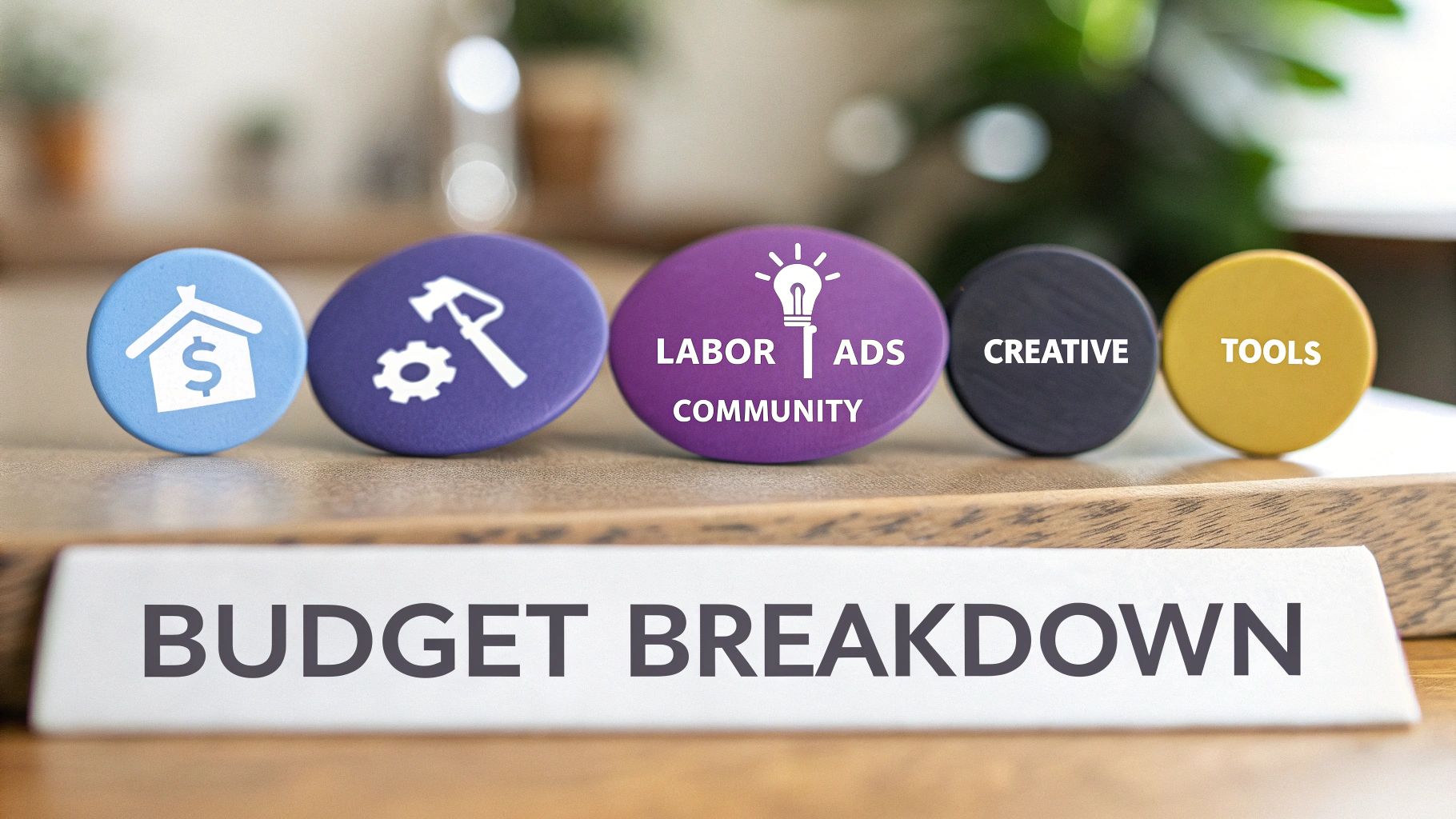
Figuring out what you'll actually spend on social media isn't as simple as looking at one monthly fee. Your total cost is really a mix of five different moving parts, and each one is essential.
Think of it like planning a road trip. You don't just budget for gas. You have to account for the car (the tools), the food and lodging (the creative), and maybe even a tour guide (the labor and strategy). Social media is the same way; you need to understand each expense to see where your money is really going.
Let's break down these five core budget drivers.
1. Labor and Strategy
This is the human element. It’s the time, expertise, and strategic thinking that makes your entire social media presence work. This isn't just about someone posting for you; it's about having a real plan that connects to what your business is trying to achieve.
Here’s what that looks like in practice:
- Building the Game Plan: This means digging into audience research, seeing what your competitors are up to, and mapping out a content calendar.
- Doing the Work: It's the day-to-day grind of writing captions, scheduling posts, and keeping everything running smoothly.
- Checking the Scoreboard: This involves tracking performance, pulling reports, and figuring out what the data is telling you so you can make smarter decisions next month.
Honestly, this is often the biggest chunk of any social media budget. You’re not just paying for someone's time—you're paying for their experience and their ability to get results.
2. Ad Spend
If your strategy is the car's engine, then ad spend is the fuel that makes it go. Let's face it, getting seen for free on social media (organic reach) is tougher than ever. Paid ads are now a must-have for any serious growth.
This is the money you set aside to run campaigns, "boost" your best posts, and get in front of new people who don't follow you yet.
Think of your ad spend as a direct investment in getting eyeballs on your brand. It’s the cash you hand directly to platforms like Meta, TikTok, or LinkedIn to place your content in the feeds of very specific people.
Without a dedicated ad budget, even the most amazing content can feel like shouting into the void. It’s how you scale your efforts and see a real return, fast.
3. Creative Production
This is everything that makes your content look good—the stuff that actually stops people from scrolling past your posts. High-quality photos, slick videos, and professional graphics aren't just nice to have anymore; they're the price of admission.
The cost here can swing wildly depending on what you need:
- Graphic Design: Creating custom post visuals, branded templates, or cool infographics.
- Photography: Getting professional product shots or lifestyle photos that match your brand’s vibe.
- Video Production: Filming and editing anything from quick TikToks and Reels to longer-form videos for YouTube.
4. Tools and Software
You can’t manage social media effectively these days without the right tech. These are the tools that handle the repetitive stuff, give you powerful analytics, and make it easier for your team to work together. This saves a massive amount of time that would otherwise be spent on manual tasks.
Common costs here include subscriptions for scheduling platforms, social listening dashboards, and design software.
5. Community Management and Moderation
Finally, this is the cost of actually talking to people. It’s the work of responding to comments, answering DMs, and turning your followers into a real community.
Just as important is moderation—filtering out spam, trolls, and nasty comments to protect your brand’s reputation. This hands-on engagement is what builds real loyalty and trust. To get a better sense of the tech involved, take a look at our guide on social media sentiment analysis tools.
Choosing Your Team: Freelancers vs. Agencies vs. In-House
One of the biggest levers you can pull on your social media budget is deciding who will do the work. The right choice really comes down to your budget, your goals, and frankly, how much you want to be involved.
Here’s a simple way to think about it: a freelancer is like a specialized handyman, an agency is the full-service general contractor, and an in-house team is your own dedicated crew. Each brings a totally different mix of cost, flexibility, and expertise to the table.
A freelancer is a solo pro, often with a deep specialty in one area—maybe they're a wizard at creating Instagram Reels or a master of running LinkedIn ad campaigns. They bring targeted skills without the overhead of a full-time employee, which makes them a flexible and often affordable pick for startups and smaller businesses.
On the flip side, a social media agency gives you a whole team of specialists under one roof. You’re not just getting one person; you’re tapping into a strategist, a copywriter, a graphic designer, an ad buyer, and an analyst. This all-in-one approach is perfect for businesses that need a wide range of services and want a proven system for getting results.
Finally, you can build an in-house team by hiring employees to work exclusively on your brand. This path gives you unparalleled brand alignment and dedication. Your in-house manager lives and breathes your company culture, a massive advantage for building a genuine community. It's also usually the most expensive route once you add up salaries, benefits, and ongoing training.
Freelancer vs Agency vs In-House Team: A Cost-Benefit Analysis
Choosing between a freelancer, an agency, or an in-house team involves weighing the costs against the benefits of scalability and expertise. Each model offers a distinct set of advantages and is suited to different business needs and growth stages. This table breaks down the key trade-offs to help you see which path aligns best with your resources and goals.
| Factor | Freelancer | Agency | In-House Team |
|---|---|---|---|
| Cost | Lower cost, typically hourly or per-project. Predictable but can scale up with workload. | Higher cost, usually a monthly retainer. Covers a full team and overhead. | Highest cost, including salary, benefits, training, and tools. A fixed overhead. |
| Expertise | Specialized in 1-2 areas (e.g., content creation, a specific platform). | Broad expertise across a team of specialists (strategy, ads, design, analytics). | Deep expertise in your specific brand and industry. Skillset limited to the individual(s) hired. |
| Scalability | Limited. Dependent on one person's capacity. | Highly scalable. Can easily add services or increase ad spend. | Scalability requires hiring more people, which is slow and expensive. |
| Dedication | Juggles multiple clients. Not 100% focused on your brand. | Manages a portfolio of clients. Your brand is one of many priorities. | 100% dedicated to your brand and its success. |
| Flexibility | Very flexible. Easy to scale up or down on a short-term basis. | Less flexible. Often requires long-term contracts (3-12 months). | Least flexible. Hiring and firing are major commitments. |
| Best For | Startups, small businesses, or companies needing specific, project-based help. | Mid-to-large businesses needing comprehensive strategy and execution across multiple channels. | Large corporations or companies where brand voice and community are central to the business model. |
Ultimately, the decision isn't just about the price tag. It's about finding the model that gives you the right blend of skills, focus, and flexibility to hit your social media objectives without breaking the bank.
Making the Right Choice for Your Business
So, how do you decide? It really boils down to your specific situation.
A small e-commerce brand just getting started could see huge value from a sharp freelancer who can build an engaged Instagram following. A mid-sized company looking to scale across several platforms with a serious ad budget would probably get more from an agency’s broad firepower. And a large corporation that needs ironclad control over its brand voice might find an in-house team is the only way to go.
If you're leaning toward bringing in outside help, this guide to outsourcing social media manager roles is a great resource for weighing your options.
And don't forget, even a dedicated in-house person needs support, especially with the relentless task of comment moderation. You can learn more about how a social media content moderator fits into the picture in our detailed guide.
How Location and Expertise Shape Your Costs
When you start pricing out social media management, you’ll quickly find that quotes are all over the map. Beyond the list of services, two of the biggest, and often surprising, factors driving the cost are where your manager is located and what they’re an expert in.
It’s a bit like hiring a chef. You can get a fantastic meal from a talented local cook for a fair price. But if you want a Michelin-starred chef in a major city who specializes in a rare cuisine, you expect to pay a premium. It’s the exact same story in social media.
This decision tree gives you a good look at how these factors play into choosing between a freelancer, an agency, or hiring someone in-house.
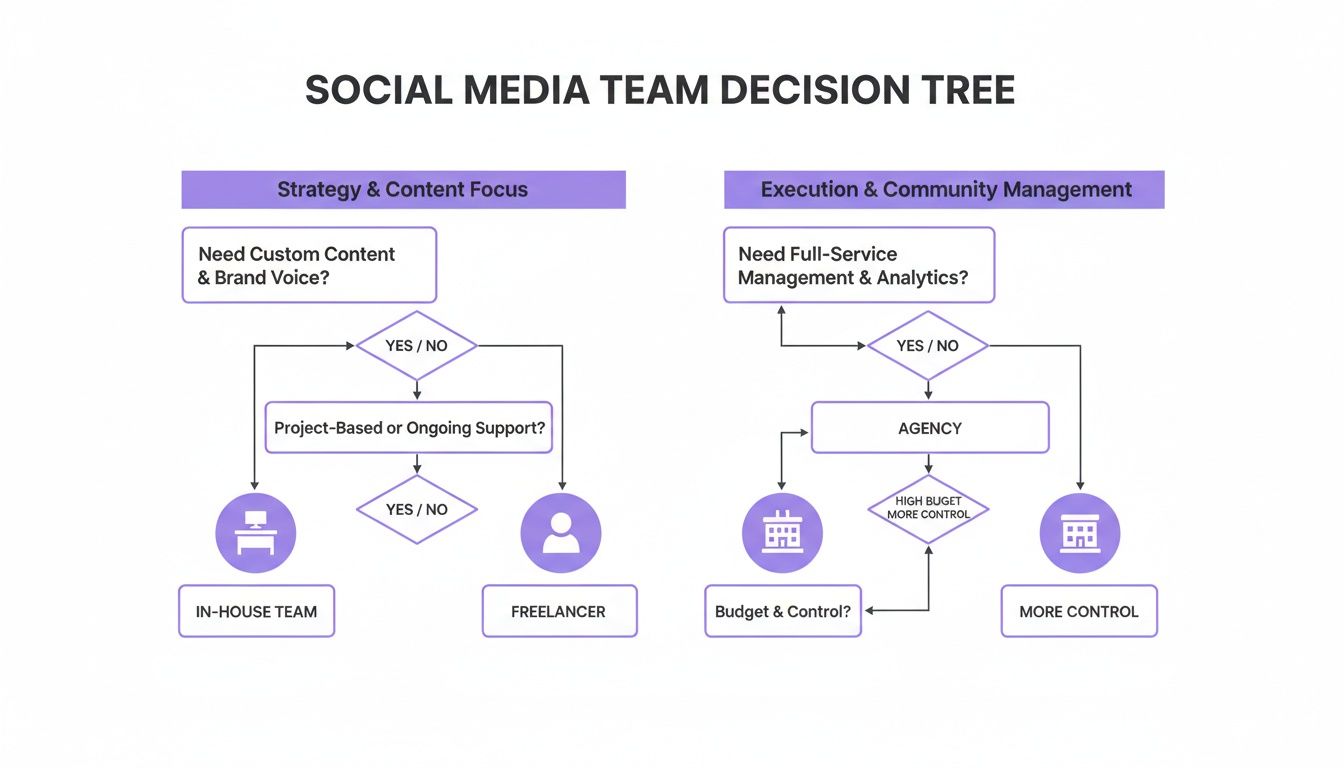
As you can see, the right path really depends on what you need to achieve with your content and strategy, with each option offering a different balance of cost and benefit.
The Geographic Pricing Gap
Where a social media manager lives and works directly impacts their rates. It mostly comes down to the cost of living and what the local market will bear. Someone based in a high-cost city like New York or London simply has higher expenses, and their prices reflect that.
For example, agencies in New York often charge between $40 and $190 per hour, with some top-tier talent asking for as much as $350 per hour. Meanwhile, agencies in smaller cities or more rural areas might have a range closer to $40 to $160 per hour. This in-depth pricing analysis digs into these tiers a bit more. The takeaway? You could be paying a lot more for the same tasks, just based on your provider’s zip code.
Why Niche Expertise Commands a Premium
Just as critical as location is specialized knowledge. A generalist can keep your accounts active, but a specialist who truly gets your industry can drive serious results—and that expertise comes at a higher price.
Paying a premium for an expert isn't just an added expense; it's an investment in efficiency and effectiveness. A specialist who knows your industry's nuances can achieve in one month what a generalist might take six months to figure out.
Think about the difference it makes:
- An E-commerce Specialist: They live and breathe Shopify integrations, know how to craft a killer Instagram product launch, and can navigate the quirks of TikTok Shop.
- A B2B SaaS Expert: This pro knows how to write for LinkedIn to catch the eye of a CTO, engage decision-makers in niche groups, and generate real, qualified leads.
- A Healthcare Professional: They understand the minefield of HIPAA compliance and know how to create content that’s sensitive, trustworthy, and legally sound.
These specialists charge more because they come pre-loaded with the industry knowledge you need. They won't be learning the ropes on your dime. While a generalist is a perfectly fine starting point for many, investing in a specialist can be the smartest money you spend, especially when the competition is stiff. And to help that expert work even smarter, check out the best social media automation tools available in our 2025 comparison.
Smart Ways to Manage Your Social Media Spend
Getting a grip on your social media costs isn't about pinching pennies or just picking the cheapest option. It’s about making every dollar you spend work harder for you. Smart spending is all about investing in efficiency and turning what could be a money pit into a revenue-generating machine.
With a few key strategies, you can make a much bigger splash without blowing up your budget. This means getting clever with your content, creating processes that actually work, and letting technology do the heavy lifting.
Get More from Your Content
Your best-performing content is a goldmine. Seriously. Instead of constantly being on the hamster wheel of "what's next?", you should be looking at what’s already resonating with your audience and repurposing it. This approach saves a ton of time and creative bandwidth.
- Repurpose Winners: Did a blog post go viral? Great. Turn it into a Twitter thread, a slick infographic for Pinterest, or a quick video for Instagram Reels. One great idea can fuel a dozen pieces of content.
- Embrace User-Generated Content (UGC): Get your customers involved! Encourage them to share photos and videos of them using your products. Featuring UGC is a powerful form of social proof, and better yet, it’s authentic content you don’t have to pay to create.
- Develop Content Pillars: Settle on three to five core themes that your brand owns. This simple step makes brainstorming a breeze and keeps your messaging consistent and focused.
Thinking this way helps you build a sustainable content engine. You'll reduce the constant pressure to come up with new ideas and slash your creative production costs at the same time.
Build Efficient Workflows
A disorganized process is a silent budget killer. When nobody knows what they’re supposed to do or when, time and money go right down the drain. Setting up clear, repeatable workflows for tasks like content creation, approvals, and scheduling is a must.
Think of it like a factory assembly line. Each person has a clear role, and the content moves smoothly from one station to the next without hitting roadblocks. A solid workflow stops people from doing the same task twice and ensures everything you publish is top-notch.
Your goal is to make every hour count. An efficient workflow doesn't just save time; it frees up your team to focus on high-value strategic tasks instead of getting bogged down in administrative chaos.
This kind of operational discipline is what allows you to scale up your social media game without your costs spiraling out of control.
Use Technology to Automate and Protect
Technology is your secret weapon for keeping social media management costs in check. The right tools can handle all the repetitive, mind-numbing tasks, freeing up your team to focus on what humans do best—strategy and creativity.
One of the biggest time-sucks? Comment moderation. Manually sifting through spam, hiding nasty comments, and answering the same basic questions over and over can eat up hours every single week.
This is where AI-powered tools like FeedGuardians completely change the game. By automating comment moderation, it doesn't just save you a fortune in labor costs; it protects your brand's reputation around the clock.
Even better, it can spot comments that show someone is ready to buy, turning a simple interaction into a potential sale. This is a perfect example of how the right tool can flip a cost center into a valuable asset. This kind of tech works best as part of a bigger plan; you can see how it all fits together by checking out our guide on what is social listening.
Got Questions About Social Media Costs? We’ve Got Answers.
It's completely normal to have a ton of questions when you're trying to figure out how much to spend on social media. You’re not just throwing money at the wall; you're making a real investment and you need to know what to expect.
Let's break down some of the most common questions business owners ask, from what a starter budget looks like to how you can tell if any of this is actually working.
What’s a Realistic Social Media Budget for a New Business?
If you're just getting started, a realistic budget usually lands somewhere between $500 and $2,000 per month. Think of this as your foundational investment to get professional help on board.
What does that get you? It’s enough to cover the essentials on one or two social platforms where your customers are actually hanging out. This typically includes creating consistent content, handling basic community engagement, and putting a little bit of money behind ads to get the ball rolling.
For a new business, the goal isn't to be everywhere. It's to make a smart, focused splash on the right channels to start growing and learning what your audience really wants.
How Do I Know If I'm Getting a Good ROI on My Social Media Spend?
This is the big one. Measuring the return on your investment (ROI) means looking past "vanity metrics" like likes and followers and connecting your social media activity to actual business results.
To really see what's working, you have to track the actions that lead to revenue. Here’s how you do it:
- Track Where People Come From: Use UTM parameters on your links. This is just a fancy way of tagging your URLs so you can see exactly how many website visits, sign-ups, or sales came directly from a specific post on Facebook or a story on Instagram.
- Know Your Numbers: Figure out what a new lead or customer is worth to your business on average. Once you have that number, you can easily calculate if the money you're spending to get them through social media is actually profitable.
- Watch for Brand Buzz: While it's a bit softer, keep an eye on things like reach, impressions, and how often people are talking about you. These are good signs that your brand awareness is growing.
At the end of the day, you want to be able to confidently say, "We spent $1,500 on social last month, and it brought in $4,500 in new business." That’s a clear, positive ROI.
Are Social Media Management Tools Actually Worth the Money?
Yes, absolutely. For almost any business, the right tools are a no-brainer investment that pays for itself almost immediately. Their whole purpose is to take the repetitive, time-sucking tasks off your plate.
Just think about scheduling posts one by one across five different platforms or manually compiling reports. A good management tool does that in a fraction of the time, freeing you or your team up for the stuff that really matters, like strategy and creating amazing content.
Tools like FeedGuardians take it a step further by automating comment moderation. This isn't just about saving hours of tedious work; it's about protecting your brand from spam and toxic comments around the clock. The cost of a tool like this is almost always a tiny fraction of the value you get back in saved time and peace of mind.
Ready to turn your comment section into a protected, lead-generating asset? FeedGuardians uses AI to automate comment moderation, hide spam, and detect purchase intent in real time. Learn more about how FeedGuardians can save you time and boost your ROI.
Tired of manually moderating comments?
FeedGuardians automates spam filtering, responds to customers, and protects your brand — setup in 3 minutes.