
Quick Summary
| Key Insight | What You Need to Know |
|---|---|
| Reach is the number | Reach is the number of unique drivers who saw the billboard. That commuter who passed it twice? They only count as one person for reach. This metric tells you the actual size of your audience. |
| How to Find and Analyze Your Impression Data | So, you get what impressions are—but where do you actually find them? The good news is, if you have an Instagram Business or Creator account, this d... |
| Impressions vs. Reach vs. Engagement | So, you know what an impression is. That’s the first step. But to really understand what's happening with your content, you need to see how it fits ... |
| A Few Common Questions About Instagram Impressions | Diving into Instagram analytics often brings up more questions than answers. Let's clear up some of the most common head-scratchers about what impress... |
Ever wondered what "impressions" really mean on your Instagram analytics? It’s one of the most fundamental metrics, but it’s often confused with others.
Let’s clear it up. Impressions are the total number of times your content—whether it's a post, a Reel, or a Story—has been shown to users. If a single person sees your post three times, that counts as three impressions.
What Are Impressions on Instagram
Think of your Instagram post as a digital billboard on a busy highway. Every time a car passes by and the driver sees it, that’s one impression. It doesn't matter if it's the same commuter driving past on their way to work and again on their way home—each time they see it, the impression count goes up.
This metric is all about visibility. It’s a raw count of how many times your content was delivered to a screen. It’s the first, most basic signal of how well the Instagram algorithm is distributing your content.
An impression doesn't measure engagement or interest—it only measures exposure. High impressions mean your content appeared on screens many times, which is the crucial first step toward building brand awareness.
For e-commerce brands and marketers, getting a handle on impressions is non-negotiable. This number tells you how frequently your content is circulating. It's fundamentally different from reach, which would only count the unique cars that saw your billboard, regardless of how many times they passed.
Grasping this difference is key to building a smart social media strategy. It's a core part of using social listening to gauge brand visibility and understanding your content's initial impact. A high impression count is a good sign that the algorithm is putting your content in front of people, creating more opportunities for engagement and growth.
Why Impressions Are a Key Metric for E-Commerce
For any e-commerce brand, it’s easy to dismiss impressions as a simple vanity metric. But that’s a mistake. A high impression count is a direct indicator of brand awareness and a powerful signal to the Instagram algorithm, connecting your visibility to real business results.
Think of it like this: the more times a potential customer sees your product, the more it sticks in their mind. This repeated exposure, which you see as a high number of impressions per user, builds brand recall. So when that person is finally ready to buy, your brand is the first one they think of.
Impressions represent every potential touchpoint in a customer's journey. While they don't equal sales on their own, they lay the essential groundwork for future conversions by keeping your brand top-of-mind.
This creates a powerful visibility loop. When the algorithm notices your content is racking up impressions, it takes that as a sign of value and rewards you with even wider distribution. This pushes your products in front of more new audiences, fueling a cycle of growth.
Turning Visibility Into Results
If you're managing ad campaigns, impressions are the bedrock of your performance analysis. This metric directly influences your CPM (Cost Per Mille), or the cost per one thousand impressions, which is how you measure the efficiency of your ad spend. Without this foundational data, it would be impossible to effectively A/B test different ad creatives or audiences.
The connection between impressions and real ROI is clear. Instagram's power in e-commerce is undeniable, with a forecasted $67.27 billion in global ad revenue and 29% of users expected to make purchases directly on the platform in 2025. Brands that tap into Instagram's massive 1.74 billion ad reach can see catalog sales convert at rates up to 3.5% of impressions, turning simple visibility into actual revenue. You can find more data exploring how Instagram drives e-commerce growth.
Ultimately, understanding impressions is about seeing their role in the bigger picture. Each impression is an opportunity to make an impact, drive recognition, and guide a user one step closer to becoming a customer. A strong impression count is the first sign of a healthy content strategy, often managed with the help of dedicated social media management software for small business.
How to Find and Analyze Your Impression Data
So, you get what impressions are—but where do you actually find them? The good news is, if you have an Instagram Business or Creator account, this data is right at your fingertips. These professional accounts give you access to Instagram Insights, the platform's built-in analytics suite.
Think of it as your command center for performance metrics. To get there, just head to your profile and tap the Professional Dashboard. This is where you'll find all the key data about how your content is doing.
Navigating to Your Metrics
Once you’re in your Insights, you can zero in on the performance of specific posts, Reels, or Stories. The process is pretty much the same regardless of the content type.
- Pull up the post, Reel, or Story you want to check out.
- Tap View Insights right below the content.
- A detailed breakdown of its performance metrics will pop up.
This screen is where you'll see the total impressions for that piece of content. The screenshot below shows you exactly where to look.
What's really powerful here is that you can see how people found your content, not just that they saw it. The dashboard breaks down where your impressions came from.
This is where you move from just counting numbers to truly understanding behavior. High impressions “From Explore” tell you that you're successfully reaching brand new audiences. A majority “From Home” means you’re killing it with your existing followers.
Knowing the source of your views is a game-changer. For example, if you see a lot of impressions coming from hashtags, you know your hashtag strategy is paying off and bringing in fresh eyes. To dig even deeper, you might want to check out some of the best tools for social media analytics that can offer more advanced insights. This level of detail is exactly what you need to fine-tune your strategy and make sure every post hits its mark.
Impressions vs. Reach vs. Engagement
So, you know what an impression is. That’s the first step. But to really understand what's happening with your content, you need to see how it fits alongside two other critical metrics: reach and engagement. People often lump them together, but they tell completely different stories about your performance.
Let's break it down with a simple analogy. Imagine your Instagram post is a billboard on a busy highway.
Impressions are the total number of times your billboard was seen. If a driver passes it on their morning commute and again on their way home, that’s two impressions. It’s a raw count of every single view.
Reach is the number of unique drivers who saw the billboard. That commuter who passed it twice? They only count as one person for reach. This metric tells you the actual size of your audience.
Engagement is how many drivers actually did something because of your billboard. Maybe they took the exit, visited your store, or told a friend about it. On Instagram, this translates to likes, comments, shares, and saves. It’s the measure of how much your content actually moved someone to act.
Why All Three Metrics Matter
You can't just look at one of these in a vacuum; you need all three for the full picture. For instance, a post with sky-high impressions but really low reach is a red flag. It probably means the same small group of followers is seeing your content over and over again, but you’re not breaking through to new audiences.
On the other hand, what if you have massive reach but barely any engagement? That tells you your content is getting out there, but it isn't hitting the mark. People see it, but they just keep scrolling. It’s not compelling enough to make them stop and interact. To really dive into what actions count, this guide on social media engagement metrics is a great resource.
The flowchart below shows you exactly where to find this data right in the Instagram app.
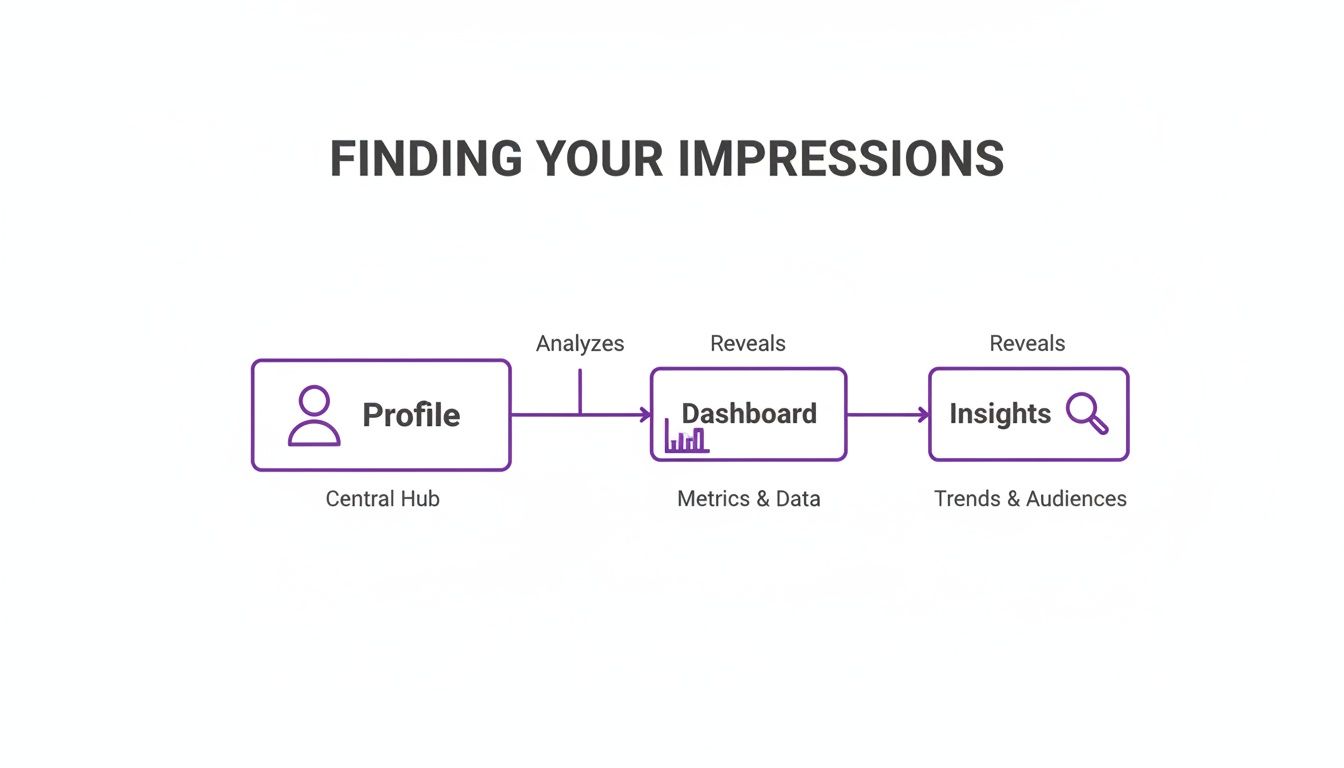
It’s just a few taps away: from your profile, head to the professional dashboard, and then tap into your insights.
To help clarify how these pieces fit together, this table breaks down the core metrics side-by-side.
Core Instagram Metrics Explained
| Metric | Primary Question Answered | Strategic Importance for E-commerce | How to Improve It |
|---|---|---|---|
| Impressions | "How many times was my content displayed on a screen?" | Measures brand visibility and ad frequency. High impressions are key for top-of-funnel awareness. | Use relevant hashtags, post at peak times, and create highly shareable content like memes or infographics. |
| Reach | "How many unique accounts saw my content?" | Indicates audience growth and how well your content is spreading beyond your current followers. | Collaborate with other accounts, run ads targeting new lookalike audiences, and encourage shares to Stories. |
| Engagement | "How many people interacted with my content?" | Shows how compelling your content is. High engagement boosts algorithmic ranking and builds community. | Ask questions in captions, run polls, respond to comments quickly, and create save-worthy posts. |
By analyzing these metrics together, you stop guessing and start understanding your content’s real-world impact.
This trio helps you pinpoint exactly where your strategy is working and where it needs a little help. If you want to take the next step and turn those views into action, our guide on best practices for social media engagement has a ton of practical tips.
7 Actionable Ways to Boost Your Instagram Impressions

Alright, so you know what impressions are. Now for the fun part: making that number climb. Getting more impressions is all about getting your content in front of more people, more often. For any e-commerce brand, that's the first step toward building real awareness and driving sales. It really boils down to creating content the algorithm can't help but show off.
Start by leaning into the content formats that Instagram's algorithm favors right now. Reels and carousels are gold because they’re built to keep people on your post longer. The more time someone spends with your content, the more Instagram sees it as valuable and worthy of a bigger audience. Think about it—a carousel post naturally encourages swiping, which holds attention far better than a static image.
Get Your Content Discovered
Creating great content is only half the battle; people actually need to find it. A solid discovery strategy is your ticket to more impressions.
Be Smart with Hashtags: It's tempting to use only the biggest, most popular tags, but that's a crowded space. A better approach is to blend broad, niche, and branded hashtags to hit different audiences. Knowing the right types of hashtags for Instagram Reels is especially critical for getting that short-form video content to pop.
Use Location Tags: This one's a no-brainer. When you tag a location in your posts or Stories, your content becomes visible to anyone exploring that area on Instagram. It’s a simple way to tap into a super-relevant local audience.
Team Up with Collabs: The Instagram Collab feature is a game-changer. It lets you co-author a post with another creator or brand, meaning your content shows up on their profile and gets served to their followers, too. It’s an instant multiplier for your impressions.
Pro-Tip: Every single share, save, and comment sends a positive signal to the algorithm. Always write captions that encourage people to take action. Ask a question, prompt them to tag a friend, or run a poll—anything to get the conversation started.
Finally, don’t sleep on active community management. Responding to comments quickly does more than just make your followers feel heard. It tells the algorithm that your post is sparking conversation, which can give it an extra push in the feed. This creates a positive cycle: more engagement leads to more visibility, which leads to more impressions. To really master this, check out our guide on how to tag people on Instagram comments and keep that momentum going.
A Few Common Questions About Instagram Impressions
Diving into Instagram analytics often brings up more questions than answers. Let's clear up some of the most common head-scratchers about what impressions really mean for your brand.
Is a Huge Number of Impressions Automatically a Win?
Not on its own, no. Think of impressions as eyeballs on your content. A high number is great—it means your content is getting out there. But if those eyeballs aren't leading to clicks, saves, or comments, you might just be shouting into the void.
For ad campaigns, this is especially critical. High impressions with low engagement can mean you're burning through your budget showing ads to the wrong people. The real goal is to get your content in front of a relevant audience that actually wants to interact with your brand.
Why Are My Impressions So Much Lower Than My Follower Count?
This is a classic—and it's completely normal. Don't panic. The Instagram algorithm doesn't blast your post out to every single follower the second you hit "publish."
Instead, it shows your content to a small test group of your audience. If that group bites—liking, commenting, sharing—the algorithm takes it as a good sign and pushes it out to more people. Things like when you post and how good your content is play a huge role here. This is why your impression count is almost always just a slice of your total follower count.
Key Takeaway: You can't see a list of every person who viewed your post—Instagram keeps that data private. What you can see are the sources of your impressions (like from the Home Feed, Hashtags, or the Explore Page) right in your post insights.
Do My Own Views Count Toward My Impression Total?
Technically, yes. If you look at your own post or Story, Instagram adds that to the impression count.
But let’s be real—your one or two views are a drop in the bucket. They won't meaningfully change your data. The power of the impression metric is in understanding how your audience sees your content, not you.
Are spam comments and trolls burying your real customer questions? FeedGuardians uses AI to automatically hide toxic comments, spot purchase intent, and answer customer questions instantly. Keep your comment section clean and optimized for growth.
Tired of manually moderating comments?
FeedGuardians automates spam filtering, responds to customers, and protects your brand — setup in 3 minutes.