
Quick Summary
| Key Insight | What You Need to Know |
|---|---|
| Automated Onboarding | You can set up welcome sequences that automatically guide new members, show them the rules, and point them to important areas. |
| Content Organization | All the discussions, resources, and user-generated content can be structured into a searchable knowledge base, which can dramatically cut down on support tickets. |
| Member Segmentation | The software lets you group users by their activity, interests, or even what they've purchased, allowing you to create more personal experiences and targeted messages. |
Think of community management software as the central hub for your brand’s online presence. It's the one place where you can build, grow, and keep an eye on all your online communities, pulling everything together into one neat dashboard.
What Is Community Management Software
Ever tried to manage a brand's community without the right tools? It feels like you're trying to host a massive party happening in a dozen different rooms at once, with no way to see what's going on in any of them. That's the exact problem community management software solves.
This software acts like a digital town square—a purpose-built space where your members can connect, swap ideas, and get the help they need. For your team, it’s a toolkit for guiding conversations, rolling out the welcome mat for new members, and putting out fires before they get out of hand. It’s all about turning a disconnected audience into a loyal community that actually helps push your brand forward.
Unifying Disparate Conversations
Without a dedicated platform, your community's conversations are all over the place—scattered across social media comments, DMs, forums, and review sites. This makes it impossible to really know what people are thinking or how healthy your community is.
A core job of this software is to pull all those different touchpoints into one place. This single view lets your managers track what’s being said, spot your most influential members, and respond to problems before they blow up. It finally lets your team stop playing "digital whack-a-mole" and start thinking strategically.
If you want to dive deeper, this comprehensive guide to community management software is a great resource that really breaks down the core ideas.
More Than Just a Forum
It's easy to think of these platforms as just glorified forums, but they do so much more than host simple discussion threads. Today's community software is built from the ground up to drive engagement and deliver real business results.
Here are a few things they handle:
- Automated Onboarding: You can set up welcome sequences that automatically guide new members, show them the rules, and point them to important areas.
- Content Organization: All the discussions, resources, and user-generated content can be structured into a searchable knowledge base, which can dramatically cut down on support tickets.
- Member Segmentation: The software lets you group users by their activity, interests, or even what they've purchased, allowing you to create more personal experiences and targeted messages.
A strong community doesn't just happen; it's built. Community management software provides the foundational blueprint and the tools needed to construct a space where your brand and its customers can grow together.
At the end of the day, this software is the infrastructure you need to build meaningful relationships at scale. It transforms a scattered audience into a powerful, interactive asset—a place where you can nurture brand advocates and build lasting customer loyalty. By bringing everything under one roof, you get the clarity needed to really manage your community effectively.
The Core Features of a Strong Community Platform
To really get why community management software is so important, we need to pop the hood and see what makes it run. These platforms aren't just glorified forums; they're sophisticated toolkits built to create, protect, and grow your brand's digital home.
Think of these features as the essential crew that keeps a bustling community running smoothly. Each one has a specific job, from the vigilant security guard keeping things safe to the friendly host making sure everyone feels welcome. Together, they create a space where real conversations can happen, turning lurkers into loyal advocates. Let's break down the four core jobs these platforms are built to handle.
Moderation and Safety Tools
First things first: you have to create a safe and welcoming space. Moderation tools are the digital bouncers for your community, working 24/7 to keep the vibe positive. Without them, even the most promising community can get overrun by spam, trolls, and toxic behavior in a heartbeat.
These tools are a mix of smart automation and good old-fashioned human oversight. For example, AI-powered systems can automatically flag keywords, phrases, or images that violate your rules. This lets your human moderators spend their time on nuanced issues instead of just wading through mountains of spam.
But good moderation is more than just hitting the delete button. The best platforms give you fine-tuned control over the member experience.
- User Permissions: You can give people different roles—like moderators, super-users, or standard members—each with its own set of posting and editing powers.
- Content Flagging: Members can flag sketchy content for review, empowering everyone to help keep the community clean.
- Spam Prevention: Advanced tools can spot and block spam bots before they even get a chance to post, keeping the conversation genuine.
A great community is built on trust. Effective moderation tools are the foundation of that trust, assuring members that they are in a safe and professionally managed space where their contributions are valued.
For anyone running paid social campaigns, keeping comment sections clean is a non-negotiable. Protecting your brand's reputation is everything, and you can learn more about the best ways to do it in our detailed guide on social media content moderation.
Automation and Workflows
Next up is your tireless digital assistant: automation. A community manager's time is incredibly valuable, and automation features are designed to take all the repetitive, soul-crushing tasks off their plate. This frees up your team to focus on what really matters—strategy, creating great content, and building real relationships.
Think about what happens when a new member joins. Instead of someone manually sending a welcome message, an automated workflow can instantly shoot them a personalized greeting, a link to the community guidelines, and a few ideas for their first post. It’s a simple touch that makes every new member feel seen from day one.
Workflows can also step in to handle common questions. If a member asks something that's already in your FAQ, the software can spot keywords and automatically suggest the right resource. Your team saves time, and your members get answers instantly.
Engagement and Analytics
So, how do you know if your community is actually healthy? That's where engagement and analytics tools come in. This is your community's health dashboard, giving you the vital signs you need to make smart decisions. It shows you who's talking, what they're talking about, and whether they're happy.
These analytics go way beyond a simple member count. A solid platform will show you:
- Activity Levels: Keep an eye on daily active users, how often people are posting, and the volume of comments to see if engagement is trending up or down.
- Top Contributors: Quickly identify your most active and influential members—these are your brand advocates in the wild!—so you can reward them.
- Popular Topics: See what discussions are getting the most attention. This is a goldmine for your content strategy and helps you understand what people care about.
- Sentiment Analysis: Some advanced tools can even read the room, analyzing the overall tone of conversations to alert you if the community mood starts to sour.
For performance marketers and social media managers, this data is pure gold. It’s direct, unfiltered feedback from your most passionate customers, helping you tweak your messaging, improve your products, and prove the real ROI of your community efforts.
Essential Features of Community Management Software
To put it all together, the best platforms blend these core functions into a seamless experience. Here’s a quick breakdown of what these features do and how they look in action for a marketing team.
| Feature Category | What It Does | Practical Example for Marketers |
|---|---|---|
| Moderation & Safety | Protects the community from spam, abuse, and off-topic content using AI and manual tools. | Automatically hiding comments on a Facebook ad that contain profanity or competitor links, protecting brand reputation. |
| Automation & Workflows | Handles repetitive tasks like welcoming new members, answering FAQs, and tagging content. | Setting up a workflow that sends a welcome DM with a starter guide to every new member who joins your Discord server. |
| Engagement & Analytics | Tracks community health, identifies key members, and reveals popular topics and overall sentiment. | Using the dashboard to find the top 10 most engaged users this month and sending them exclusive early access to a new product. |
| Integration Capabilities | Connects the community platform to other business tools like CRMs, helpdesks, and marketing automation software. | Syncing community user data with your HubSpot CRM to see which customers are also your biggest brand advocates. |
Ultimately, these features work together to create a self-sustaining ecosystem where your brand and your customers can build something valuable together.
Integration Capabilities
Last but not least, a community platform can’t live on an island. It needs to play nice with the other tools you already use. Integrations are key to creating a unified customer experience, ensuring that the valuable insights from your community don’t get stuck in a silo.
For instance, by connecting your community software to your CRM, you can link a user's community activity directly to their customer profile. Suddenly, your sales and support teams get a 360-degree view of each person, seeing their questions, their contributions, and how influential they are. You can also integrate with a helpdesk like Zendesk, automatically turning support questions from the community into trackable tickets for your customer service team. It’s all about making your data work smarter, not harder.
Driving Business Growth and ROI with Your Community
A thriving online community is so much more than a chat room or a place to handle customer complaints. Think of it as a powerful engine for real, measurable business growth. Investing in the right tools to manage it isn't just a "nice-to-have" expense; it's a strategic move that directly impacts your bottom line.
When you bring your audience together in one place, you're building an asset that benefits the entire company. You're creating a self-sustaining ecosystem that transforms passive customers into brand advocates. The value here is clear, from cutting marketing spend to getting products to market faster.
Increasing Customer Lifetime Value
One of the first places you'll see a return is in your Customer Lifetime Value (CLV). A community creates a built-in support network where members help each other out, which is a massive driver of loyalty. It’s what keeps people from churning.
Imagine a customer hits a snag. Instead of getting frustrated and walking away, they can hop into the community and get help from other users or your own experts within minutes. This peer-to-peer support doesn't just solve problems; it creates a sense of belonging that your competitors can't easily copy. And we all know loyal customers spend more and become your best salespeople.
A brand-owned community is the ultimate retention tool. It shifts the customer relationship from purely transactional to deeply relational, making your brand an indispensable part of their professional or personal lives.
These platforms also make it easy to spot your superfans—the people who truly love what you do. You can connect with them, build an advocacy program, and keep them deeply invested in your brand's future, which feeds directly back into higher retention rates.
Lowering Acquisition and Support Costs
An active community acts as a marketing amplifier, which can seriously lower your Customer Acquisition Cost (CAC). When members are happy, they naturally talk about their positive experiences. This generates authentic word-of-mouth marketing and user-generated content that people trust way more than a slick ad.
Every positive review, helpful tutorial, or success story shared in your community is basically a free marketing campaign. This organic buzz brings in new customers who are already warmed up to your brand because they’ve seen real people getting real value from it.
But the ROI gets even clearer when you look at what it does for your support costs.
- Ticket Deflection: When users can find answers from each other or in a community knowledge base, they don't open a support ticket. That’s a direct reduction in your customer service team's workload.
- Scalable Support: A single answer posted in a public forum can help hundreds—or even thousands—of other users facing the same issue. You simply can't get that kind of scale from one-on-one support channels.
Of course, tracking this impact is key. Learning how to measure social media engagement is a great starting point for understanding your community's financial contribution.
Accelerating Product Innovation
What if you could get instant, honest feedback from your most passionate customers without spending a dime on focus groups? That's what a community gives you. It's a direct line to your user base that can dramatically speed up your product development cycles.
Instead of paying for expensive market research, you can just post a new feature idea, a design mockup, or an invitation to a beta test. The feedback you get is immediate. It helps you validate ideas, spot potential problems early, and ultimately build products that people are actually asking for. This doesn't just save money; it makes sure your roadmap is perfectly aligned with what the market wants.
This direct connection is becoming non-negotiable for smart companies. For more strategic insights, explore our guide on the best practices for social media engagement. By bringing your community into the process, you turn customers into co-creators. That builds a powerful sense of ownership and loyalty while helping you build better products, faster.
How to Choose the Right Community Software
Picking the right community management software can feel like a huge decision, but it doesn't have to be a headache. The trick is to break the process down into manageable steps. If you do, you'll end up with a platform that not only works for you today but grows with you tomorrow. It's all about looking past the slick sales pitches and focusing on what your brand and audience actually need.
The whole process kicks off with a dose of reality: a needs analysis. Before you even think about watching a demo, you have to get crystal clear on the main goal for your community. Is it about cutting down on support tickets? Building a legion of brand advocates? Or is it a goldmine for product feedback? Your answer changes everything.
Define Your Core Community Goal
Every great community has a purpose. A platform built for peer-to-peer customer support is going to be packed with features like knowledge bases and ticket deflection. On the other hand, a tool designed for brand advocacy will lean heavily into gamification and ways to highlight user-generated content.
Nailing down your primary objective acts as a powerful filter, instantly clearing away a lot of the noise in the market. Get specific. Don't just aim to "increase engagement." Instead, set a measurable goal like "reduce customer support response times by 30%" or "source five new product ideas from the community each quarter."
This decision framework shows exactly how that initial goal connects directly to measurable ROI—whether that’s better retention, lower costs, or faster R&D.
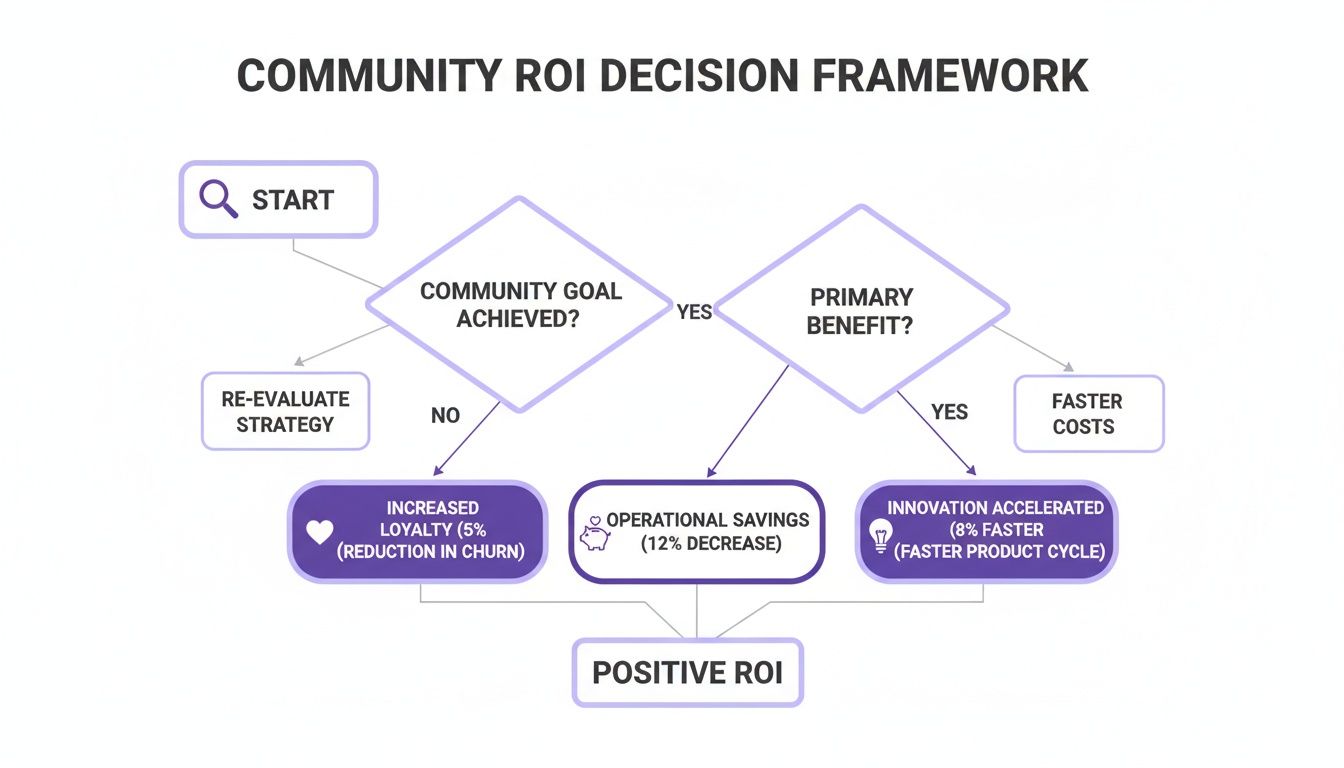
Here’s the key takeaway: your community's "why" dictates the features you hunt for and the metrics you'll use to prove its worth. A clear goal stops you from overspending on bells and whistles you’ll never touch.
Evaluate Key Technical Criteria
Once your strategy is locked in, it’s time to talk tech. The best software has to play nice with your existing tools and workflows. A platform that creates data silos or adds manual work for your team isn't an asset; it's a liability.
Here’s a quick checklist of the must-haves to look for:
- Integration Capabilities: Does it connect to your core tech stack? Look for out-of-the-box integrations with your CRM (like HubSpot or Salesforce), helpdesk software, and email marketing tools. This is how you get a single, unified view of your customers.
- Scalability: Think about where you'll be in a year or two. The platform needs to handle a huge influx of members and activity without slowing down or sending your bill through the roof.
- Deployment Model: Honestly, almost every modern platform is cloud-based, and for good reason. It offers better scalability, remote access for your team, and far easier integrations than old-school on-premise solutions. In fact, industry data shows the cloud model holds a majority share of the market for this exact reason. You can learn more about trends in Community Management Systems and their deployment from this Data Bridge Market Research report.
- User Experience (UX): Test drive the experience from both sides of the screen. A clunky admin dashboard will drive your managers crazy, while a confusing member interface will kill participation before it even gets going.
The right software shouldn't force you to change how you work; it should amplify your existing strengths. Prioritize platforms that complement your current systems and workflows, not ones that require a complete overhaul.
Run Meaningful Software Trials
Last but not least, never, ever make a final call based on a demo alone. A sales presentation is a highlight reel, designed to show the software at its absolute best. To see what it’s really made of, you have to run a trial with real-world scenarios.
Don't just click around aimlessly. Give the platform a specific job to do. For example, try setting up an automated welcome sequence for new members. Test its moderation AI by posting something that should get flagged.
Even better, invite a small group of trusted team members or community power-users to give you honest feedback on the member experience. You should also take a hard look at the analytics. To get a sense of what great reporting looks like, check out our guide on the best tools for social media analytics.
This hands-on testing is the only way to see how the software performs under pressure. It gives you the confidence to make an evidence-based decision that fits your budget and sets your community up for success.
Understanding Where Community Platforms Fit
It’s a fair question: "Don't I already have a tool for this?" Your marketing stack is probably already packed with social media schedulers, analytics dashboards, and a CRM. So, where does community management software even fit?
It’s easy to see it as just another tool, but it actually fills a specific, vital gap that those other platforms aren't built to handle.
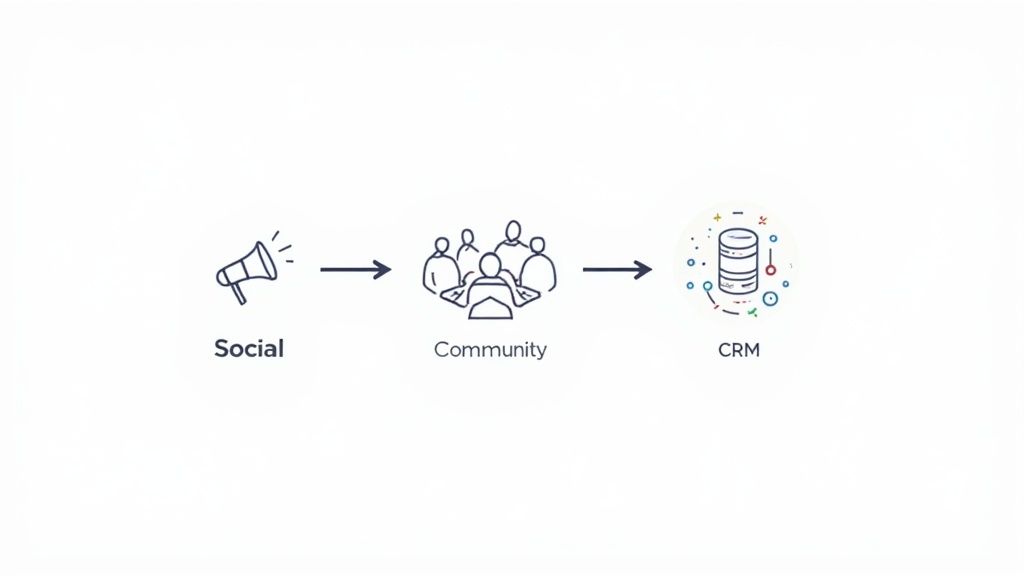
Let's break it down. Think of your social media management tool as a megaphone. It’s perfect for broadcasting your message far and wide, running ad campaigns, and engaging with a massive public audience. Its main job is one-to-many communication—shouting from the rooftops to get attention.
A community platform, on the other hand, is more like a private workshop or a members-only clubhouse. It's a space you own, a place to build real, lasting relationships with your most dedicated customers and biggest fans. The goal isn't just talking at them; it's about giving them a place to talk to each other.
How Is It Different From a CRM?
So, what about your CRM? A Customer Relationship Management system is your digital filing cabinet. It’s brilliant at tracking one-on-one customer data—every purchase, support ticket, and sales call. It gives you a detailed history of your direct relationship with each person.
But a community platform does something a CRM simply can't. It maps the web of connections between your customers. It shows you who’s helping who, which members are stepping up as leaders, and what topics are sparking genuine peer-to-peer conversations. This is the kind of insight that reveals the true health and culture of your community.
Community management software is the bridge between the mass-market reach of social media and the individual focus of a CRM. It’s the only tool specifically built to cultivate and measure the collective power of brand loyalty.
And what about those standalone moderation tools? They're great for cleaning up comments, but that's just one small piece of the puzzle. A true community platform weaves moderation together with tools for engagement, analytics, and member management to create a thriving, self-sustaining ecosystem.
Finding the Right Fit for Your Goals
The market for these tools is pretty diverse, and different platforms are built for different jobs. For example, some software is designed specifically for organizing in-person events and local meetups. Other, more common platforms combine online community features with content and broader social tools, representing a much larger and faster-growing market.
Ultimately, you need to be clear on your primary goal. Are you chasing broad brand awareness or trying to build deep, unshakable customer loyalty?
- Social Media Management Tools: Best for top-of-funnel activities. Use them to cast a wide net for brand discovery and audience growth.
- Community Management Software: Your go-to for building a loyal base. Use it to reduce churn, gather priceless product feedback, and even lower customer support costs.
- CRM: This is your system of record. It tracks direct customer interactions and sales data across their entire journey with your brand.
Once you see these distinct roles, it becomes clear that community management software isn’t just another tool—it’s essential for building a lasting competitive advantage through loyalty. And when you combine it with your other marketing efforts, its power multiplies. To see how this fits into your bigger strategy, check out our guide on what is social listening.
Common Questions About Community Management Software
Even after you see the potential, investing in a new piece of tech always brings up a few last-minute questions. When we talk to marketers and business leaders about community management software, the same concerns about timing, cost, and getting it right tend to pop up.
Let's tackle those head-on. Here are some straightforward answers to the most common questions we hear, so you can move forward with confidence.
How Long Does It Take to See Results?
This is usually the first thing everyone wants to know, and the answer comes in two parts. You’ll feel the operational benefits almost instantly. From day one, the software starts automating tasks like filtering spam or welcoming new members, which immediately frees up your team’s time.
The bigger business impact, however, takes a little more time to grow. Think of it like planting a garden. The software gives you the best soil and tools, but the seeds still need time to sprout and flourish.
- Within 3 months: You should start seeing some really promising signs. Look for higher engagement rates, more user-generated content, and a general shift toward more positive conversations.
- Within 6 to 12 months: This is where you can expect to see a real, measurable ROI. Things like a tangible lift in customer retention, a drop in support costs, or a faster feedback loop for your product team usually become clear in this timeframe.
The key is consistency. The software is a powerful tool, but it’s the consistent strategy and human touch that really drive those long-term, bottom-line results.
Can Small Businesses Benefit from This Software?
Absolutely. This kind of software isn't just for massive companies with huge customer bases. In fact, for a small business, a dedicated and engaged community can be a serious competitive advantage.
For a smaller brand, a community is a direct engine for word-of-mouth marketing. It helps you build a loyal base of customers who actively cheer for your products—something that’s way more powerful than traditional advertising. It also gives you a direct line for product feedback when you don’t have a huge R&D budget.
For a small business, community isn't a luxury; it's a force multiplier. It lets you punch above your weight in customer support, marketing, and product innovation by tapping into the collective power of your most passionate users.
Many software providers now offer flexible pricing plans designed for small and medium-sized businesses. This makes it easier than ever to start building your brand’s digital home without a massive upfront investment.
What Is the Biggest Mistake to Avoid?
The single biggest pitfall is falling for the "if you build it, they will come" myth. Just launching the software and expecting a vibrant community to appear out of thin air is a recipe for an empty digital room.
A successful community needs a proactive launch strategy. The software is the venue, but you’re the host. It’s on you to create a welcoming and engaging environment right from the start.
To avoid this classic mistake, make sure you have these things ready before you go live:
- A Dedicated Manager: Someone needs to own it—nurturing the community, sparking conversations, and keeping things on track.
- A Clear Purpose: Members need to know why they should be there. Is it for support? Networking? Exclusive content? Make it clear.
- An Initial Content Plan: Have a backlog of discussion prompts, polls, and interesting content ready to go. You have to get the conversation started.
Think of it like throwing a party. You wouldn't just unlock the door and hope for the best. You'd have music playing, snacks out, and be at the door to greet your first guests.
How Does This Software Integrate with Other Tools?
Great community platforms are designed to be the central hub of your customer experience, not just another data silo. They almost always offer solid integrations with the tools your marketing and sales teams already use every day.
These connections are what really unlock the power of your community data, giving you a richer, fuller picture of your customer. For example, any quality community management software will connect with a CRM.
- CRM Integration (e.g., Salesforce, HubSpot): This syncs community activity with individual customer profiles. Your sales team can see which prospects are highly engaged, and your support team can identify your most helpful brand advocates.
- Helpdesk Integration (e.g., Zendesk, Intercom): This can automatically turn community posts into support tickets, ensuring no one’s question gets missed. It also helps you see which problems the community is solving for you.
- Marketing Automation (e.g., Mailchimp, Marketo): You can use community activity to trigger targeted email campaigns, segmenting users based on their interests or how engaged they are.
Managing all these interactions is key, especially when it comes to keeping conversations productive and safe. To get a better handle on this crucial piece, you can check out our detailed guide on what comment moderation means and how it protects your brand.
Ready to protect your brand and turn your social media comments into a conversion machine? FeedGuardians uses AI to automatically hide harmful comments, detect purchase intent, and provide instant, brand-safe replies. Stop wasting time on manual moderation and start building a community that drives growth. Learn more and get started with FeedGuardians today!
Tired of manually moderating comments?
FeedGuardians automates spam filtering, responds to customers, and protects your brand — setup in 3 minutes.