
Quick Summary
| Key Insight | What You Need to Know |
|---|---|
| Proactive Engagement | This means jumping into conversations, anticipating customer needs, and building a genuine community around your brand, not just reacting to tags. |
| Seamless Technology Integration | Your tools have to talk to each other. This is about connecting social data to your main CRM, helpdesk, or e-commerce platform to create one unified customer profile. |
| Data-Driven Execution | Using the data from all those interactions to spot buying signals, track customer sentiment, and fine-tune how you communicate to get better results. |
When you hear “CRM,” you probably think of managing customer data from emails, phone calls, and maybe your website. But what about the constant stream of interactions happening out in the open on social media? That’s where Social Media Customer Relationship Management comes in.
It’s the practice of treating every comment, DM, and mention on social platforms not just as a notification to clear, but as a genuine opportunity to build a relationship, solve a problem, or even close a sale. This isn't just about damage control or answering basic questions; it's a complete strategy for engaging with your audience where they spend their time.
The New Front Door to Your Business
Think of your business as a brick-and-mortar shop for a moment. Traditional CRM is what happens inside—managing contacts, tracking purchases, and handling direct inquiries. Social CRM, on the other hand, is like having your best employee out on the sidewalk, greeting people who walk by, engaging with those who comment on your window display, and answering questions from the crowd gathered in the town square.
Instead of waiting for a customer to email support, a solid Social CRM strategy means you’re already in the conversation on Instagram, Facebook, or TikTok. It’s about creating a system to manage every single one of those public interactions to guide people along their customer journey.
The big shift with Social CRM is moving from passive monitoring to active relationship-building. Every social interaction becomes a valuable piece of the puzzle, feeding insights into your sales, marketing, and even product development teams to build a true 360-degree view of your customer.
From Social Listening to Active Engagement
You might be thinking this sounds a lot like social listening, and you're on the right track. Social listening is the essential first step—it’s how you tune into conversations about your brand, your competitors, and your industry. If you want to dive deeper, we have a complete guide on what is social listening.
But Social CRM is what you do with that information. It’s the action plan. Social listening gives you the intel; Social CRM provides the framework for turning that intel into measurable business outcomes. This structured approach transforms your social media channels from a chaotic mess of notifications into a powerful engine for growth.
A successful Social CRM strategy really boils down to three key pillars:
- Proactive Engagement: This means jumping into conversations, anticipating customer needs, and building a genuine community around your brand, not just reacting to tags.
- Seamless Technology Integration: Your tools have to talk to each other. This is about connecting social data to your main CRM, helpdesk, or e-commerce platform to create one unified customer profile.
- Data-Driven Execution: Using the data from all those interactions to spot buying signals, track customer sentiment, and fine-tune how you communicate to get better results.
Done right, this turns your comment sections from a wild, untamed space into a well-managed—and highly profitable—asset. It’s how you build real connections with customers, one comment at a time.
Here is the rewritten section, designed to sound like it was written by an experienced human expert.
Why Social CRM Is Essential for E-commerce Growth
For e-commerce brands, the game has completely changed. Your digital shelf isn't just your product page anymore. It’s every social media comment section where potential customers gather to ask questions, share opinions, and ultimately, decide whether to buy. A solid social media customer relationship management strategy isn't just a "nice-to-have" these days—it's a core engine for real business growth.
This is about moving way beyond counting likes and shares. We're talking about systematically turning public chatter into sales, loyalty, and a brand reputation that actually means something. Every single interaction is a new chance to guide someone from casual curiosity to a confident checkout.
Turning Conversations into Conversions
Think about it: every day, your social media ads and organic posts pull in comments from people who are this close to making a purchase. They're asking about sizing, shipping details, or specific product features. These aren't just idle questions; they are direct buying signals.
Leaving these high-intent comments hanging is like watching a customer with a full shopping cart wander out of your store. A quick, genuinely helpful response can be the exact push they need to click "buy now." This kind of direct engagement opens up a whole new, measurable revenue stream that far too many brands ignore.
By spotting and jumping on purchase intent in real-time, you're essentially shortening the sales cycle and grabbing revenue that would have otherwise slipped through your fingers. It's all about meeting customers exactly where they are.
Building Lasting Customer Loyalty and Lifetime Value
Exceptional experiences are what turn one-time buyers into people who stick around for the long haul. Social CRM is the machine that makes those positive interactions happen, and at scale. When a customer gets a fast, personal, and useful reply, they feel seen and valued.
That feeling builds a real emotional connection to your brand, which has a direct line to customer lifetime value (CLV). A happy customer isn't just likely to come back; they're going to tell their friends about you.
A brand's responsiveness is a huge part of customer retention. The speed and quality of your social interactions send a clear signal about how much you value your community, turning casual followers into loyal customers who feel like they belong.
In such a crowded market, ignoring comments is a massive risk. In fact, a staggering 73% of social media users say they're likely to jump ship to a competitor if a brand doesn't respond quickly on social platforms. This number, highlighted in a comprehensive Sprout Social report, shows just how much platforms like Instagram and TikTok have become the front lines for winning—or losing—customer loyalty.
Protecting and Elevating Your Brand Reputation
Your comment section is a public window into your brand's soul. When it’s overrun with spam, unanswered questions, or ignored complaints, it kills trust and makes you look unreliable. Potential customers see that chaos and think twice before buying.
A smart Social CRM strategy is your brand's reputation shield. It’s about actively managing the conversation to keep things positive, helpful, and on-brand.
This boils down to a few key actions:
- Automated Spam Removal: Instantly hiding bots, scams, and sketchy links keeps the space clean and safe for real customers.
- Rapid De-escalation: Jumping on negative feedback quickly and professionally stops small problems from blowing up into PR nightmares. Simply acknowledging a complaint and offering a path to a solution shows everyone you care.
- Showcasing Positive Interactions: When other users see you actively helping people, it builds powerful social proof and cements your reputation for great service.
By keeping your comment sections healthy, you create an environment where customers feel confident and secure making a purchase. This isn't just about damage control; it's about actively polishing your public image, making your brand the obvious choice. It’s a crucial investment in your long-term success.
Weaving Social CRM into Your Martech Stack
A powerful social media CRM strategy can't exist on an island. To get real value from it, it has to be the connective tissue for your entire marketing technology stack, linking public conversations directly to your core business operations.
Without proper integration, all those likes, comments, and DMs are just isolated data points. They have no context. The real magic happens when you build bridges between your social channels and your internal systems. Think of your Social CRM tool as a translator—it takes the fast-paced, unstructured language of social media and turns it into clean, actionable insights for the platforms that run your business.
Connecting the Dots in Your Tech Stack
The goal is to create a single, unified view of every customer. To do that, your Social CRM needs to feed data seamlessly into your other key platforms. This creates a powerful feedback loop where each system makes the others smarter, leading to better marketing, faster support, and a genuinely personalized customer journey.
So, where do you need to build these bridges? The primary integration points are:
- Traditional CRM (like Salesforce or HubSpot): This is the most important connection. Social interactions, user handles, and stated interests get piped directly into a customer's profile. This gives your sales and marketing teams the full story—not just purchase history, but public sentiment and engagement habits, too.
- E-commerce Platform (like Shopify or Magento): Integrating with your e-commerce backend allows you to directly attribute sales to social media activity. You can finally track when a user who commented on an Instagram post goes on to make a purchase, proving the direct ROI of your team's engagement.
- Customer Support Software (like Zendesk or Gorgias): When a comment signals a problem, a good integration can automatically create a support ticket. This ensures no customer issue falls through the cracks and that it's routed to the right team instantly. Making this work requires clear communication between support and marketing systems, a core principle covered in this helpful guide to the Modern IT Service Desk.
Your marketing stack is an ecosystem, and for it to thrive, every component needs to communicate effectively. Below is a breakdown of the essential tools that form a modern, high-performing Social CRM technology stack.
Components of a Modern Social CRM Tech Stack
| Tool Category | Primary Function | Example Tools |
|---|---|---|
| Social CRM Platform | Central hub for managing all social interactions, analyzing sentiment, and identifying customer intent. | FeedGuardians, Sprout Social |
| Traditional CRM | The main database for all customer data, including purchase history, contact info, and support tickets. | Salesforce, HubSpot |
| Help Desk Software | Manages and tracks customer support issues, creating a streamlined resolution process. | Zendesk, Gorgias |
| E-commerce Platform | The backend system that powers the online store, processing orders and managing inventory. | Shopify, Magento, BigCommerce |
| Marketing Automation | Nurtures leads and engages customers through automated email sequences and targeted campaigns. | Klaviyo, Mailchimp |
Each tool plays a critical role, but it’s the seamless integration between them that transforms individual actions into a cohesive and powerful customer experience strategy.
A Practical Workflow: From Comment to Conversion
Let's walk through a real-world example. Imagine a fashion brand posts a video of a new jacket on Instagram. A user comments, "Wow, I need this for my trip next month! How much is it?"
Without integration, a social media manager might just reply with the price and cross their fingers. But with a connected Social CRM, a much smarter workflow kicks in automatically.
- Intent Detection: An AI-powered tool like FeedGuardians instantly scans the comment, flagging the phrase "I need this" as strong purchase intent.
- Automated Public Reply: The system immediately posts a pre-approved public reply like, "We're so glad you love it! It's perfect for travel. You can find all the details and grab yours here: [link]." This response captures the lead while their interest is at its peak.
- CRM Lead Creation: At the same time, the system sends the user’s data (Instagram handle, comment) to your main CRM (like HubSpot). It creates a new lead or updates their existing profile, tagging them with "High-Intent Lead - Instagram."
- Personalized Follow-Up: This new tag can trigger an automated marketing sequence. The user might get added to an email list for a follow-up campaign featuring travel apparel or even a limited-time offer on that specific jacket.
This seamless flow transforms a fleeting social media comment into a tracked, nurtured lead within your core sales funnel. It closes the loop between public engagement and measurable revenue, making your social media team a direct contributor to the bottom line.
This infographic helps visualize how a strong social media presence, built on genuine engagement, strengthens your brand, builds loyalty, and ultimately drives sales.
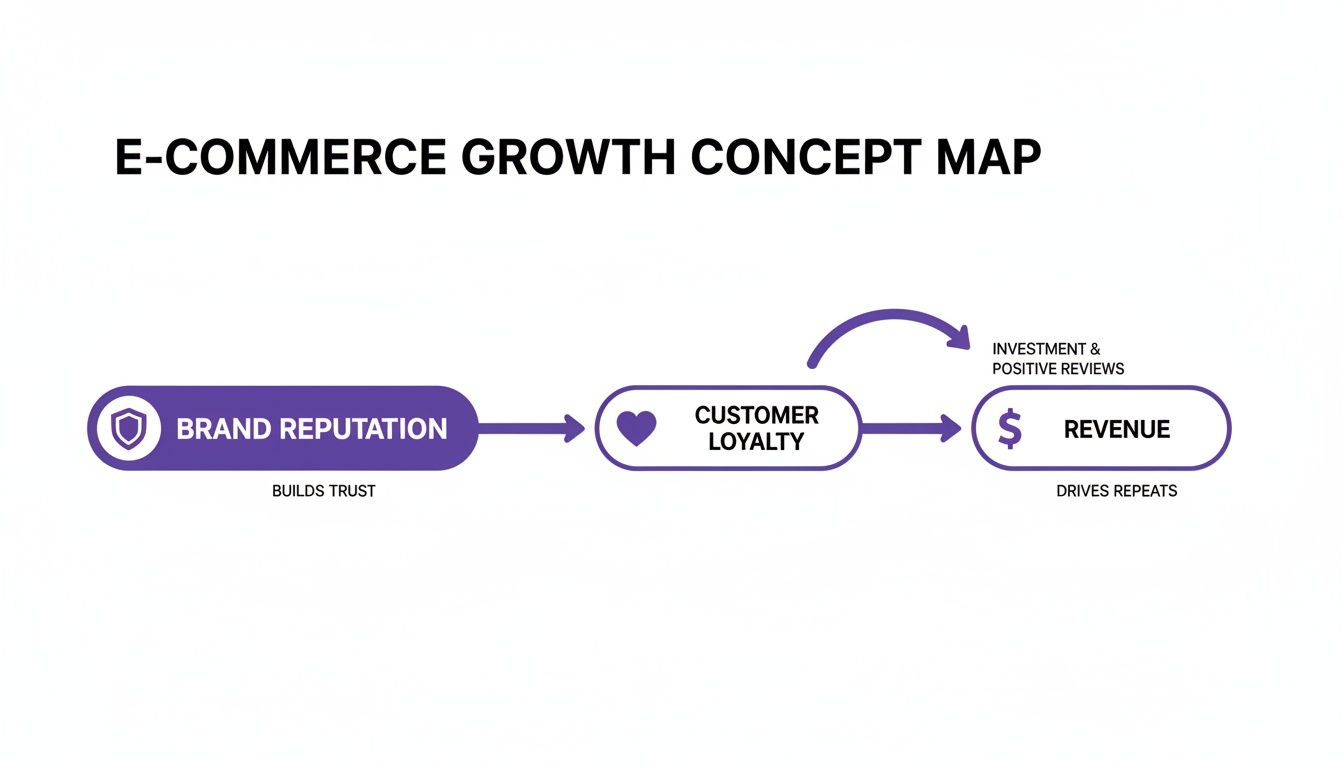
As you can see, it all starts with protecting your brand reputation. That builds the trust needed for customer loyalty, which in turn becomes a reliable source of revenue.
By weaving your social media customer relationship management strategy into the very fabric of your martech stack, you move beyond just posting content. You create an intelligent system that understands and responds to customers consistently, no matter where the conversation starts. This is how the best e-commerce brands build resilient customer relationships and unlock new growth. If you're looking to build your own stack, this detailed comparison of social media automation tools for 2025 is a great place to start your research.
Actionable Social CRM Workflows That Drive Results

A great social media customer relationship management strategy isn't just theory—it’s about having specific, repeatable processes that actually get the job done. The real results come from turning abstract goals into well-defined, automated workflows your team can count on day in and day out.
Think of these workflows as your team's playbook. They bring order to the chaos of your comment sections, transforming them into a well-oiled machine. They provide a clear blueprint for handling every kind of interaction, ensuring every customer gets a fast, consistent, and helpful response.
Here are three critical workflows that e-commerce brands can set up right now to see measurable results.
The Purchase Intent Capture Workflow
This is all about turning comments into cash. The goal here is to spot users who are ready to buy and give them the final nudge they need to cross the finish line, all in real time.
We’ve all seen comments like, "I need this for my upcoming trip!" or "How much is this?" These aren't just questions; they're buying signals. Ignoring them is like turning your back on a customer standing at the register with their wallet out.
Here’s how this workflow turns those moments into sales:
- AI-Powered Intent Detection: The process kicks off with an AI tool, like FeedGuardians, scanning every single comment as it comes in. It’s been trained to recognize thousands of phrases that signal high purchase intent, from direct questions about price to excited expressions of desire.
- Instant, Automated Reply: As soon as intent is flagged, the system posts an immediate, pre-approved public reply. This isn't some generic "Thanks for your comment!" but a genuinely useful response, like, "It's perfect for travel! You can find all the details and color options right here: [product link]."
- Lead Tagging and CRM Sync: At the same time, the user is tagged as a “high-value lead” in your social CRM dashboard. This interaction data is then automatically sent to your main CRM, either updating an existing customer profile or creating a new one. Your sales team gets the full context without lifting a finger.
This entire process captures sales opportunities the second they appear, capitalizing on that peak moment of customer interest before they get distracted and scroll away.
By automating the first touchpoint and the data entry, you guarantee no high-intent comment ever slips through the cracks. This workflow forges a direct link between social engagement and your sales pipeline, making it a cornerstone of any serious social CRM strategy.
The Proactive Customer Support Workflow
Every bit of customer service on social media is a public performance. The way you handle one frustrated comment can sway hundreds of potential buyers watching from the sidelines. This workflow is built to de-escalate issues quickly while showcasing your brand’s commitment to amazing support.
The idea is to take control of the narrative. You move a potentially damaging public complaint into a private, one-on-one conversation, which protects your brand's reputation while actually helping the customer.
Here’s the step-by-step process:
- Negative Sentiment Identification: An AI model scans incoming comments for negative sentiment, looking for keywords like "broken," "late," or "doesn't work," along with general expressions of frustration.
- Instant Comment Moderation: The moment a negative comment is detected, it’s automatically hidden from public view. This isn’t about censorship; it’s a temporary pause that gives your team breathing room to address the issue before it spirals.
- Public Offer of Assistance: Immediately after the comment is hidden, the system posts a public, empathetic reply. Something like: "We're so sorry to hear you're having an issue. We want to make this right. Please check your DMs for a message from our support team so we can help you."
- Ticket Creation and Private Follow-Up: A support ticket is automatically created in your help desk software, and a direct message is sent to the user to start the resolution process. This seamless handoff is a core component of effective customer service automation.
This workflow shows you're accountable and responsive, turning a potentially negative situation into a public display of fantastic customer care.
The Brand Reputation Shield Workflow
Your comment section is prime real estate for spammers, bots, and trolls. If you let them run wild, this junk can easily drown out genuine customer conversations, tank your credibility, and make your page feel unsafe for your real community.
This workflow is like having a 24/7 security guard for your social media pages.
The process is simple but incredibly effective:
- Content Analysis: The system automatically scans every new comment for spam triggers. This includes suspicious links, offensive language, competitors trying to poach your customers, and repetitive, bot-like text.
- Auto-Hiding and Deletion: Based on the rules you set, the tool instantly hides or deletes any comment that violates your community guidelines. This happens in milliseconds—long before most of your followers will ever see it.
- Reporting and Logging: Every moderated comment is logged in a dashboard for your team to review. This keeps the process transparent and helps you fine-tune your moderation rules over time.
This proactive defense keeps your comment sections clean, positive, and valuable—a place for real customer engagement to flourish. And that engagement is the lifeblood of modern CRM. With comments surging 107% YoY on X and 37% on LinkedIn, and with 68% of teams now tracking engagement for ROI, these automated workflows are essential. They help you manage this explosive growth and turn all those conversations into conversions. You can explore more social media statistics to see just how massive this opportunity has become.
How to Measure the ROI of Your Social CRM Strategy

For anyone running performance marketing or an e-commerce brand, proving the value of a strategy isn’t just a nice-to-have—it’s everything. The engagement perks of a social media customer relationship management program are obvious, but tying those activities directly to the bottom line is what really secures budget and drives investment.
It's time to graduate from vanity metrics like likes and follows. We need to focus on the key performance indicators (KPIs) that draw a straight line from a social media comment to a real financial impact.
The mission is to build a business case that speaks the C-suite's language: revenue, cost savings, and efficiency. This means creating a clear framework for measuring your social CRM’s return on investment (ROI) and turning those anecdotal wins into cold, hard data. To get this right, you'll need to know your methods and the right AI Tools For Social Media ROI Tracking to get the job done.
Key Metrics That Tie Social Activity to Revenue
To really get a handle on ROI, you have to track the metrics that bridge the gap between a simple comment and a final conversion. These KPIs provide the tangible link you need, showing that social CRM isn't a cost center but a legitimate revenue generator.
Here are three core metrics you should start tracking immediately:
- Comment-to-Conversion Rate: This is the ultimate proof of performance. It tells you the percentage of people who actually make a purchase after your team engages with one of their high-intent comments. If you reply to 100 comments asking "Where can I buy this?" and 15 of them lead to a sale, your comment-to-conversion rate is a solid 15%.
- Socially-Assisted Revenue: This metric tots up the total revenue from customers who had a conversation with your brand on social media before they checked out. By using UTM parameters in the links you share in replies and integrating your social CRM with your e-commerce platform, you can directly attribute sales back to specific social interactions.
- Average Reply-to-Sale Time: How fast does a conversation turn into a sale? Tracking the time between your first reply to an interested user and their eventual purchase helps you fine-tune your response strategy and prove that real-time engagement pays off.
Calculating Cost Savings and Efficiency Gains
ROI isn’t just about the money you bring in; it’s also about the money you don't spend. A smart social CRM strategy creates some serious operational efficiencies that translate directly into cost reductions, and these savings are a critical part of your business case.
A well-implemented social CRM program reduces the burden on your traditional customer support channels. By resolving issues and answering questions directly in the comment section, you prevent those inquiries from becoming costly support tickets, emails, or phone calls.
Think about these efficiency-focused KPIs:
- Reduction in Customer Service Costs: First, figure out the average cost of a support ticket (factor in agent time, software fees, etc.). Then, start tracking the number of questions you answer on social media that would have otherwise clogged up your support queue. The result is a direct, quantifiable cost saving.
- Increased Team Productivity: Measure the time your team gets back by automating repetitive tasks like deleting spam or answering FAQs. For example, if an AI tool like FeedGuardians zaps 5,000 spam comments a month, you can easily calculate the hours saved and show how that time was reallocated to high-value work like nurturing leads.
Case Study: A Tangible Lift in Sales
Let's walk through a realistic example. An online apparel retailer brought in an AI-powered comment management system to get a handle on its massive volume of Instagram and TikTok comments. Before this, their team was completely swamped, and countless sales-related questions were slipping through the cracks.
After rolling out a social CRM strategy with automated intent detection and real-time replies, the results were almost immediate.
- Before: The team was only able to manually reply to about 20% of comments that showed purchase intent. Their socially-assisted revenue was fuzzy at best, lumped into general social media efforts.
- After: Within just three months, they were automatically replying to over 95% of high-intent comments. This directly led to a 22% lift in sales from those interactions and freed up the team, boosting their efficiency by 35%.
This kind of data changes the conversation entirely. You go from saying "social media is important" to proving that "our social CRM strategy generated an extra $50,000 in revenue last quarter." Personalization is a huge piece of this puzzle. Today, 76% of customers expect personalized interactions, and brands that provide them are 71% more likely to earn their loyalty. AI-driven sentiment analysis helps brands deliver that personalization at scale, which is exactly what drives these impressive ROI figures.
By focusing on these concrete metrics, you can build a powerful, data-backed argument for investing in social media customer relationship management. If you're looking for the right tools to start collecting this data, check out our guide on the best tools for social media analytics.
Frequently Asked Questions
When you start digging into social media customer relationship management, a lot of practical questions pop up. It's one thing to grasp the concept, but another to figure out how it actually works in practice. This section tackles the most common questions we hear from e-commerce pros just like you.
We'll break down how Social CRM compares to the traditional systems you already know, whether it’s a good fit for smaller brands, and what your very first steps should be. The goal here is to cut through the noise and give you the clarity you need to build a strategy that delivers real results.
How Is Social CRM Different From Traditional CRM
The biggest difference comes down to where the data comes from and what it looks like. A traditional CRM is designed to handle information from direct, private interactions—think emails, support tickets, and phone calls. It’s a structured record of conversations you’ve started or that customers have sent straight to you.
Social CRM blows the doors wide open to include the messy, unstructured world of public social media chatter. It’s the difference between managing a private meeting and managing your brand’s reputation in a crowded public square.
Think of it this way: traditional CRM is reactive, organizing information from customers who come to you. Social CRM is proactive, actively listening for opportunities, feelings, and purchase intent in public discussions that are happening whether you’re part of them or not.
This proactive listening gives you a live pulse on what your audience actually thinks and wants, something historical transaction data can never capture on its own.
Can Small Businesses Benefit From Social CRM
Absolutely. In fact, for small e-commerce brands, every single customer interaction is a big deal. You don’t have the massive marketing budgets of your bigger competitors, so a strong, loyal community is your secret weapon.
A single unanswered question on an Instagram post can easily become a lost sale. On the flip side, one complaint handled with care can create a passionate advocate for life.
Modern AI-powered tools have made Social CRM surprisingly accessible and affordable, which really levels the playing field. These platforms can automate the grind of tasks that would otherwise eat up someone's entire day, like:
- Filtering out spam and bot comments.
- Answering common product questions.
- Spotting and flagging comments from people ready to buy.
This kind of automation lets a small team provide top-notch customer care, protect the brand’s image, and drive sales directly from social media without needing to hire a huge team.
What Are the First Steps to Implement a Social CRM Strategy
Getting started doesn't have to be a massive undertaking. The trick is to start with a single, clear focus and build from there. Jumping in without a plan is a recipe for getting overwhelmed and wasting effort.
Here’s a simple, four-step process to get your strategy off the ground:
- Define One Clear Objective: Don't try to boil the ocean. Pick one primary goal to start. Is it to drive more sales from Instagram comments? Improve your customer response time? Or just get a handle on all the spam? A sharp focus makes it much easier to measure success.
- Audit Your Social Channels: Get a clear picture of where you are right now. Look at the volume and types of comments you're getting on each platform. Understanding this baseline is key to setting realistic goals and seeing where you need the most help. Our guide on what comment moderation means can help you think through this process.
- Establish Rules of Engagement: Put together a simple playbook for your team. What’s your target response time? How do you handle negative feedback versus positive shout-outs? Who is responsible for escalating tricky issues? Clear rules ensure a consistent customer experience.
- Select the Right Technology: Finally, pick a tool that directly supports your main objective. Look for a platform that automates your most repetitive work and can grow with you. Start by running a pilot on your busiest social channel to test your workflow before rolling it out everywhere.
Ready to turn your comment sections into a powerful engine for sales and customer loyalty? FeedGuardians uses AI to automatically manage spam, detect purchase intent, and reply to customers in real time, helping you build stronger relationships and drive revenue. See how FeedGuardians can transform your social media engagement.
Tired of manually moderating comments?
FeedGuardians automates spam filtering, responds to customers, and protects your brand — setup in 3 minutes.