
Quick Summary
| Key Insight | What You Need to Know |
|---|---|
| Sales-y Language | Words like “free,” “giveaway,” “crypto,” or “discount” can instantly put a comment under review, especially if there's a link attached. |
| Fake Urgency | Phrases designed to create pressure, like “act now” or “limited time only,” often get flagged as spammy sales tactics. |
| Shady Links | This is a major one. Posting shortened URLs (like bit.ly) or weird-looking links is a classic spammer move to hide malicious sites. |
You've seen it before: a comment on your post gets hidden away in a folder labeled "potential spam." What does that actually mean?
Think of it as your social media platform’s built-in security guard. It automatically pulls aside comments that look a bit fishy, giving you the chance to check them out before they go live for everyone to see. It’s a first-pass filter for anything that might be harmful, irrelevant, or just plain annoying.
Understanding the Potential Spam Warning
This warning is your first line of defense. It’s designed to catch comments that could clutter your feed or damage your brand’s credibility before they have a chance to do any real harm. A comment doesn't have to be confirmed spam to get flagged—it just needs to show a few of the classic signs.
And this isn't a small problem. Spam is a massive headache on every platform. In fact, over 90% of social media users say they’ve encountered spam like phony links and bot-generated comments. The sheer volume is mind-boggling. In just the second quarter of 2024, YouTube had to remove over 842.8 million comments, and a whopping 80% of those were taken down for being spammy or misleading.
Think of the "potential spam" folder as a digital quarantine zone. It separates potentially harmful messages from your healthy online community, allowing you to safely inspect them without risking infection.
These flagged comments are often the work of what’s known as a spam account. Getting familiar with how these accounts operate is key to protecting your community. At the end of the day, this automated filtering helps keep your comment section clean, safe, and engaging for your genuine followers.
Quick Guide to Potential Spam Characteristics
To help you spot these comments faster, here’s a quick breakdown of what usually gets a comment sent to the "potential spam" folder.
| Characteristic | What It Looks Like | Why It's a Red Flag |
|---|---|---|
| Generic Comments | Vague phrases like "Great post!" or "Wow!" that could apply to anything. | Bots often use generic replies to appear human without engaging with the actual content. |
| Suspicious Links | Unfamiliar URLs, especially from link shorteners, often with urgent calls to action. | These can lead to phishing sites, malware downloads, or scams. |
| Keyword Stuffing | Repeating the same words or phrases over and over in an unnatural way. | This is a classic tactic to manipulate search algorithms or promote a specific topic. |
| User Mentions | Tagging multiple, unrelated accounts in a single comment. | Spammers do this to broaden their reach and grab the attention of other users. |
Recognizing these traits will make your job as a moderator much easier, allowing you to quickly decide whether a comment is legitimate or needs to be removed.
Why Your Comments Get Flagged as Spam
Ever wondered why a seemingly innocent comment gets zapped into the spam folder? It’s not random. Social media platforms use sophisticated systems that act like digital detectives, constantly on the lookout for specific clues that point to spam.
Think of it this way: these systems are trained to spot anything that doesn't feel like a genuine human interaction.
One of the biggest red flags is repetitive action. Imagine someone posting the exact same comment—like "Nice pic!" or a string of fire emojis—on 50 different posts in two minutes. A real person just doesn't do that. It’s a classic sign of an automated bot at work, and algorithms are built to catch it.
Common Content Triggers
Besides behavior, the actual words you use matter. Algorithms are programmed to be wary of certain language commonly found in spam campaigns.
While the specifics are always evolving, here are some consistent triggers:
- Sales-y Language: Words like “free,” “giveaway,” “crypto,” or “discount” can instantly put a comment under review, especially if there's a link attached.
- Fake Urgency: Phrases designed to create pressure, like “act now” or “limited time only,” often get flagged as spammy sales tactics.
- Shady Links: This is a major one. Posting shortened URLs (like bit.ly) or weird-looking links is a classic spammer move to hide malicious sites.
This isn’t just a minor annoyance; it’s a massive problem that directly hurts brand engagement. In fact, research shows that 66% of social media users say they see spam comments all the time. The issue is even worse on platforms like TikTok, where a shocking 44% of ad comments are so spammy or toxic they have to be removed.
But it’s not just what is being said; it’s who is saying it. A brand-new account with zero followers that starts blasting out links is practically screaming "I'm a bot!"
We dive deeper into this in our guide on how to spot bots commenting on Instagram. Once you start seeing your comments section through the eyes of the algorithm—combining the content with the user's behavior—you'll get much better at spotting and stopping spam before it harms your community.
Recognizing Common Types of Spam
To really get a handle on "potential spam," you have to know what you're up against. Spam isn't just one thing; it's a whole family of sneaky, deceptive comments, each with its own goal of exploiting your audience and chipping away at your brand's reputation. Knowing how to spot these different types is your first line of defense.
One of the most common and dangerous types is phishing spam. These are the comments with sketchy links pretending to be special deals or urgent notifications, trying to bait people into giving up passwords or credit card numbers.
Then you have the promotional comment hijacker. These accounts parachute into your popular posts to hawk their own products or services. They completely derail real conversation and turn your hard-earned engagement into a free ad for someone else.
Subtle Yet Harmful Spam Tactics
Not all spam screams for attention. Some of the trickiest kinds are designed to look almost normal, making them tough to catch unless you know what to look for.
- Generic Bot Comments: We’ve all seen them. The one-word comments like "Cool!" or "Nice!" that pop up from accounts with no profile picture. These bots try to mimic engagement, but they add zero value and make your comments section feel hollow.
- 'Get Rich Quick' Schemes: These comments promise absurd profits from things like crypto or forex trading. They prey on people's hopes and can lead to devastating financial losses, which gets your brand associated with some really nasty scams.
Understanding the different flavors of spam is crucial. It’s like knowing the difference between a harmless weed and a poisonous plant in your garden—both are unwanted, but one poses a much greater threat to the ecosystem you've built.
Learning to tell these apart will make your moderation efforts much more effective. For a closer look at what this looks like in the wild, check out our guide on how to handle spam on Instagram.
The New Wave of AI-Generated Spam

The spam game has officially changed. We all got pretty good at spotting the old-school stuff—the bad grammar, the weird links, the obvious sales pitches. But generative AI has created a whole new kind of spam, and it's a lot harder to catch.
AI tools can now write comments that are perfectly fluent and even seem to understand the context of the conversation. They mimic genuine human interaction so well that your standard filters just don't stand a chance.
This new breed of sophisticated spam can subtly drop misinformation into a thread, promote a scam with believable language, or tuck a malicious link inside what looks like a helpful tip. They're designed to slip past not only your audience but also the basic moderation tools that rely on simple keyword flags.
Why Old Defenses Are Failing
Your old blocklists and simple filters just aren't going to cut it anymore. An AI can rephrase the same spammy message a hundred different ways, making it nearly impossible to block every variation. This puts brands in a tough spot.
The research on this is pretty eye-opening. One study found that 63.5% of people couldn't tell the difference between human content and text from ChatGPT 4.0. It gets worse: 86% of social media users are convinced AI is already being used to pump out spam.
To really get a handle on this, it's worth digging into understanding and fixing AI hallucinations. This new wave of intelligent spam requires an equally intelligent defense—one that can look beyond just keywords to understand the real intent behind a comment.
How to Manage Flagged Comments Effectively
So, you see a comment flagged as "potential spam." Your gut reaction might be to hit delete and move on. But hold on a second. Not every comment that gets flagged is actually junk.
Sometimes, a perfectly normal comment from a real customer gets caught in the net. We call this a "false positive," and if you just delete it without a second thought, you could end up alienating a genuine fan. That's why having a solid game plan is so important.
Think of it like being a detective. Your job is to sift through the evidence to tell the real troublemakers from the innocent bystanders. A simple three-step approach usually does the trick: review the comment, figure out the user's intent, and then take the right action.
Following a clear process like this helps you avoid accidentally removing a legit customer question or valuable feedback. It’s a simple way to protect your brand’s reputation and keep your community a great place to be.
Review Differentiate and Act
First things first, take a quick look at the comment itself. Does it have a weird link? Is it full of generic praise like "Nice post!" or stuffed with spammy keywords? These are classic red flags.
Next, glance at the user's profile. Is it a brand-new account with a random username, no profile picture, and zero followers? That's another big sign you're dealing with a bot or a spammer.
A false positive is often just a well-meaning comment that accidentally tripped a spam filter. Think of a super excited customer using a ton of emojis, or someone asking a question that includes a trigger word like "free shipping." The algorithm sees a pattern, but the intent is harmless.
Once you know what you're dealing with, it's time to act. Having a consistent approach to social media content moderation is key to keeping your comment section clean and welcoming. Your options are pretty straightforward.
Spam vs False Positive A Quick Comparison
Not sure what to look for? This table breaks it down, helping you quickly decide if a flagged comment is real spam or just a genuine interaction that got flagged by mistake.
| Signal | Likely Spam | Likely False Positive |
|---|---|---|
| Content | Irrelevant links, sales pitches, or generic "Nice post!" comments. | On-topic questions, detailed feedback, or enthusiastic but clumsy wording. |
| User Profile | Brand new account, no profile picture, random username, zero followers. | Established account with a history of genuine interaction and followers. |
| Action | Delete & Block. Immediately remove the comment and block the user to prevent future spam. | Approve & Engage. Approve the comment so it's visible and respond to the user to encourage more conversation. |
By using this simple framework, you can handle flagged comments with confidence. You’ll be protecting your community from real spam while making sure you don't shut out your most passionate followers.
Automating Your Brand's Spam Defense
Trying to manually filter every single comment that gets flagged as "potential spam" is a draining, never-ending task. It's a battle you just can't win. While you're sleeping, eating, or focusing on growing your business, your comment sections are left wide open to trolls, scammers, and even competitors trying to hijack your posts.
The only way to really get ahead is to automate your defenses. Modern tools don't just block a list of bad words; they use smart AI to figure out the intent and sentiment behind what people are saying. That's how they can spot the difference between an unhappy customer you need to help and a malicious troll using similar language.
Building Your Automated Shield
Think of it like setting up a 24/7 security guard for your social media pages. With the right tool, you can build custom moderation rules that automatically hide or delete comments that pose a threat—not just the obvious spam, but the sneakier stuff, too.
- Competitor Promotions: Instantly zap comments trying to plug another brand's products on your turf.
- Toxic Language: Keep your community safe and welcoming by automatically filtering out hate speech, profanity, and harassment.
- Unwanted Content: Block comments that are completely off-topic or break your established community guidelines.
This simple flowchart breaks down the kind of logic an automated system uses to make decisions in a split second.
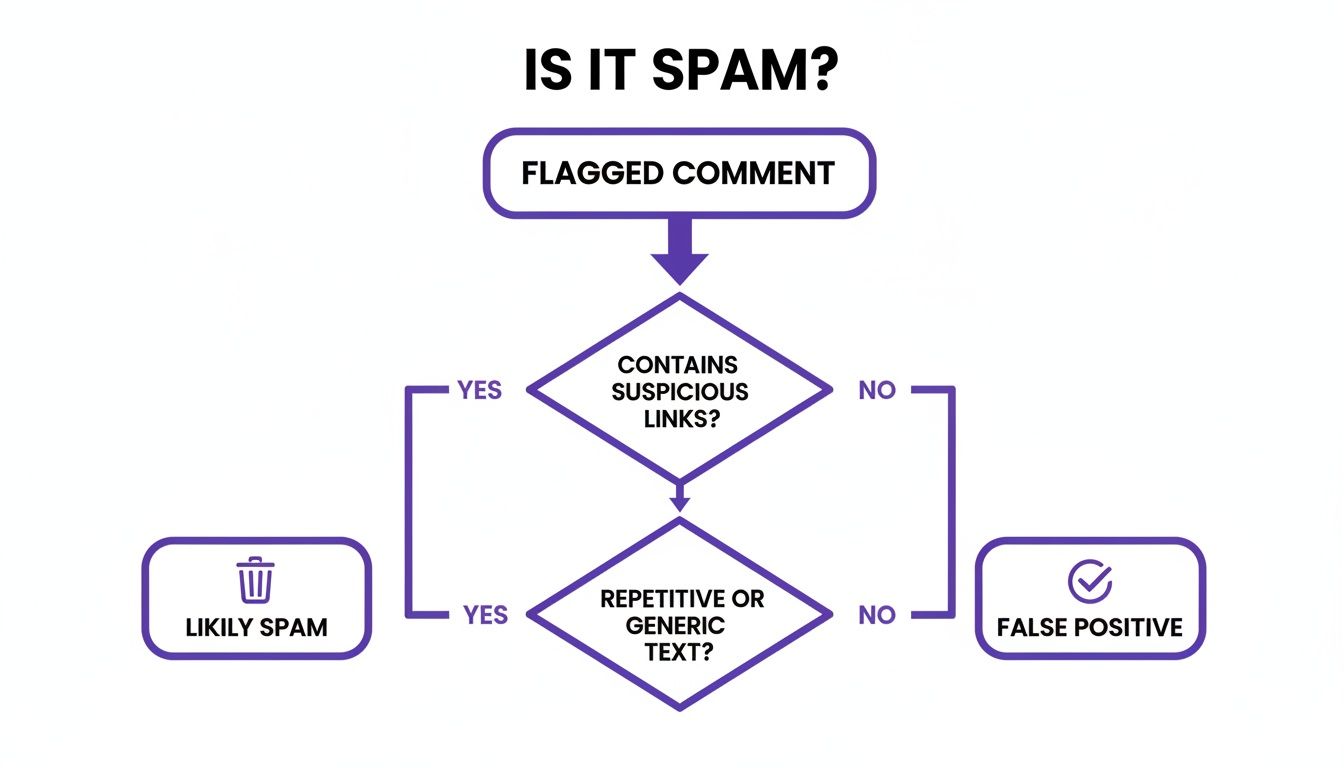
As you can see, the system quickly sorts comments into "Likely Spam" for removal or "False Positive" for your approval, which can save you a ton of time. If you want to dive deeper, you can check out our https://feedguardians.com/blog/social-media-automation-tools-comparison-2025.
Of course, protecting your brand also means engaging ethically. It’s helpful to learn about strategies for driving conversions without spamming customers on WhatsApp to build trust. By automating your spam defense, you're not just protecting your brand's reputation; you're creating a better, safer space for real conversations to happen.
Got Questions About Spam? We’ve Got Answers.
Let's clear up a few common questions that pop up when you're dealing with potential spam. Think of this as a quick-reference guide for those "what do I do now?" moments.
Should I Just Turn Off My Spam Filters?
It’s tempting, especially when you’re dealing with a lot of false positives, but turning off your spam filters is a bad idea. It's like leaving your front door wide open—you're inviting a flood of toxic content and sketchy links right onto your page.
A much better strategy is to use a smart moderation tool. That way, you get the protection you need without accidentally hiding comments from your real customers.
Does Replying to Spam Actually Make It Worse?
Yes, it absolutely does. When you reply to a spam comment, even if it's just to tell them off, you’re signaling to the platform's algorithm that the comment is getting engagement. This can actually make it more visible.
The golden rule? Never reply. Just hide or delete the comment, block the account, and move on. It’s the fastest way to protect your community.
How Do I Tell If a Positive Comment Is Fake?
Keep an eye out for praise that feels a little too generic, like "Great product!" or "Awesome post!" coming from an account with a strange username or no profile picture. These are often bots trying to blend in. Real praise usually has a bit more personality to it.
Protect your brand from spam 24/7. FeedGuardians uses AI to automatically hide harmful comments, detect customer questions, and keep your community safe. Find out how FeedGuardians can help.
Tired of manually moderating comments?
FeedGuardians automates spam filtering, responds to customers, and protects your brand — setup in 3 minutes.